14
X5001 USER GUIDE - 501-3327100
INSTALLING THE GATEWAY (cont.)
Connecng to the LAN
Using an Ethernet LAN cable, you can connect the gateway to a desktop computer,
notebook, hub, or switch. The gateway supports auto-MDI/MDIX, so you can use either
a standard straight-through or crossover Ethernet cable.
1. Connect one end of an Ethernet cable to one of the four LAN ports on the rear panel
of the gateway.
2. Connect the other end of the cable to your computer’s network-interface card (NIC)
or to another network device.
Connecng the WAN
To connect the gateway to a Wide Area Network (WAN) interface:
• Connect the SC/APC connector of a single-mode bre opc cable to the opcal
terminal in the your home or oce (it could also be a splier or a PIM card of an
OLT), and connect the other end of the cable to the port labeled PON on the rear
panel of the gateway (see page 12). Use only manufactured bre opcal cables with
SC/APC connectors at both ends for all connecons.
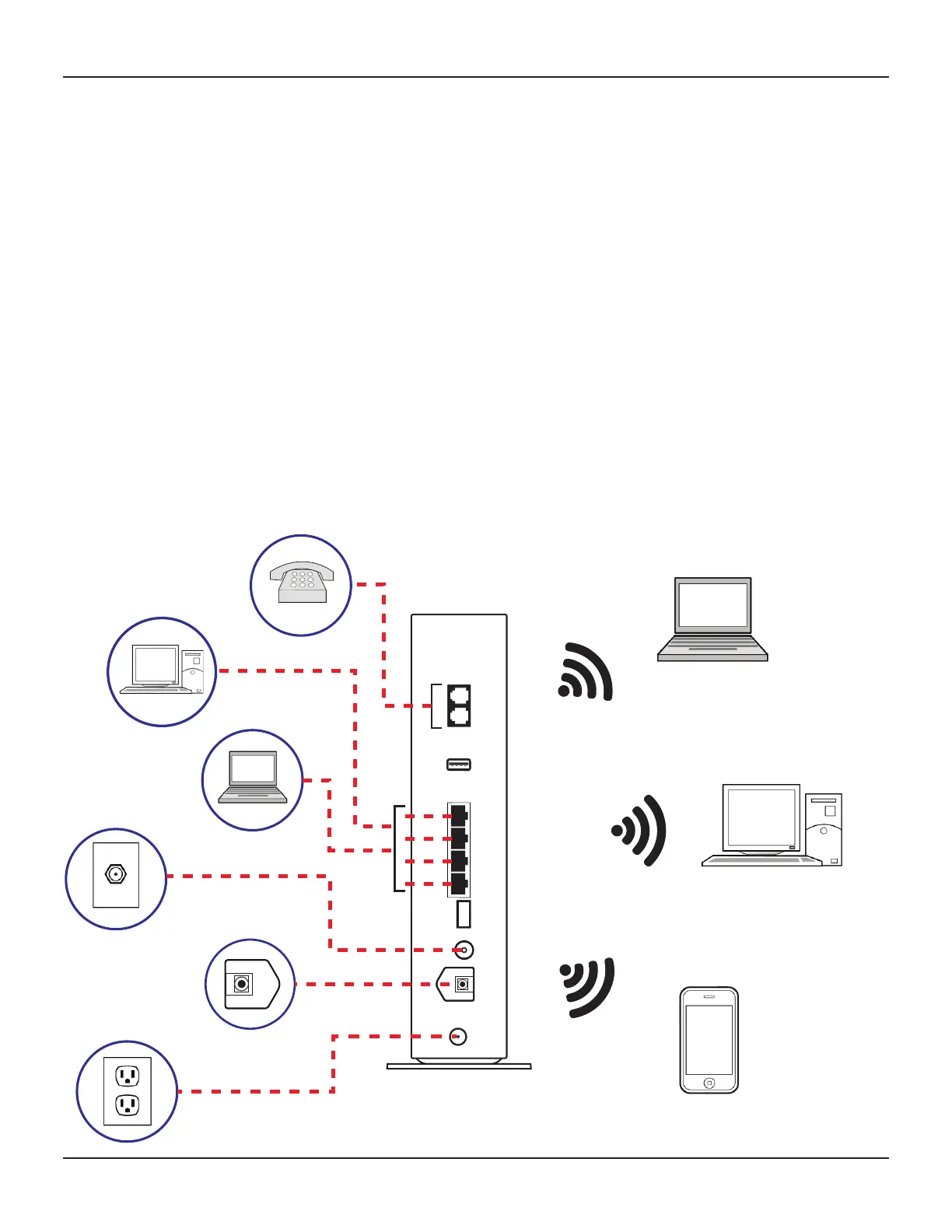
Gateway connecons
Before proceeding, be sure all devices are aached to the gateway. The following gure
summarizes the connecons that can be made to the gateway.
2.4 GHz /
5 GHz
MoCA














 To Next Page