5
X5001 USER GUIDE - 501-3327100
Safety aspects of connecons
Full details of the rear panel are on page 8.
Connecng
Do not connect your device (to the power supply unl you have
properly connected all the other cables.
Your device is designed for use only with the power supply unit
provided.
On the power supply unit there is a label that species the
correct AC power supply input for it. Do not connect the power
supply unit to any supply other than this.
Always connect the 12 volt DC cord from the power supply unit
to your device before you insert the AC power cord from the
power supply unit into the wall AC outlet.
Disconnecng
To disconnect power from your device, always detach the power
supply unit from the wall AC outlet (rather than remove the 12 volt
cord from your device). Therefore you must install your device near
to the wall AC outlet, which should be easily accessible.
If you are in any doubt about the power supply cord, its plug or
its connecon, or are not certain that the electrical outlets you
are using are properly wired and grounded, consult a qualied
electrician before proceeding any further.
SAFETY INFORMATION (cont.)
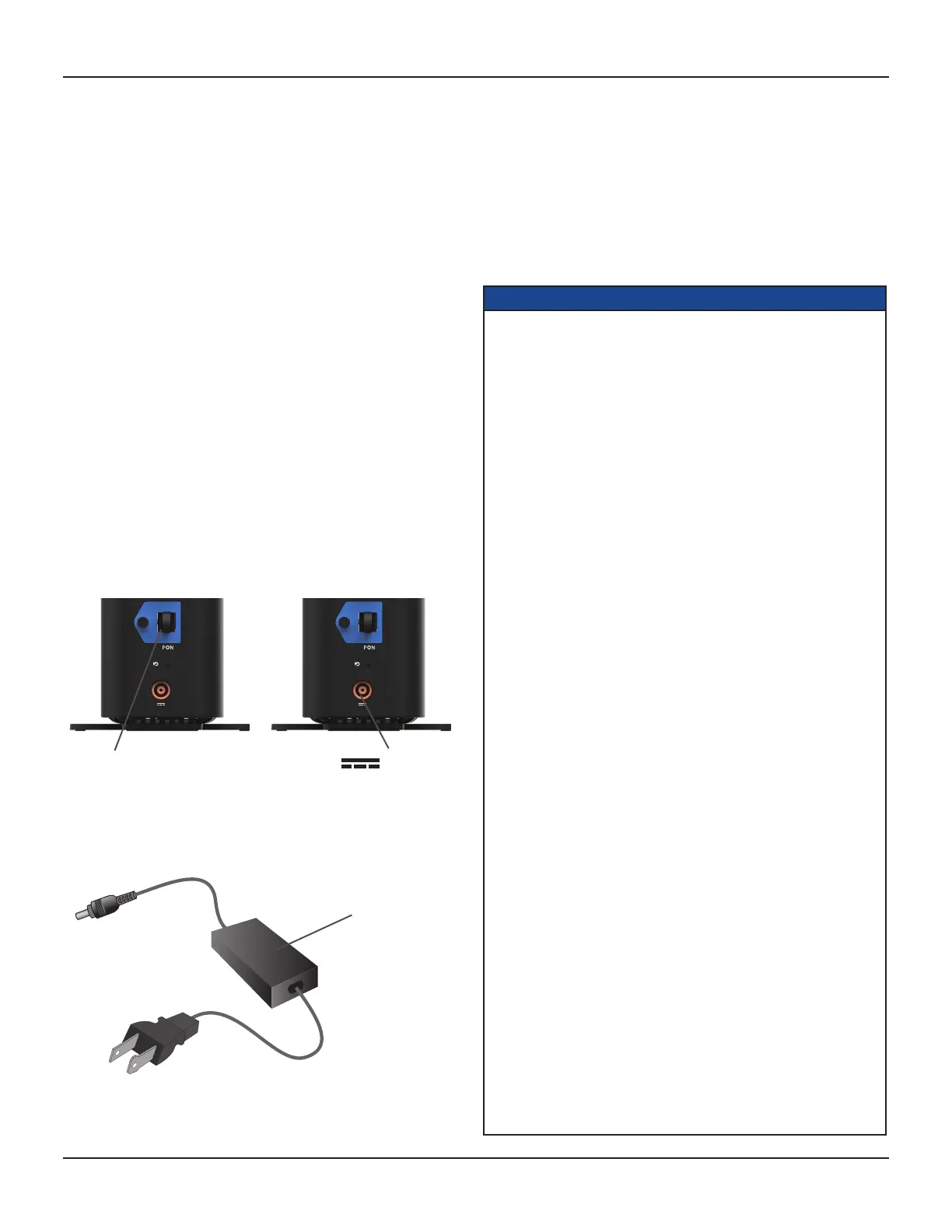
The PON OLT connector is
designed for connecon to a
passive opcal network (PON)
only. You must not connect any
other equipment to this input.
POWER
INPUT
REGULATORY INFORMATION
This device complies with Part 15 of the FCC Rules. Operaon is subject to
the following two condions:
(1) this device may not cause harmful interference, and
(2) this device must accept any interference received, including interference
that may cause undesired operaon.
This equipment complies with FCC radiaon exposure limits set forth for
an uncontrolled environment. End users must follow the specic operang
instrucons for sasfying RF exposure compliance. This transmier must
not be co-located or operang in conjuncon with any other antenna or
transmier.
Changes or modicaons not expressly approved by the party responsible
for compliance could void the user’s authority to operate the equipment.
FCC RF Radiaon Exposure Statement
MPE/SAR/RF Exposure Informaon.
This equipment complies with FCC RF radiaon exposure limits set forth for
an uncontrolled environment.
This equipment was veried for RF exposure and found to comply with
Council Recommendaon 1999/519/EC and FCC KDB 447498 D01 General
SAR Exclusion Guidance.
WARNING: While this equipment is in operaon, a separaon distance of
at least 20 cenmetres (equal to 8 inches) must be maintained between the
antenna inside the equipment and the bodies of all persons exposed to the
antenna in order to meet the FCC RF exposure guidelines. Making changes
to the antenna or the equipment is not permied. Doing so may result in
the equipment exceeding the FCC RF exposure guidelines. This equipment
must not be co-located or operated in conjuncon with any other antenna
or radio transmier.
NOTE: Your device has been tested and found to comply with the limits for
a Class B digital device, pursuant to Part 15 of the FCC Rules. These limits
are designed to provide reasonable protecon against harmful interference
in a residenal installaon. Your device generates, uses and can radiate
radiofrequency energy and, if not installed and used in accordance with
the instrucons, may cause harmful interference to radio communicaons.
However, there is no guarantee that interference will not occur in a parcular
installaon. If your device does cause harmful interference to radio or television
recepon, which can be determined by turning your device o and on, you are
encouraged to try to correct the interference by one or more of the following
measures:
• Reorient or relocate the receiving antenna.
• Increase the separaon between your device and the receiver.
• Connect your device to an outlet on a circuit dierent from that to which
the receiver is connected.
• Consult your dealer or an experienced radio/TV technician for help.
WIFI
Users should be advised that high-power radars are allocated as primary
users (i.e. priority users) of the bands 5250-5350 MHz and 5470-5725
MHz and that these radars could cause interference and/or damage to the
LE-LAN device.
The device for operaon in the band 5150-5250 MHz is only for indoor
use to reduce the potenal for harmful interference to co-channel mobile
satellite systems.
12 volt power
supply unit
To ensure correct operaon, use this device only with the ARRIS-
approved power supply unit provided. If you use an unapproved
alternave, you will invalidate the warranty.
Regulatory Informaon
CAUTION:
• Do not aempt to modify your device without wrien
authorizaon from the manufacturer. Unauthorized
modicaon could void your authority to operate your
device.
• Failure to heed the Safety Informaon provided by
failing to connect to a properly wired outlet may void the
manufacturer’s warranty.














 To Next Page