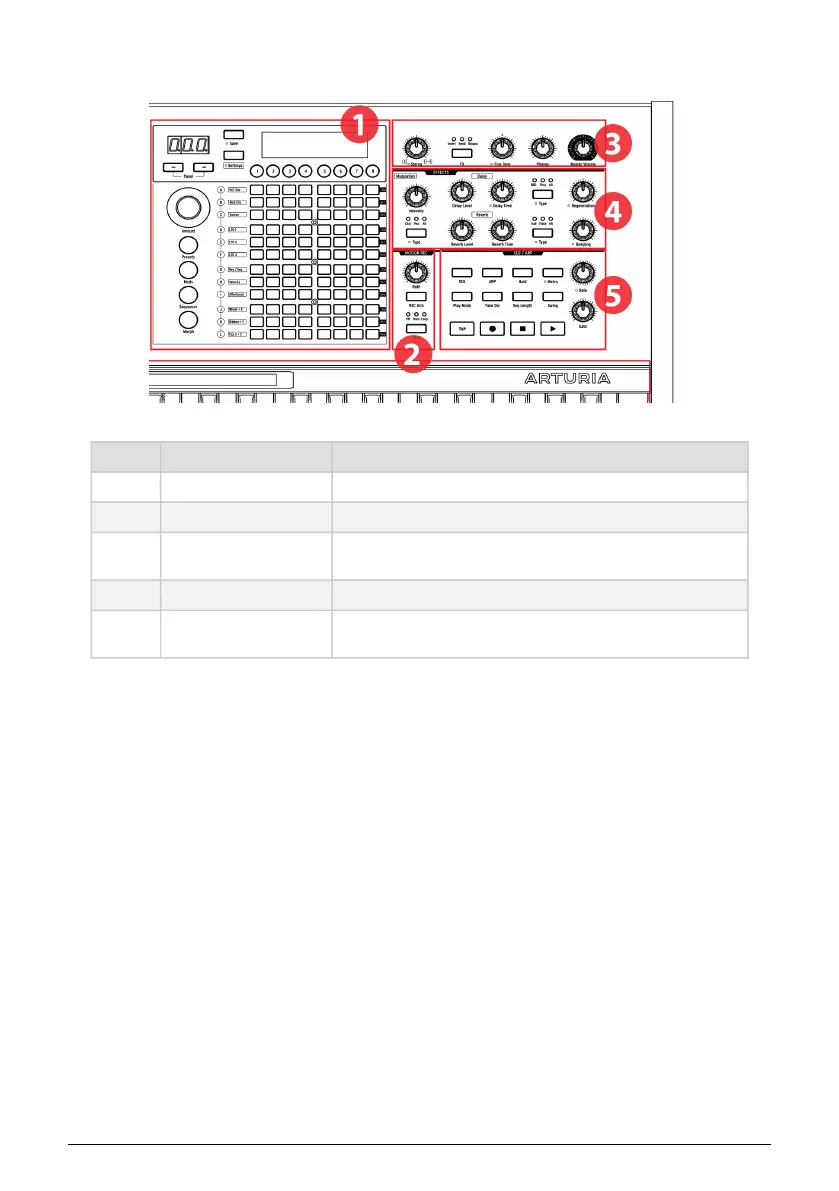
1.1.2. Right side
Number Section Description
1 Matrix panel Select presets, Mod Matrix, Seq/Arp, Morph/Matrix editing
2 Motion recorder [p.42] Capture motion of one control, play back at 1/8x to 8x speeds
3 Master controls [p.9]
Stereo spread [p.33], FX routing [p.78], fine tune, phones level, master
volume
4 Digital effects [p.78] Modulation (chorus, phaser, etc.), Delay, Reverb, plus controls
5
Sequencer/Arpeggiator
[p.53]
Arpeggiator; real-time/step-time sequencer, step editing, hybrid
mode
1.1.3. The Matrix panel
The Matrix panel is an 8 x 12 (96-button) grid that has four modes. It is used to select Presets
[p.45], to work with the Sequencer / Arpeggiator [p.53], and to manage the modulation matrix
through the Mods [p.48] button. The Morph button [p.72] is used to access the modulation
matrix with a focus on one or both of the morphing sounds in each patch.
6 Arturia - User Manual PolyBrute - Overview















 To Next Page