6.3. Random patch generation
PolyBrute can generate a random patch for you by choosing sounds A and B from different
patches, changing the morph knob value, moving the result to sound A, and then repeating
most of that process a random number of times. The generated patch can then be tweaked,
saved as a Snapshot, or saved as a new preset.
This feature is found at Settings/Preset Info/Generate. Press [Assign 3] to generate the
random patch.
6.4. Panel mode
In Panel mode the position of each knob determines the sound. This is the mode to use if
you want 1:1 feedback between the parameters and the sound you are editing: what you see
is what you get.
If you've edited the current patch, you might want to take a Snapshot [p.45] before entering
Panel mode so you can get back to that edit. To do this, press [Save] once. Then press
[Program < / >] at the same time to load the panel settings. This replaces the current preset
with the actual positions of the knobs and sliders. To restore the edited preset, hold [Settings],
press [Save], and use [Assign 1-6] to select the most recent Snapshot.
6.5. Saving a preset
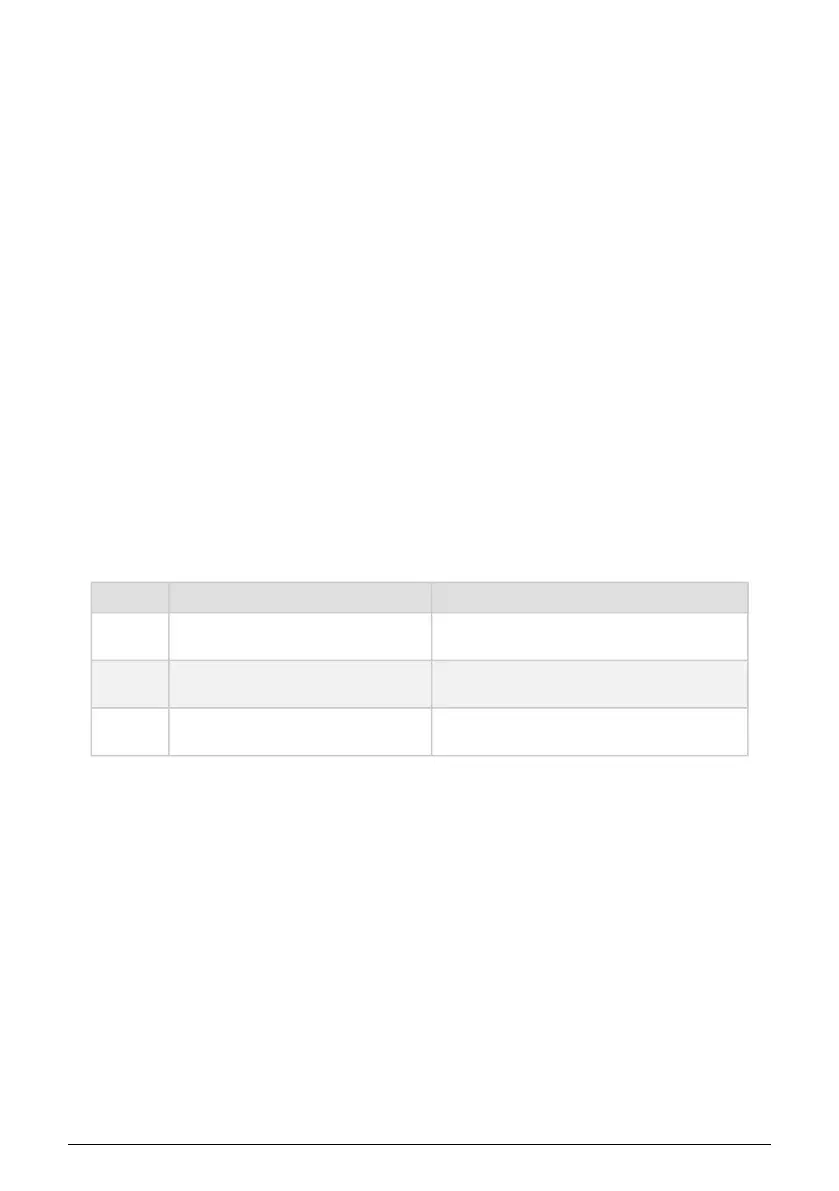
The [Save] button is used to take Snapshots, do a "Quick Save" to the current location, or save
an edited Preset to a new location. Summary first, then the details:
Function Action Description
Snapshot Press [Save] once
Temporary buffer for comparing an edited preset
with others
Quick
Save
Press [Save] three times Edited preset is saved to current location
Save
Preset
Hold [Save] + Press Assign 1-8 + Press
[Matrix A1-L8
Save preset to another location
Snapshots were described in the previous section [p.45].
6.5.1. Quick Save
To save an edited preset quickly on top of the original version, press [Save] three times. This
overwrites the current preset location, so we made it a deliberate action to avoid accidents.
46 Arturia - User Manual PolyBrute - Working with Presets















 To Next Page