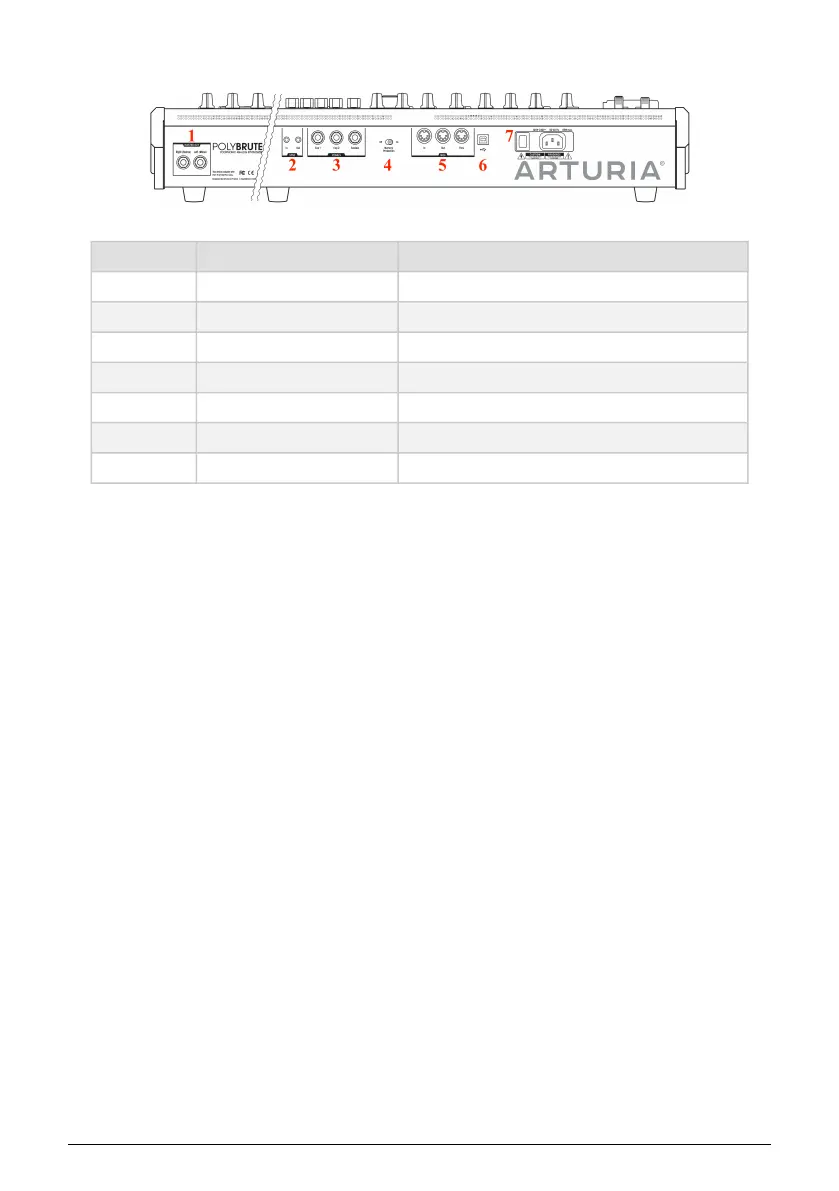
1.2. Rear panel
Number Section Connections
1 Master Out Right (Stereo), Left (Mono)
2 Sync In, Out
3 Pedals Exp 1, Exp 2, Sustain
4 Memory Protection Off, On
5 MIDI In, Out, Thru
6 USB Type B (max. cable length 3 meters)
7 Power On/Off switch, AC cable
1. Master Out - 1/4" unbalanced +4dBu stereo line-level outputs, intended to go to an amp and
speakers, or to an audio interface or mixer. For mono use the left channel only.
2. Sync In/Out - These 3.5mm connectors enable the PolyBrute to synchronize with non-
MIDI devices through the most widely used sync standards.
3. Expression 1, 2; Sustain - Pedal inputs. Expression 1 and 2 work with continuously variable
expression pedals to control volume, filter frequency, and more. Sustain is for a momentary
on/off pedal (i.e. a sustain pedal). Momentary pedals can be normally closed or normally
open; PolyBrute has a polarity setting for each pedal, so you can use either type.
4. Memory Protection On/Off - When On, prevents the PolyBrute's patch memories from
being overwritten.
5. MIDI In/Out/Thru - Standard 5-pin DIN jacks, used to connect PolyBrute to other MIDI
devices.
6. USB - USB type B port for connecting PolyBrute to a Mac or PC. This lets you use Arturia's
PolyBrute Editor software (available from www.arturia.com), and it also exchanges MIDI
data with your computer. We recommend using a cable that is no longer than 3 meters (10
feet or shorter).
7. Power section - Connect the AC cable to an appropriate power source and use the switch
to turn the instrument on and off. Power requirements: 100-240Vac, 50-60Hz, 85W.
1.2.1. Connections
1.2.1.1. Audio
Connect cables from the Master Out section to a sound system, using the left output for
mono if needed. You can also plug headphones into the headphone jack near the Morphée
controller; the headphones have their own level control.
Arturia - User Manual PolyBrute - Overview 7















 To Next Page