Page 23
Parameter Setup:
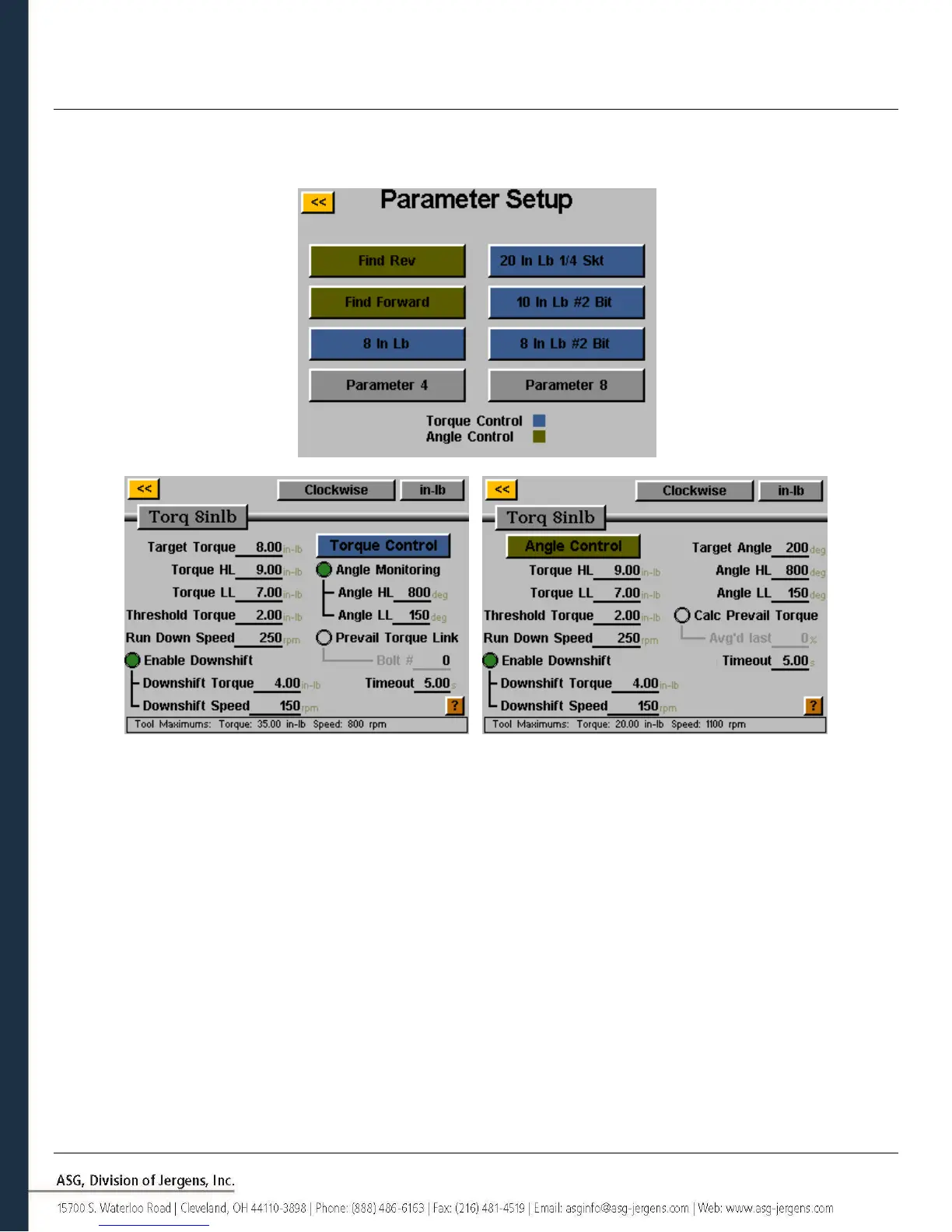
From the task setup screen, select the Parameters button. Shown will be a button for each of the 8 available parameters
for that task.
Some useful definitions for the Parameter Setup:
Target Torque: The torque value at which the tool should stop the fastener rundown (Torque Control
parameters only)
Target Angle: The angle value at which the tool should stop the fastener rundown (Angle Control parameters
only)
Torque HL/LL: The High Limit (HL) or Low Limit (LL) of acceptable torque for the fastener in the user’s process.
Parameters will stop if the HL value is reached during a cycle.
Angle HL/LL: The High Limit (HL) or Low Limit (LL) of acceptable angle for the fastener. In Torque Control
Profiles, this monitoring may be disabled by tapping the ‘Angle Monitoring’ radio button.
Calc. Prevail. Torque: Enabling this feature sets the final % of a rundown during which the prevailing torque is
calculated. (Angle Control parameters only) See Prevailing Torque section of this manual for
more detailed information.



 To Next Page