Page 30
Exporting Task Settings to USB
The ASG-CT2500 controller is capable of exporting the task settings to USB for backup and transfer to other ASG-CT2500
controllers. To accomplish this, insert a USB flash drive with available memory to the port on the controller.
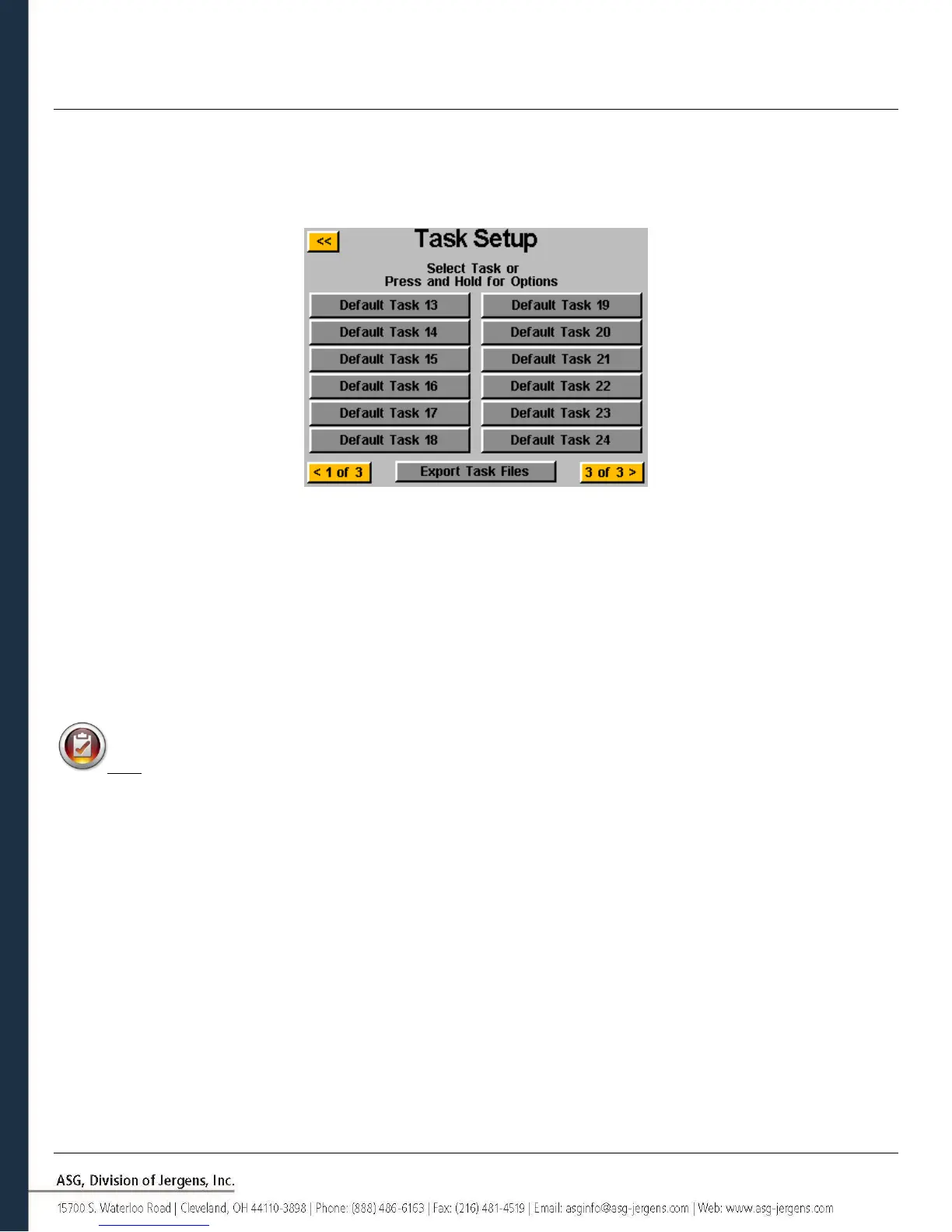
From the ‘Run Tool’ screen, tap the task name at the top to bring up the ‘Task Setup’ menu
When a USB drive is inserted, the ‘Export Task Files’ button is displayed. Tapping this button will automatically save the
setting files for all 32 tasks in the controller to the USB. The settings will be saved in the directory: \[Controller
Name]\Config Where [Controller Name} is the user defined name programmed into the ‘Name’ box in the ‘Controller
Info’ screen (see Controller Info section of this manual for more information). This is the same directory you must
navigate to when importing a task file as well.
Note: Do not attempt to rename the individual task files on the USB flash drive. Doing so may corrupt the
contained data and make it impossible to re-import to the controller. It is recommended that if a user needs to catalog
saved task files, the individual files be placed into folders that can be named by the user.



 To Next Page