Page 45
Downloading Data
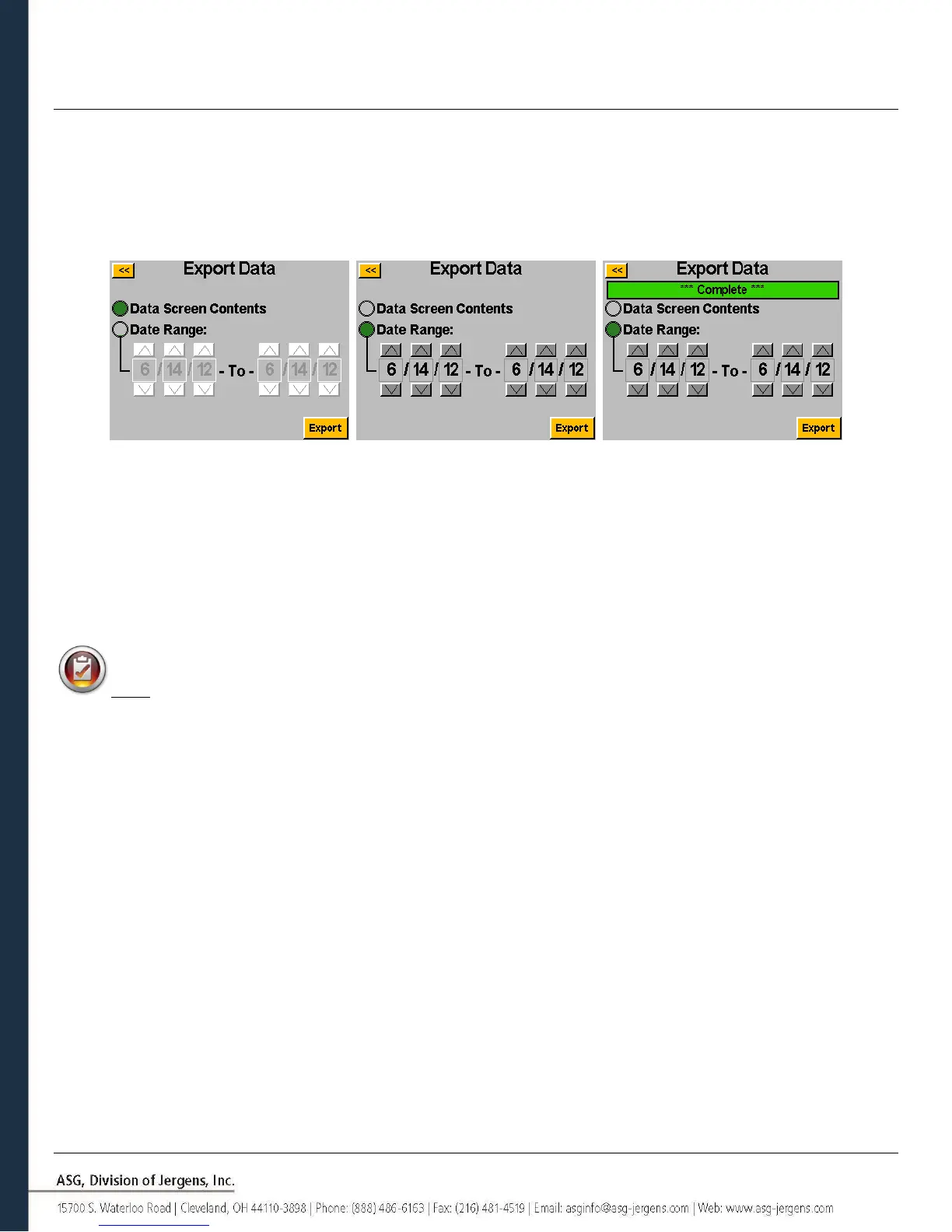
To download data to a USB flash drive, insert a flash drive with available memory into the port on the bottom of the
controller. Tap the ‘Export Data’ button at the bottom of the data table, and then select either to download just the
Data Screen Contents, or choose a date range for which you wish to download the data. Tap the ‘Export’ button to copy
the information to the flash drive. The downloaded files are a CSV format (comma separated value) and will open
automatically in typical spreadsheet programs.
To view the data downloaded to USB, insert the flash drive into a computer and open to view the files and folders. The
controller will create a folder on your flash drive called your controller name (if you have named your controller ‘Station
1’ in the ‘Controller Information’ screen, you will find a folder on your flash drive named ‘Station 1’. See the Controller
Information section of this manual for more information). Inside this folder will be a folder called ‘Data’ which contains
the files exported to the flash drive. Note: if multiple days are selected for download, the controller will save a file for
each day on the flash drive. For example, if 5 days are selected for data export, you will find 5 files on the flash drive
(unless the tool was not used during some of those days).
NOTE: The data is organized in the controller’s internal memory by the controller date. This date is set in the
‘System Setup’ menu. Be sure to have the controller date set correctly. Inaccurate date settings in the controller will
result in data stored under the wrong date, making download of the correct data difficult.
Data available in these downloaded files includes the following:
• Date
• Time
• Tool Model Number
• Tool Serial Number
• Tool Cycle Number
• Task Name
• Bolt Number
• Torque Units
• Parameter Target
• Prevailing Torque Value
• Applied Torque
• Final Torque Reading
• Final Angle Reading
• Cycle Time
• Result Note
• Parameter Name
• Parameter Type
• Parameter Threshold Torque
• Parameter Torque HL
• Parameter Torque LL
• Parameter Angle HL
• Parameter Angle LL
• Downshift Torque
• Rundown Speed
• Downshift Speed
• Hand of Rotation



 To Next Page