Page 18
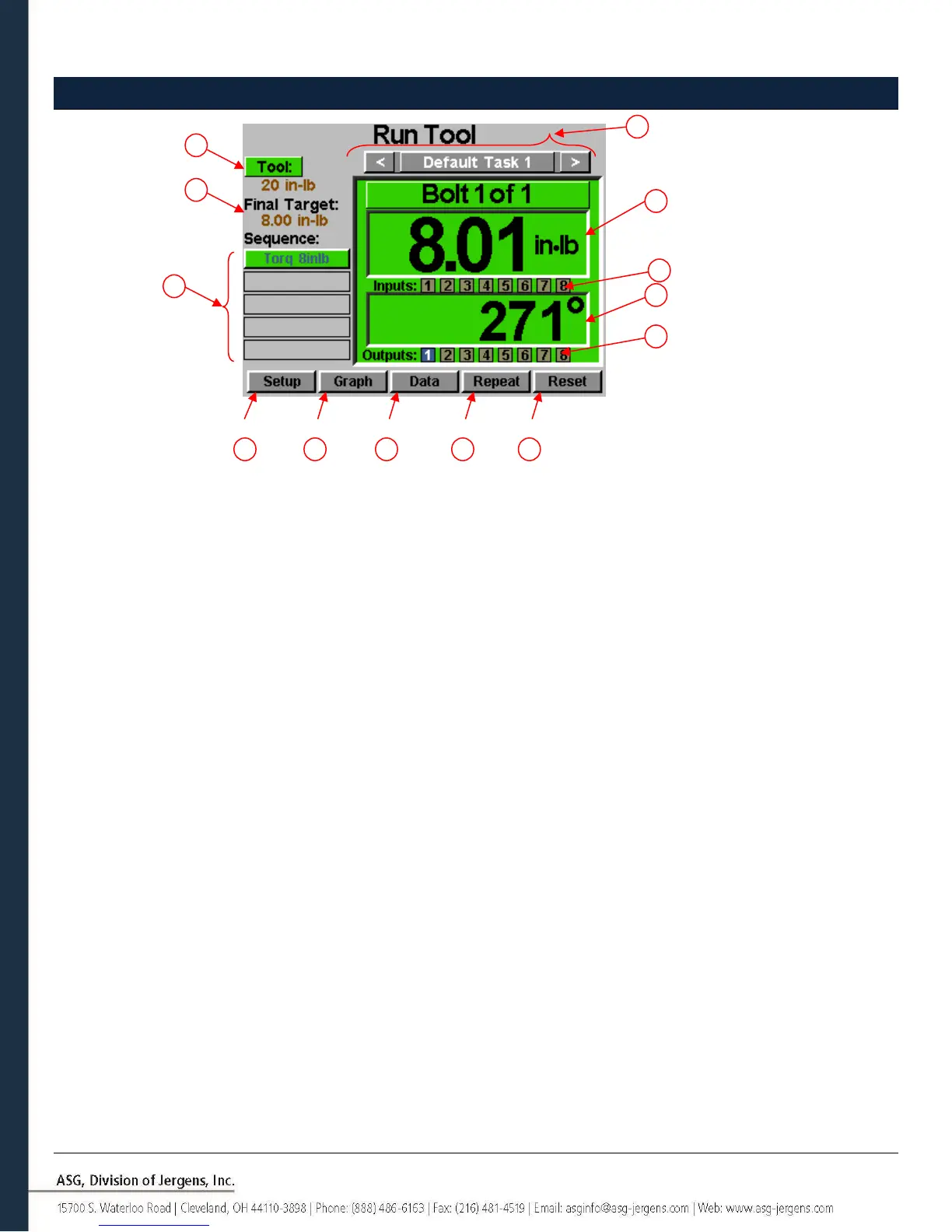
Run Tool Screen
1. Task Selection: Shows the user the current task, and allows the user to select one of 32 available tasks.
Selecting the button with the task name will bring up the Task Menu where another task
may be selected or altered. The arrow keys will advance to the previous or next task.
Settings for bolt counts, parameters, inputs, outputs, etc will switch with these actions
to the settings of the selected task.
2. Tool Button: Displays the Tool Information screen that shows tool characteristics.
3. Final Target: Displays the target value of the active Parameter, either torque or angle.
4. Torque Reading: Displays the torque seen by the tool during or at the end of the fastening cycle. This
field will color code at the end of a fastening cycle to denote Pass (green), Fail – High
(red), or Fail – Low (yellow) as defined by high and low limits of the selected Parameter.
5. Angle Reading: Displays the angle seen by the tool during or at the end of the fastening cycle. This field
will color code at the end of a fastening cycle to denote Pass (green), Fail – High (red), or
Fail – Low (yellow) as defined by high and low limits of the selected Parameter. The
field remains un-highlighted when Angle Monitoring is disabled within the Parameter.
6. Inputs: Displays (1) radio button for each of the (8) available inputs. The appropriate radio
button will illuminate blue when the input is active.
7. Bolt Sequence Steps: Displays the sequence step and selected parameter. The parameter name will be
highlighted red, yellow, or green at the end of its cycle to show its status. This sequence
shown is for the current bolt only.
8. Setup Button: Takes you to screens where you may set up Tasks, Parameters, Bolt Sequences, Inputs,
Outputs, and System Settings.
9. Graph Button: Displays the most recent fastening cycle graphically as Torque vs. Time,
Angle vs. Time, Torque vs. Angle, Speed vs. Time, and Power vs. Time.



 To Next Page