Doc ID: ADR111A _IM_01
Ref ID: ADR111A /IM/PC-SI
Rev No. : 04
Page No. : 48 of 127
ADR111A /
ADR211A
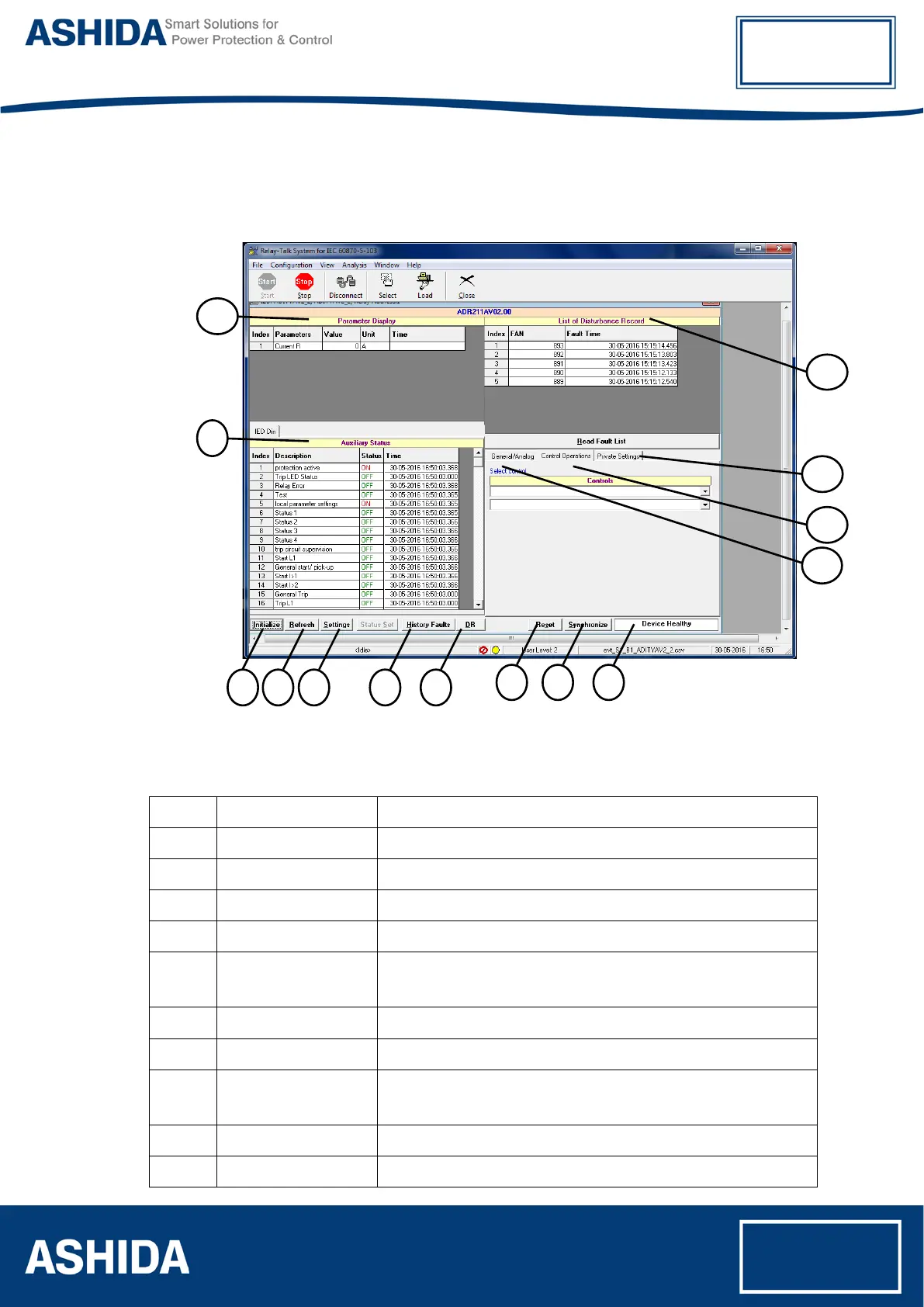
3.3 ADR211A IED Main Screen
After checking all settings and loading the IED the following window will be displayed on the
PC screen.
10
9
1 2 3 4 5
6 7 8
11
12
13
14
Figure 5: IED Main screen
The windows/Buttons functions are as follows
Sr. No Name Description
1 Initialize This will initialize relay communication.
2 Refresh It will refresh all windows and parameters
3 Settings This will display the relay Settings
4 History Faults It will read all fault data (which is also available on LCD display)
5 *Disturbance Recorder
This is used to view the disturbance with the help of waveform as
well as parameters
6 Reset This is used to reset the relay.
7 Synchronize This is used to synchronize the relay date and time with PC
8 Device Healthy
This window indicates the healthy condition of the relay with
software
9 Auxiliary Status This is used to view the input status received by the relay
10 Parameter Display This is used to view the parameters of current.



 To Next Page