Asiga MAX User Guide
Copyright ASIGA © 2017 VERSION 1.04
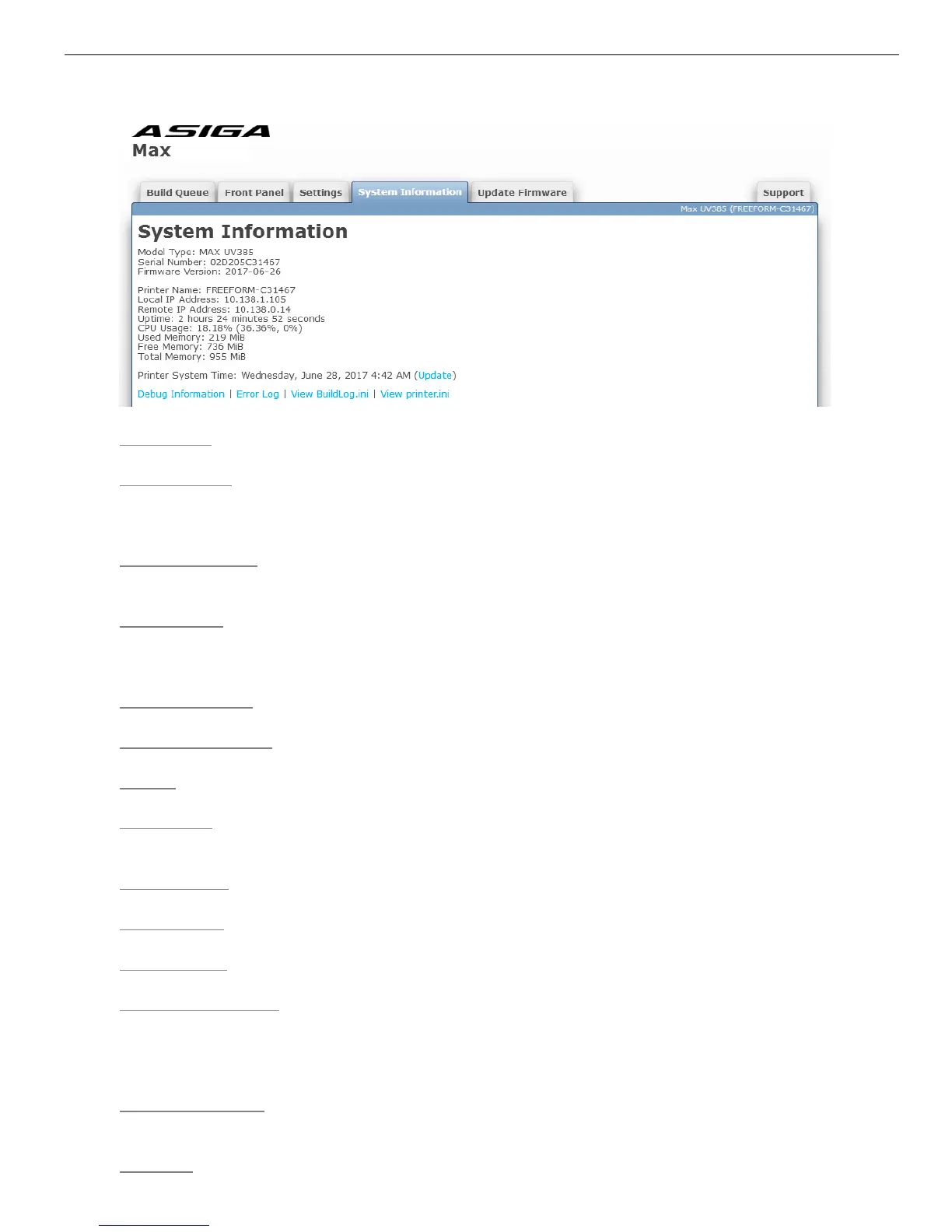
Model Type – This will be “MAX” for a MAX printer
Serial Number – This will be 12 hexadecimal characters (0-9, A-F). The MAC address of
the wired Ethernet interface of the printer will be the same as the serial number. (e.g. a
serial number of 0123456789AB corresponds to a MAC address of 01:23:45:67:89:AB).
Firmware Version – This will be the date the firmware was created (e.g. 2015-07-14) in the
format YYYY-MM-DD
Printer Name – The name of the printer as visible in Composer's New Build dialog and on
Windows networks. By default it is set to FREEFORM-XXXXXX where XXXXXX is the last
6 characters of the serial number.
Local IP Address – The IP address of the printer whose web interface you are accessing
Remote IP Address – The IP address of the computer where the web browser is running
Uptime – The amount of time the printer has been running
CPU Usage – Estimate of the percentage of the printer's CPU utilized. A combined usage
and a usage for each CPU core is shown.
Used Memory – Amount of printer's RAM currently in use
Free Memory – Amount of printer's RAM remaining
Total Memory – Amount of printer's RAM installed
Printer System Time – Current date/time on the printer. The printer's clock runs in
Coordinated Universal Time (UTC). For display purposes, a time zone offset can be set in
Settings > Time Zone to show the clock in your desired time zone. Clicking the Update link
will synchronize the printer's UTC date/time with the UTC date/time on your computer.
Debug Information
– Shows a log of diagnostic messages since the printer was turned on
(including error messages)
Error Log – Shows a log of error messages since the printer was turned on


 To Next Page