Asiga MAX User Guide
Copyright ASIGA © 2017 VERSION 1.04
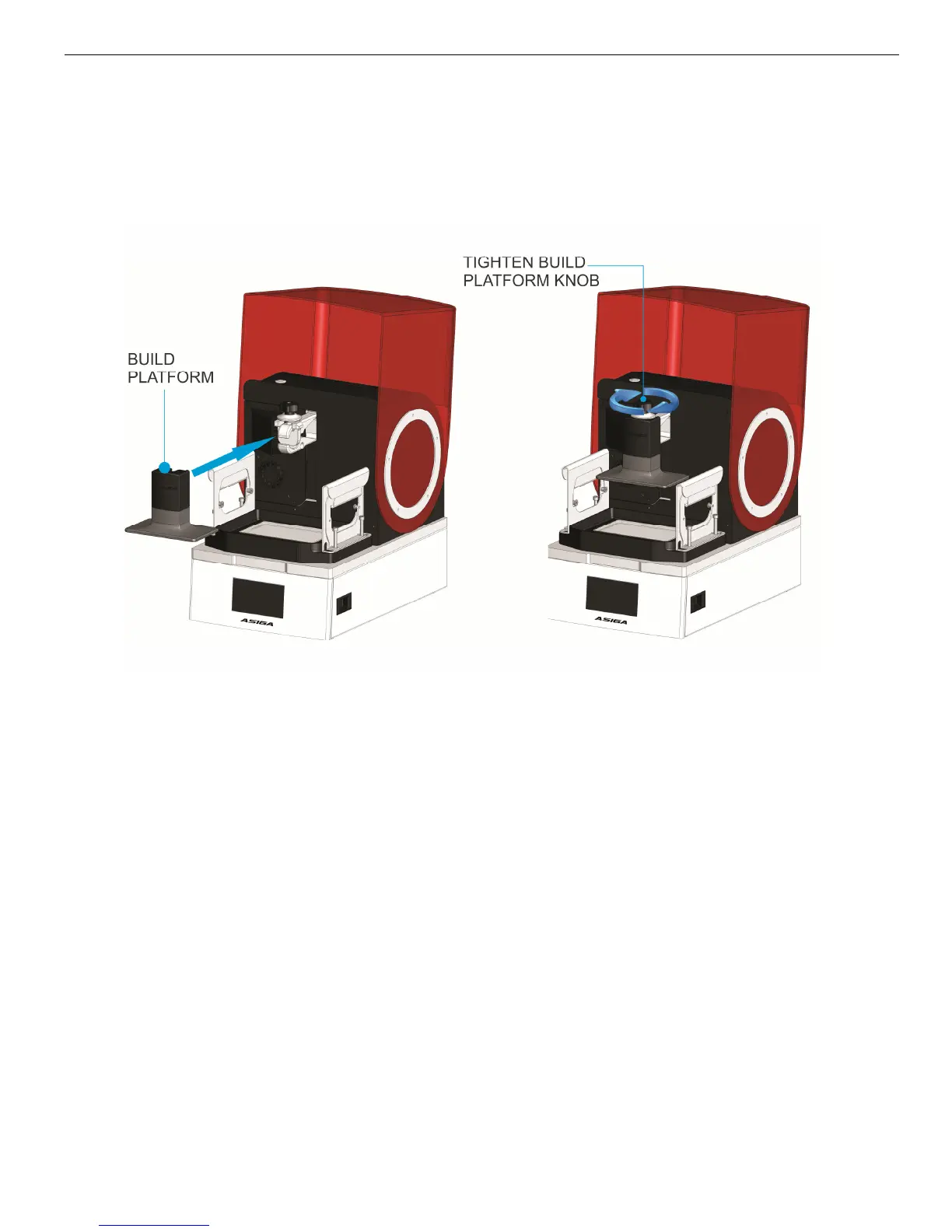
Install Build Platform
The MAX vertical axis has a bracket for holding the build platform. Secure it in place by
tightening the release knob.
Zero Position Calibration
Note: a video demonstration of the zero position calibration procedure is included on the
USB stick which ships with your machine.
Correct operation of the MAX requires:
1. The build platform to be parallel to the glass window; and
2. The build platform to be in contact with the glass window when the vertical axis
position is set to zero.
This is accomplished by performing the “zero position” calibration procedure.
The zero position calibration is done in the factory before the machine is shipped. However,
it is recommended to recalibrate this position after the machine is transported or every few
months. Poor zero calibration can result in models not attaching to the build platform.
To calibrate the zero position:
1. Install the build platform onto the vertical axis bracket.
2. Tighten the Build Platform Release Knob to secure the build platform in place.
3. Go to menu item Maintenance > Zero Position.


 To Next Page