Servicemanual TD60
10
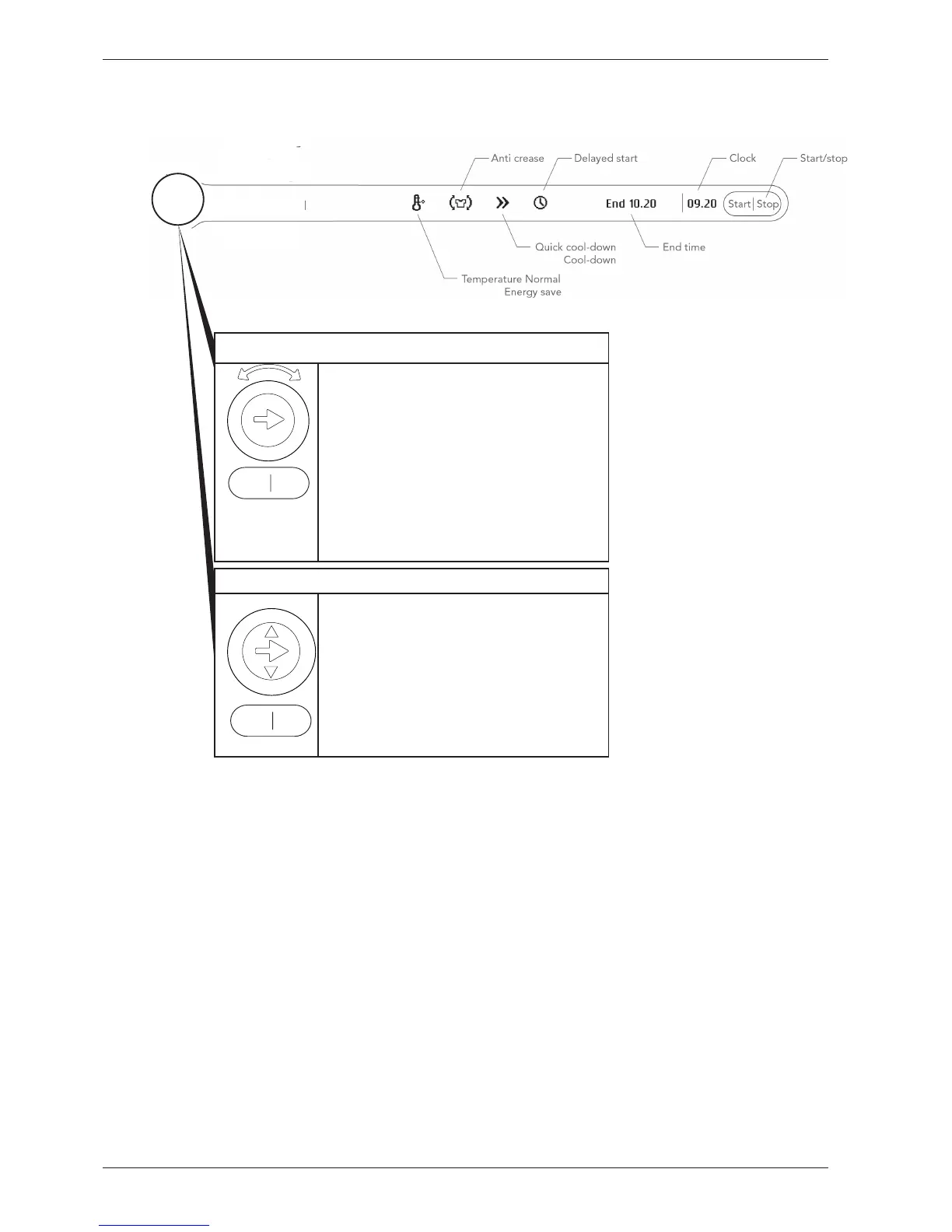
Program selector for integrated machines
1. Press the program selector button to navi-
gate between the different menus (e.g. to go
from temperature menu to Anti crease menu).
2. Press the small arrows to make a selection in
the menus (e.g. select normal temp.). Confirm
the selection and go to the next menu by pres-
sing the program selector button.
3. Press Start to start. Hold Stop in for 3 se-
conds to exit the current program.
Program selector
1. Press the program selector button to
navigate between the different menus (e.g. to
go from temperature menu to Anti Crease
menu).
2. Turn the program selector button to make
a selection in the menus (e.g. select normal
temp.). Confirm the selection and go to the
next menu by pressing the program selector
button.
3. Press Start to start. Hold Stop in for 3 se-
conds to exit the current program.
Programme selection, options and making settings TD60.3
Program 1
Program 2
Program 3
Program 4
Program 7
Program 6
Program 5
3



 To Next Page