Servicemanual TD60
22
Service menu TD60.1
Auto Extra Dry
Auto Dry
Timed Dry
Auto Normal
Auto Iron Dry
Air Fluff program
T 7 5 3 C
B U T T E R F L Y D R Y I N G
Start +
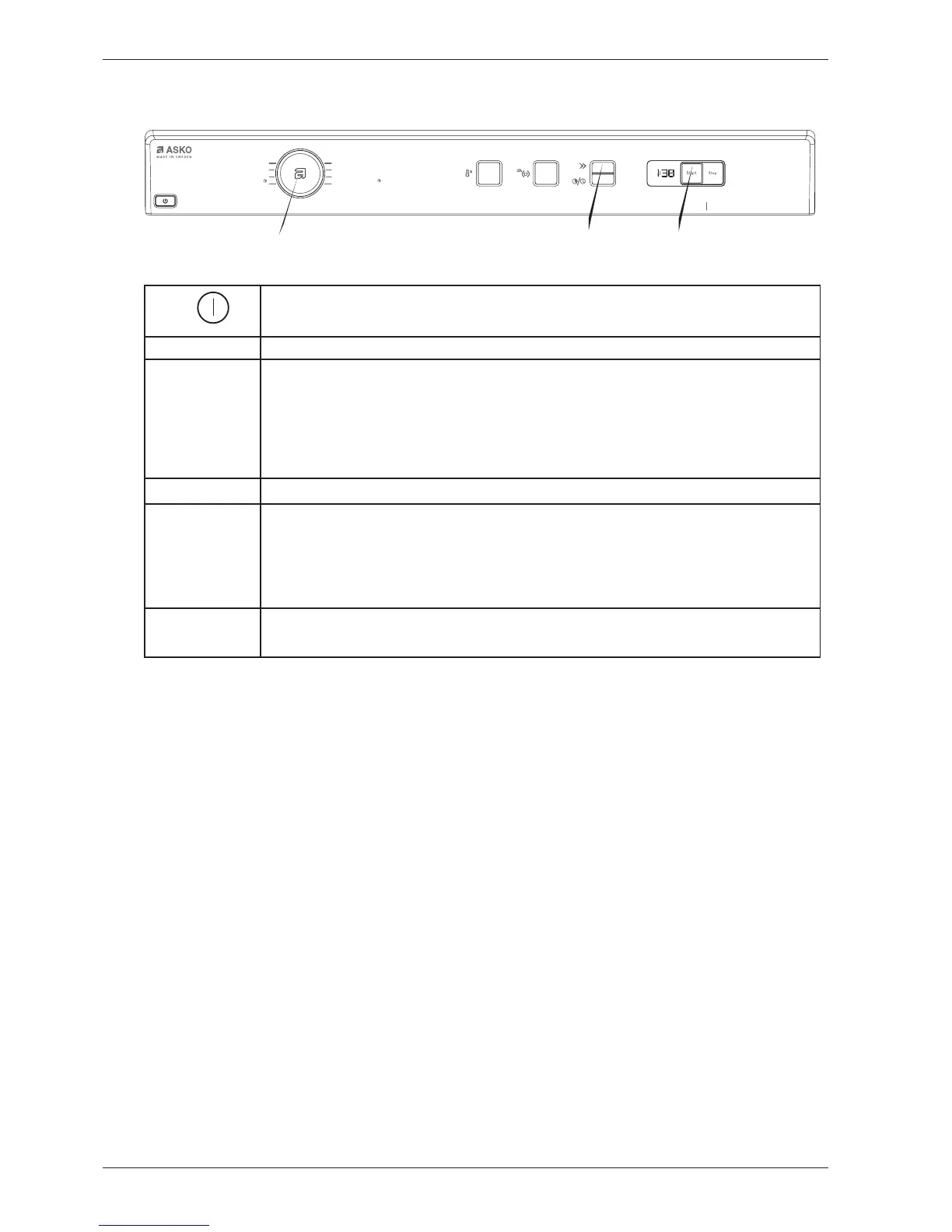
Press and hold Start (S10) and switch on the machine.
Start × 5
Press Start (S10) 5 times within 5 seconds to enter the service menu.
Diagnostics
Separate component tests
Turn the programme selector (J1), each component is turned on with a 1-second delay:
”Testing”: no component being tested
”Testing motor": motor on
”Testing element 1”: motor and heating element 1 on max 70°
”Testing element 2”: motor and heating element 2 on max 70°
”Testing pump": drainage pump on - only condenser
Press Time saver (S7) to stop the test and continue.
Extended drying time
Turn the programme selector (J1)
Drying level L0: (default, no extension)
Drying level L5: (5-minute extension)
Drying level L10: (10-minute extension)
Drying level L15: (15-minute extension)
Drying level L20: (20-minute extension)
Press Time saver (S7) to save and return to the first step (diagnostics)
or
Press Start (S10) to save and exit the service menu.
S10
S7
J1



 To Next Page