3. OPERATION
Software is used to control OmniBus products and to manipulate data. Whether
you use Ballard’s CoPilot® software or develop your own applications using
Ballard’s BTIDriver™ API library, it is easy to operate the PCIe/PXIe card and
to utilize its powerful interface.
3.1 CoPilot
A PC with CoPilot and Ballard’s OmniBus II PCIe/PXIe card makes a powerful,
low-cost databus analyzer/simulator. CoPilot interfaces directly with OmniBus
products, eliminating the need to write custom software. CoPilot greatly simplifies
such tasks as defining and scheduling bus messages and capturing and analyzing
data. CoPilot is a Windows-based program that features a user-friendly GUI
(Graphical User Interface) and many timesaving features. For example, bus
messages can be automatically detected, posted in the hardware tree, and
associated with the appropriate attributes from the database of equipment, message,
and engineering unit specifications.
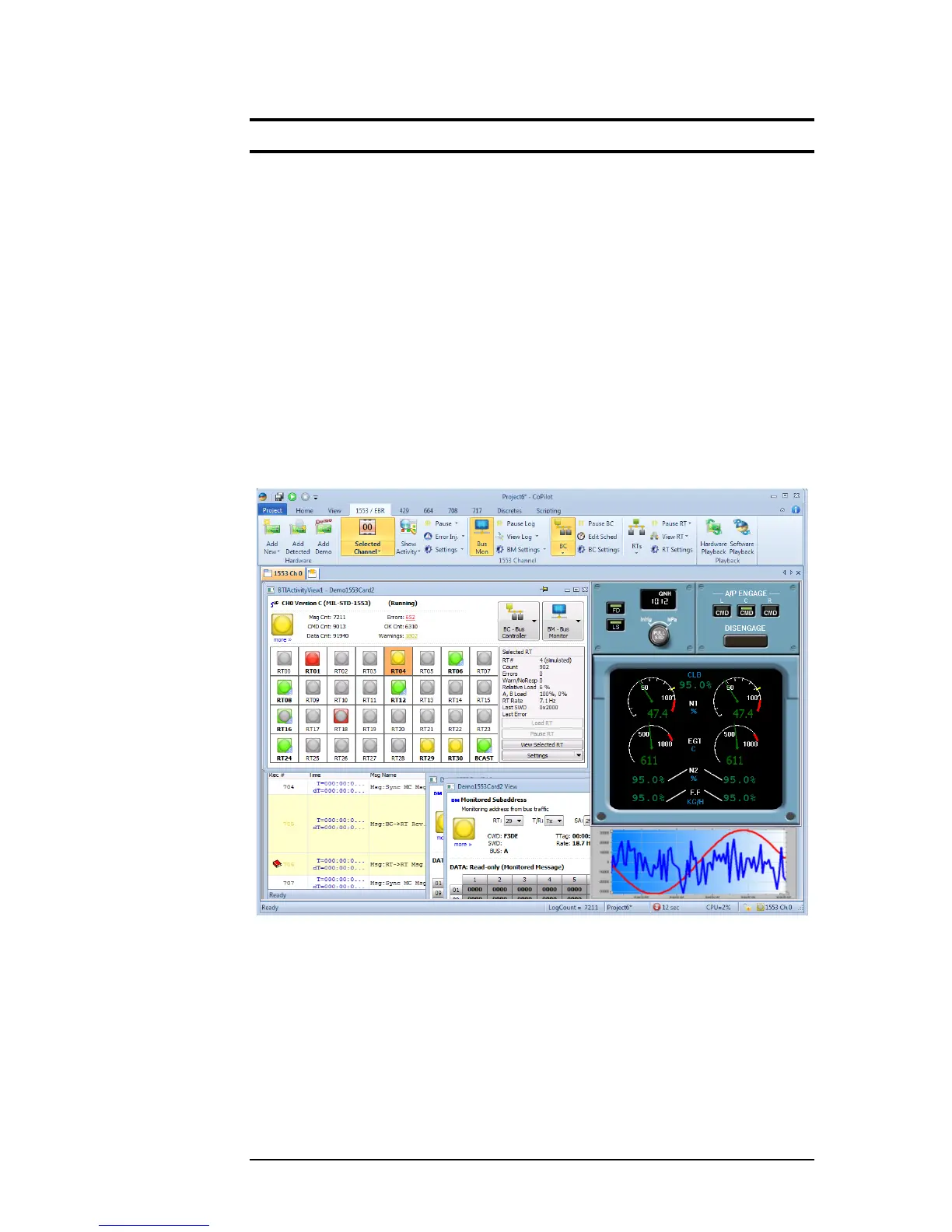
Figure 3.1—Sample CoPilot screen
CoPilot users can quickly configure, run, and display the activity of multiple
databuses in a unified view. Data can be observed and changed in engineering
units while the bus is running. The Strip View graphically illustrates the history
of the selected data values. Data can also be entered and viewed as virtual in-
struments (knobs, dials, gauges, etc.) that can be created by the user or automati-
cally generated by dragging and dropping an item into the Control View window.
OmniBus II PCIe/PXIe User’s Manual 3-1


 To Next Page