36
DSL-N12E Chapter 4: Conguring via the web GUI
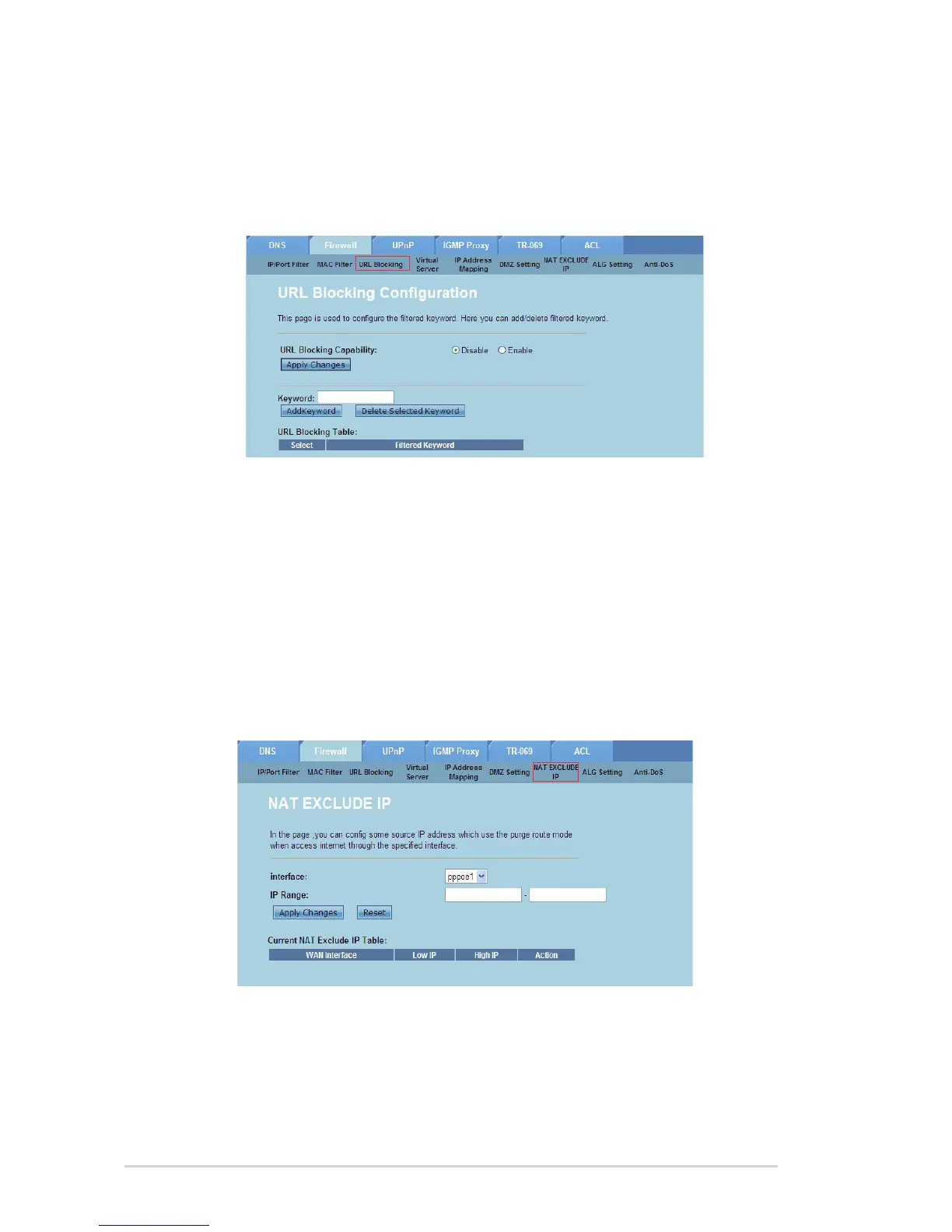
Congure the URL Blocking settings
The URL Blocking page allows you to block certain websites or online contents
based on specic keywords.
To congure the keyword lter settings:
Click Internet Service > Firewall tab > URL Blocking.
In the URL Blocking Capacity eld, click Disable or Enable.
In the Keyword eld, enter the keyword that you want to block.
Click Add Keyword to add the keyword to the URL Blocking Table.
1.
2.
3.
4.
Conguring the NAT Exclude IP settings
The NAT Exclude IP page allows you to congure the IP range to be excluded from
your router’s NAT pool.
To congure the NAT Exclude IP settings:
Click Internet Service > Firewall tab > NAT EXCLUDE IP.
In the IP Range eld, key in the IP range that you want to exclude from your
router’s NAT pool.
Click Apply Changes to save the settings made.
1.
2.
3.



 To Next Page