
 Need help?
Do you have a question about the ASUSTeK COMPUTER ROG Rapture GT-AC5300 and is the answer not in the manual?
Introduction to the router and list of items in the package.
Identifies router ports, buttons, LEDs, and lists technical specifications.
Advises on placement for best wireless signal and avoiding interference.
Lists hardware and software needed for initial wireless network setup.
Instructions for initial router setup, including wired and wireless connections.
Guides users through the Quick Internet Setup wizard with auto-detection.
Steps for connecting computers and smart devices to the router's network.
Instructions on how to access and log into the router's web interface.
Explains how to use the Dash Board for real-time traffic and ping analysis.
Introduces Game IPS for malware detection, filtering, and network protection.
Steps to configure network protection features within Game IPS.
How to enable the feature to block known malicious websites.
Steps to enable Two-Way IPS for resolving common exploits.
How to enable protection against infected devices communicating personal info.
How to set up Parental Control for managing internet access and usage.
How to enable Apps Analysis within Game Boost for performance tuning.
How to enable and configure QoS for bandwidth prioritization.
How to view the history of sites or URLs visited by clients.
Instructions for firmware updates and using WTFast for game latency reduction.
Ensures the router doesn't block game connections via NAT/port blocks.
How to use Game Radar to identify server connection quality for games.
Details WiFi Radar, Site Survey, Channel Statistics, and Advanced Troubleshooting.
Steps to set up access to a VPN server for secure communication.
How to view network traffic on a daily, weekly, or monthly basis.
Overview of Network Map and steps to configure wireless security settings.
How to view, block, and manage network clients connected to the router.
How to monitor USB devices and safely remove them from the router.
How to configure basic wireless settings like frequency band, SSID, and Smart Connect.
How to enable Wi-Fi Protected Setup (WPS) for simple device pairing.
How to connect the router to another access point as a wireless repeater.
How to control access to the wireless network based on MAC addresses.
How to set up RADIUS for enhanced wireless security with WPA-Enterprise.
Details various advanced wireless settings for fine-tuning network performance and features.
How to provide temporary internet access to visitors without sharing the private network.
How to modify the router's LAN IP address and subnet mask.
How to configure the DHCP server for automatic IP address assignment.
How to configure a routing table to share internet service with multiple routers.
Settings for connecting to IPTV services, VoIP, multicasting, and UDP.
Details on setting up WAN connection types, NAT, UPnP, DNS, and MAC address.
How to configure port range triggering for specific application needs.
How to direct internet traffic to specific ports on local network devices.
How to expose one client to the internet for inbound traffic.
How to set up Dynamic DNS for accessing the router via a domain name.
How to enable/disable NAT Passthrough for VPN connections.
Introduces USB applications like AiDisk, Servers Center, Printer Server, and Download Master.
How to share files stored on a USB device through the internet using AiDisk.
How to configure Media Server, Samba, and FTP services for sharing files from USB drives.
How to connect to the internet using a 3G/4G USB modem.
Introduces AiCloud 2.0 for saving, syncing, sharing, and accessing files remotely.
Steps to create a cloud disk using a USB drive and access files remotely.
How to access your home network via the router's domain name.
How to sync files with ASUS WebStorage using AiCloud.
Steps to set up IPv6 addressing for expanded IP address support.
How to set up basic firewall, URL, and keyword filters for security.
How to block or allow LAN to WAN packet exchanges for specific services.
How to allow incoming traffic from specified services through the IPv6 firewall.
How to select the appropriate operating mode for the router (Router, AP, Bridge).
How to change router password, time zone, enable Telnet, and manage WAN access.
Steps to download and install the latest firmware for the router.
How to save, restore, or upload router configuration settings.
How to view recorded network activities and logs.
How to enable Smart Connect for automatic client steering to optimal Wi-Fi bands.
Details on setting steering trigger conditions, STA policy, interface procedures, and bounce detect.
How to use the ASUS WLAN utility to detect and configure the router.
How to restore firmware if an upgrade fails, using rescue mode.
Steps to set up a USB printer as a network print server for wireless printing.
Detailed steps for sharing printers using LPR/LPD on Windows and MAC OS.
How to download files even when laptops are switched off using the Download Master utility.
How to configure BitTorrent download tasks, speed limits, and encryption.
How to set up a USENET server for downloading NZB files.
Basic steps to resolve common router issues, including firmware upgrades and network restarts.
Addresses problems with client wireless connection, 5GHz band, and DHCP server.
Solutions for no internet access and forgotten SSID or network password.
Steps to disable proxy, set TCP/IP, and resolve issues preventing web GUI access.
Information on FCC compliance, radiation exposure, and important warnings.
Provides the full text and terms of the GNU General Public License.
Provides contact information for ASUS support across different regions.
Lists hotline numbers and service hours for ASUS support worldwide.
 General
| Brand | ASUS |
|---|---|
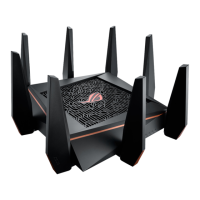
| Model | ROG Rapture GT-AC5300 |
| Category | Wireless Router |
| Wireless Standards | 802.11a/b/g/n/ac |
| RAM | 1 GB |
| Flash Memory | 256 MB |
| Security | WPA2-PSK, WPA-PSK, WPA-Enterprise, WPA2-Enterprise, WPS support |
| Frequency Band | 2.4 GHz / 5 GHz |
| Antennas | 8 x external antennas |
| VPN Support | IPSec, PPTP, L2TP |
| Features | Game Accelerator, AiProtection, Adaptive QoS |
| Maximum Wireless Speed | 5334 Mbps (1000 Mbps on 2.4 GHz + 2167 Mbps on 5 GHz + 2167 Mbps on 5 GHz) |
| Ports | 8 x Gigabit LAN, 1 x Gigabit WAN, 1 x USB 3.0, 1 x USB 2.0 |
| Processor | 1.8 GHz quad-core processor |

 To Next Page