EasyManua.ls Logo

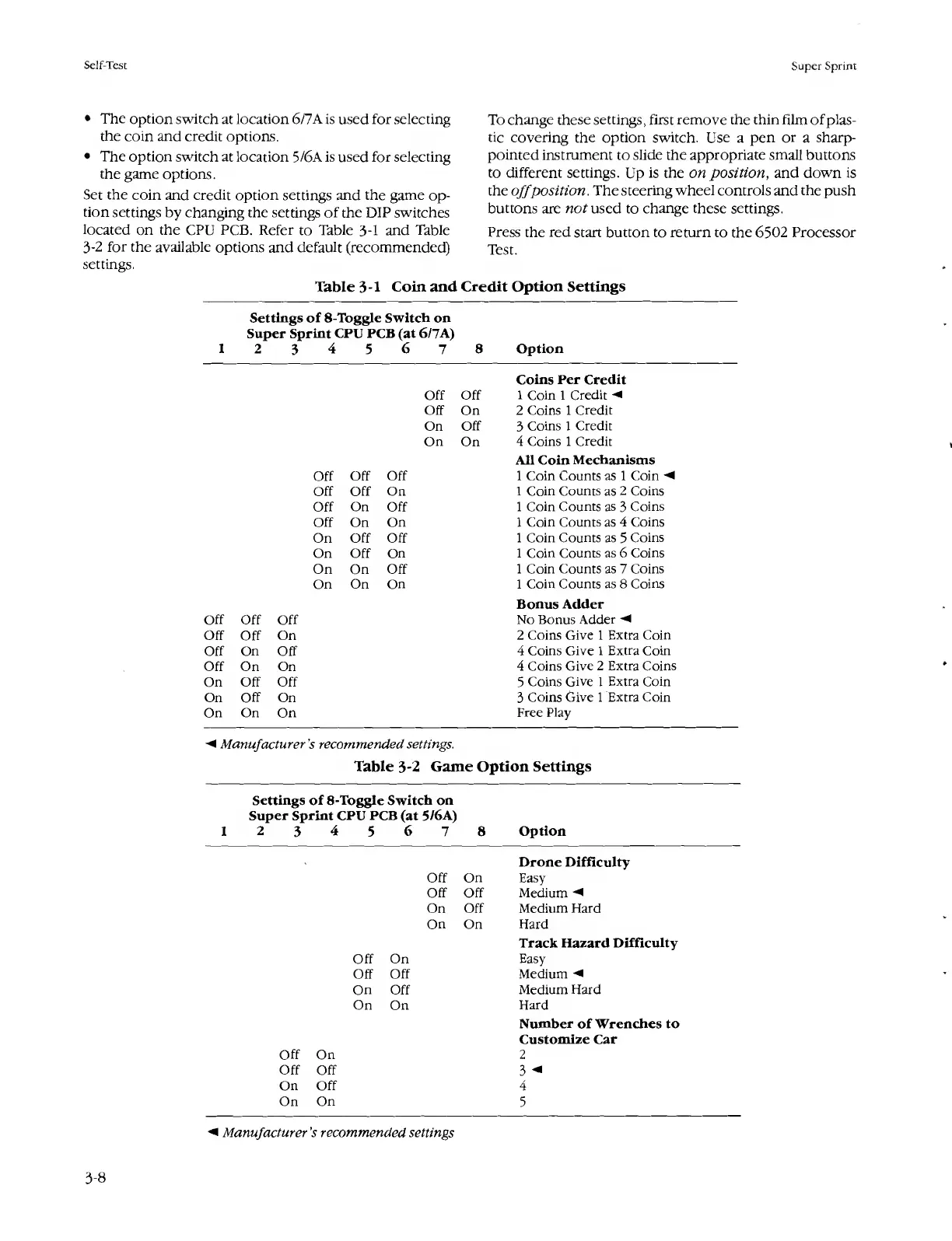
Atari SUPER SPRINT - Table 3-1 Coin and Credit Option Settings; Table 3-2 Game Option Settings

Atari SUPER SPRINT
80 pages
Print Icon
To Next Page IconTo Next Page
To Previous Page IconTo Previous Page
Loading...
Self-Test
Super
Sprint
The
option
switch
at
location
6/7A
is
used
for
selecting
the
coin
and
credit
options.
The
option
switch
at
location
5/6A
is
used
for
selecting
the
game
options.
Set
the
coin
and
credit
option
settings
and
the
game
op¬
tion
settings
by
changing
the
settings
of
the
DIP
switches
located
on
the
CPU
PCB.
Refer
to
Table
3-1
and
Table
3-2
for
the
available
options
and
default
(recommended)
settings.
Table
3-1
Coin
and
To
change
these
settings,
first
remove
the
thin
film
of
plas¬
tic
covering
the
option
switch.
Use
a
pen
or
a
sharp-
pointed
instrument
to
slide
the
appropriate
small
buttons
to
different
settings.
Up
is
the
on
position,
and
down
is
the
off
position.
The
steering
wheel
controls
and
the
push
buttons
are
nor
used
to
change
these
settings.
Press
the
red
start
button
to
return
to
the
6502
Processor
Test.
Credit
Option
Settings
Settings
of
8-Toggle
Switch
on
Super
Sprint
CPU
PCB
(at
6/7A)
1
2
3
4
5
6
7
8
Option
Off
Off
Off
On
On
Off
On
On
Off
Off
Off
Off
Off
On
Off
On
Off
Off
On
On
On
Off
Off
On
Off
On
On
On
Off
On
On
On
Coins
Per
Credit
1
Coin
1
Credit
2
Coins
1
Credit
3
Coins
1
Credit
4
Coins
1
Credit
All
Coin
Mechanisms
1
Coin
Counts
as
1
Coin
1
Coin
Counts
as
2
Coins
1
Coin
Counts
as
3
Coins
1
Coin
Counts
as
4
Coins
1
Coin
Counts
as
5
Coins
1
Coin
Counts
as
6
Coins
1
Coin
Counts
as
7
Coins
1
Coin
Counts
as
8
Coins
Bonus
Adder
Off
Off
Off
No
Bonus
Adder
Off
Off
On
2
Coins
Give
1
Extra
Coin
Off
On
Off
4
Coins
Give
1
Extra
Coin
Off
On
On
4
Coins
Give
2
Extra
Coins
On
Off
Off
5
Coins
Give
1
Extra
Coin
On
Off
On
3
Coins
Give
1
Extra
Coin
On
On
On
Free
Play
Manufacturer's
recommended
settings.
Table
3-2
Game
Option
Settings
Settings
of
8-Toggle
Switch
on
Super
Sprint
CPU
PCB
(at
5/6A)
1
2
3
4
5
6
7
8
Option
Drone
Difficulty
Off
On
Easy
Off
Off
Medium
On
Off
Medium
Hard
On
On
Hard
Track
Hazard
Difficulty
Off
On
Easy
Off
Off
Medium
On
Off
Medium
Hard
On
On
Hard
Number
of
Wrenches
to
Customize
Car
Off
On
2
Off
Off
3
<
On
Off
4
On
On
5
Manufacturer’s
recommended
settings
3-8

Table of Contents

Related product manuals