EasyManua.ls Logo

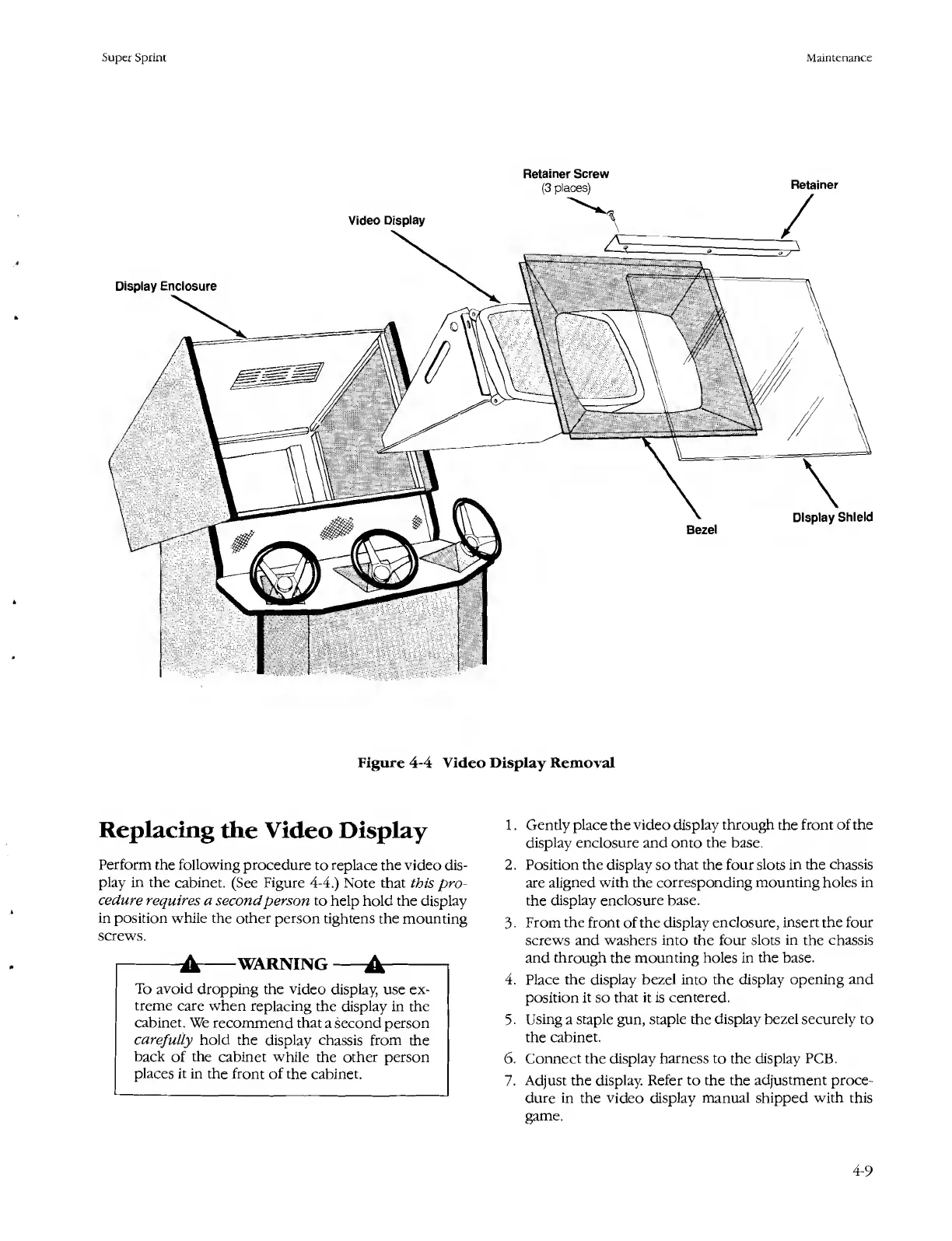
Atari SUPER SPRINT - Replacing the Video Display; Figure 4-4 Video Display Removal

Atari SUPER SPRINT
80 pages
Print Icon
To Next Page IconTo Next Page
To Previous Page IconTo Previous Page
Loading...
Super
Sprint
Maintenance
Display
Enclosure
Bezel
Display
Shield
Retainer
Retainer
Screw
(3
places)
Video
Display
Figure
4-4
Video
Display
Removal
Replacing
the
Video
Display
Perform
the
following
procedure
to
replace
the
video
dis¬
play
in
the
cabinet.
(See
Figure
4-4.)
Note
that
this
pro¬
cedure
requires
a
second
person
to
help
hold
the
display
in
position
while
the
other
person
tightens
the
mounting
screws.
-A-WARNING-A-
To
avoid
dropping
the
video
display,
use
ex¬
treme
care
when
replacing
the
display
in
the
cabinet.
We
recommend
that
a
second
person
carefully
hold
the
display
chassis
from
the
back
of
the
cabinet
while
the
other
person
places
it
in
the
front
of
the
cabinet.
1.
Gently
place
the
video
display
through
the
front
of
the
display
enclosure
and
onto
the
base.
2.
Position
the
display
so
that
the
four
slots
in
the
chassis
are
aligned
with
the
corresponding
mounting
holes
in
the
display
enclosure
base.
3.
From
the
front
of
the
display
enclosure,
insert
the
four
screws
and
washers
into
the
four
slots
in
the
chassis
and
through
the
mounting
holes
in
the
base.
4.
Place
the
display
bezel
into
the
display
opening
and
position
it
so
that
it
is
centered.
5.
Using
a
staple
gun,
staple
the
display
bezel
securely
to
the
cabinet.
6.
Connect
the
display
harness
to
the
display
PCB.
7.
Adjust
the
display.
Refer
to
the
the
adjustment
proce¬
dure
in
the
video
display
manual
shipped
with
this
game.
4-9

Table of Contents

Related product manuals