- 65 -
Advanced/simplifi ed menu
Settings
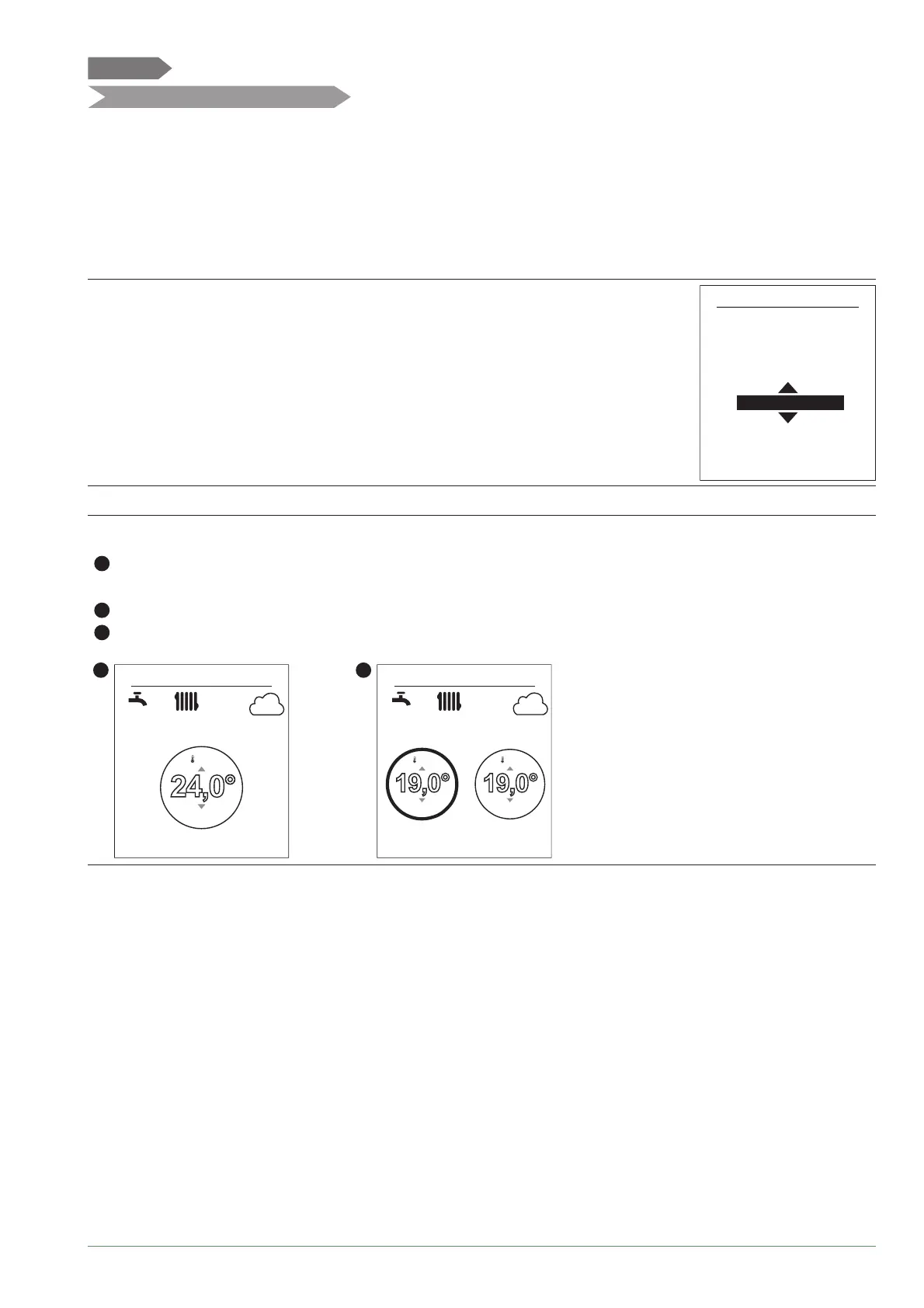
Two display modes for menus and appliance functions are available:
- Advanced menu:
- The appliance follows the time programming defi ned in paragraph
"Time programming", page 56.
- Simplifi ed menu*:
- The appliance operates at a constant temperature set directly by the user.
- Some functions are no longer accessible.
* The "Simplifi ed Menu" setting is not compatible with the Cozytouch application.
Choose the display mode from the menu:
"Settings" > "Advanced/Simplifi ed menu".
Settings
Simplifi ed menu
Advanced/simplifi ed menu
Select the level of accessible
functions:
Setting the temperature in the Simplifi ed Menu
1 zone
1
- Turn the knob to adjust the temperature directly.
2 zones
2
- Select the zone. Accept.
4
- Set the temperature using the knob. Accept.
1
15:23
12°
24,0°
--,-
OFF
7 September 2017
2
15:23
12°
19,0°
--,-
19,0°
--,-
OFF
7 September 2017
Alfea Extensa A.I. R32 / INSTALLATION / 2114 - EN




 To Next Page