33
February 2006
Harmony™ Operating Manual
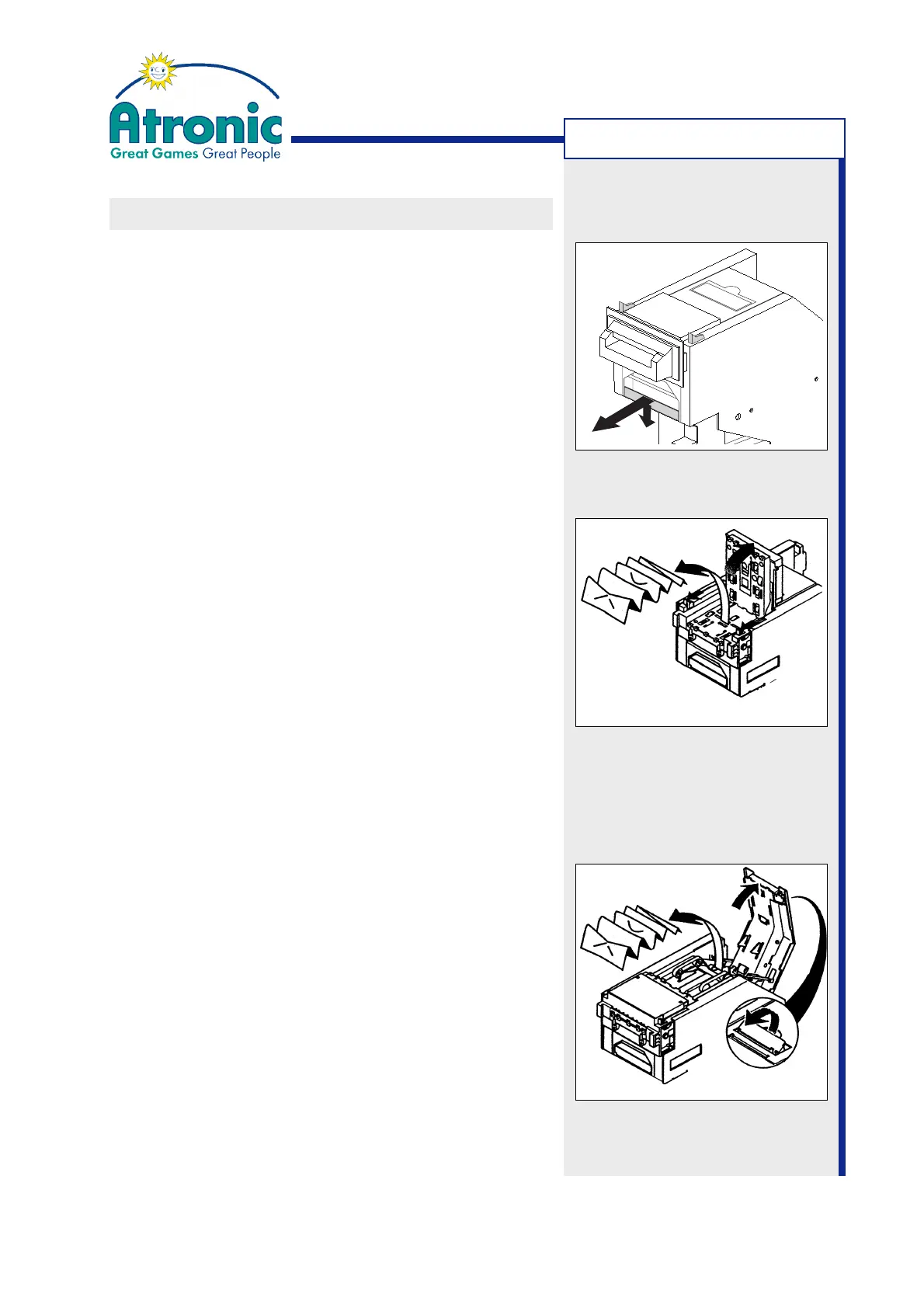
CLEARING BILL JAM
Follow these procedures to clear a bill jam in a JCM™
WBA-type bill acceptor.
Take out the Acceptor Head Assembly
1. Open the maindoor.
2. Push the acceptor head release lever downwards
and slide out the acceptor head assembly.
Procedure for Acceptor Head
1. Take out the acceptor head assembly.
2. Pull the acceptor head opening notches on both
sides of the acceptor head towards you and open
the acceptor head.
3. Remove the jammed bill and any debris.
4. Close the acceptor head and make sure it is fully
engaged.
5. Slide the acceptor head assembly back into it's
mounting frame and close the maindoor.
6. Clear bill acceptor error message via audit key.
Procedure for Transfer Unit
1. Take out the acceptor head assembly.
2. Open the transfer unit cover by pulling on the trans-
fer unit opening lever.
3. Remove the jammed bill and any debris.
4. Close the transfer unit cover and make sure it is
fully engaged.
5. Slide the acceptor head assembly back into it's
mounting frame and close the maindoor.
6. Clear bill acceptor error message via audit key.
TROUBLESHOOTING



 To Next Page