FMB10 User’s Manual Edition 06/2005
___________________________________________ Page 16 _____________________________________________
Audemat-Aztec SA – Audemat-Aztec INC
WEB: www.audemat-aztec.com - e-mail: contact@audemat-aztec.com
4 INSTALLATION OF THE FMB10 CONTROL SOFTWARE
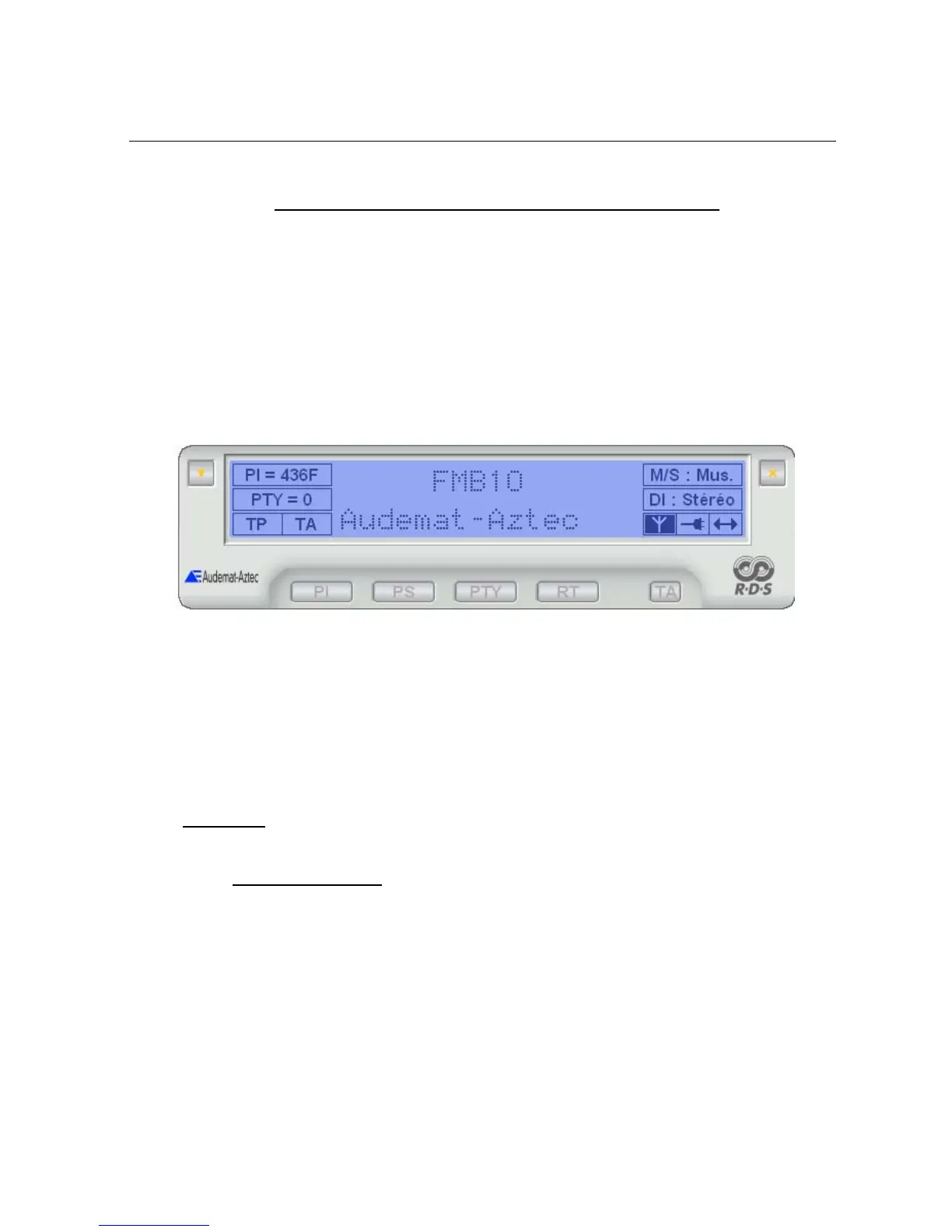
This software has been designed for operating and configuring FMB10.
Its interface comprises:
¾ a display indicating the main parameters of the encoder generated RDS data.
¾ a set of buttons giving access to the encoder’s current operating functions.
¾ a button which enables the software’s main menu to be accessed. A password can protect
these functions and allow only qualified technical personnel to access.
The software has been designed for running with the encoder by means of an RS232C link so as to program it
in real time when changing parameter values. It can also save the configurations created in file form: this
enables an encoder to be quickly reprogrammed in a given configuration.
The software is supplied on a CD-Rom which contains an installation program as well as this user’s manual in
file form, readable using Adobe software: Acrobat Reader®.
4.1 Installation
4.1.1 Software environment
The software is intended for Microsoft WINDOWS 9x, NT 4.x, 2k or XP. The user will make sure that his/her
environment has the appropriate software and versions by referring to equipment and software manuals.


 To Next Page