FMB10 User’s Manual Edition 06/2005
___________________________________________ Page 28 _____________________________________________
Audemat-Aztec SA – Audemat-Aztec INC
WEB: www.audemat-aztec.com - e-mail: contact@audemat-aztec.com
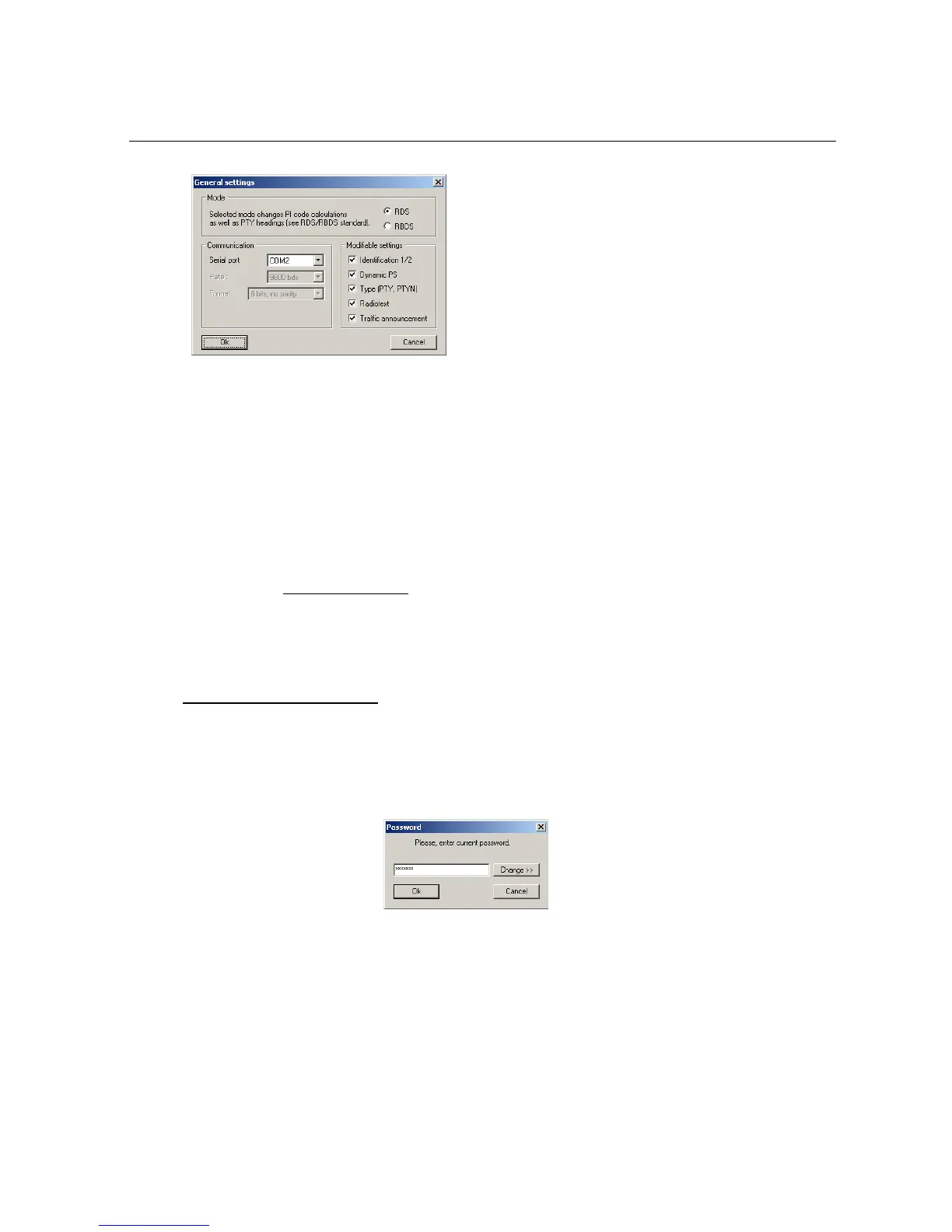
¾ Mode: defines the software’s default mode. Depending on the chosen mode, the PTY
codes and their wording, as well as the PI code calculations, are different.
¾ Communication: these parameters are the ones used for communicating with the
encoder via the RS232C link.
¾ Modifiable parameters: when a box is not ticked, the corresponding parameter will
be forbidden in Exploitation mode and its button will be de-validated. All parameters
are default (software installation) validated.
4.3.5 Configuration files
The software enables complete configurations to be kept on the disk: this makes it easier to restore an
encoder in a defined state. When a configuration is loaded into memory ('File / Load a configuration'
menu), it is automatically sent to the encoder which is connected to the PC.
4.4 Detailed menu description
Access to the application’s main menu can be protected by a password, in which case, when pressing the 'Main
menu' button, a window will request the current password to be captured:


 To Next Page