FMB10 User’s Manual Edition 06/2005
___________________________________________ Page 19 _____________________________________________
Audemat-Aztec SA – Audemat-Aztec INC
WEB: www.audemat-aztec.com - e-mail: contact@audemat-aztec.com
4.3 Function details
4.3.1 Main window
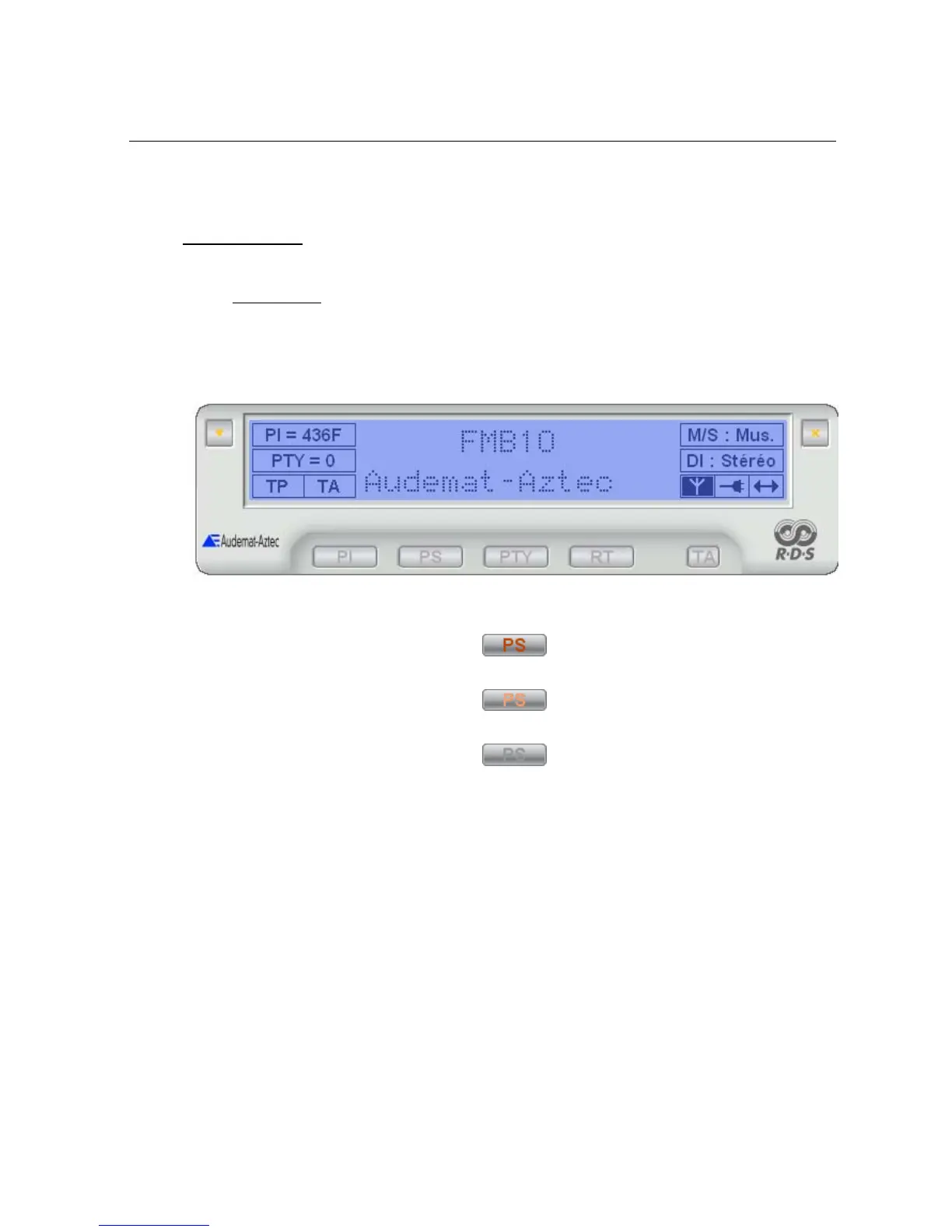
This consists of a zone displaying the encoder’s main parameters and the command buttons.
Active button wording appears in dark red:
When the mouse’s cursor goes over an active button, its wording appears in bright red:
When a function is disabled or inaccessible, the corresponding button appears in grey:
When the mouse cursor stays above a button or a display parameter zone, an explanation message is
displayed.
4.3.1.1 Description of display
The upper part of the main window is occupied by a display zone which reproduces an LCD type of displayer.
The central part is reserved for alpha-numerical indications:
• PS (Programme Service name): this is the name of the received program, displayed on all
RDS receivers. This zone also displays the Dynamic PS when this functionality is active (see
paragraph ). This zone has 8 characters.
• RT (Radio text): a text message of a maximum of 64 characters destined for receivers
equipped with an appropriate displayer (usually home receivers). This zone has 16 characters.
When this information is dynamic (Dynamic PS, Radio text), the display is a simulation of RDS data transmitted
by the encoder (timing, groups of characters …). It is not, in any way, a question of an acquisition of actual


 To Next Page