FMB10 User’s Manual Edition 06/2005
___________________________________________ Page 27 _____________________________________________
Audemat-Aztec SA – Audemat-Aztec INC
WEB: www.audemat-aztec.com - e-mail: contact@audemat-aztec.com
¾ Encoder
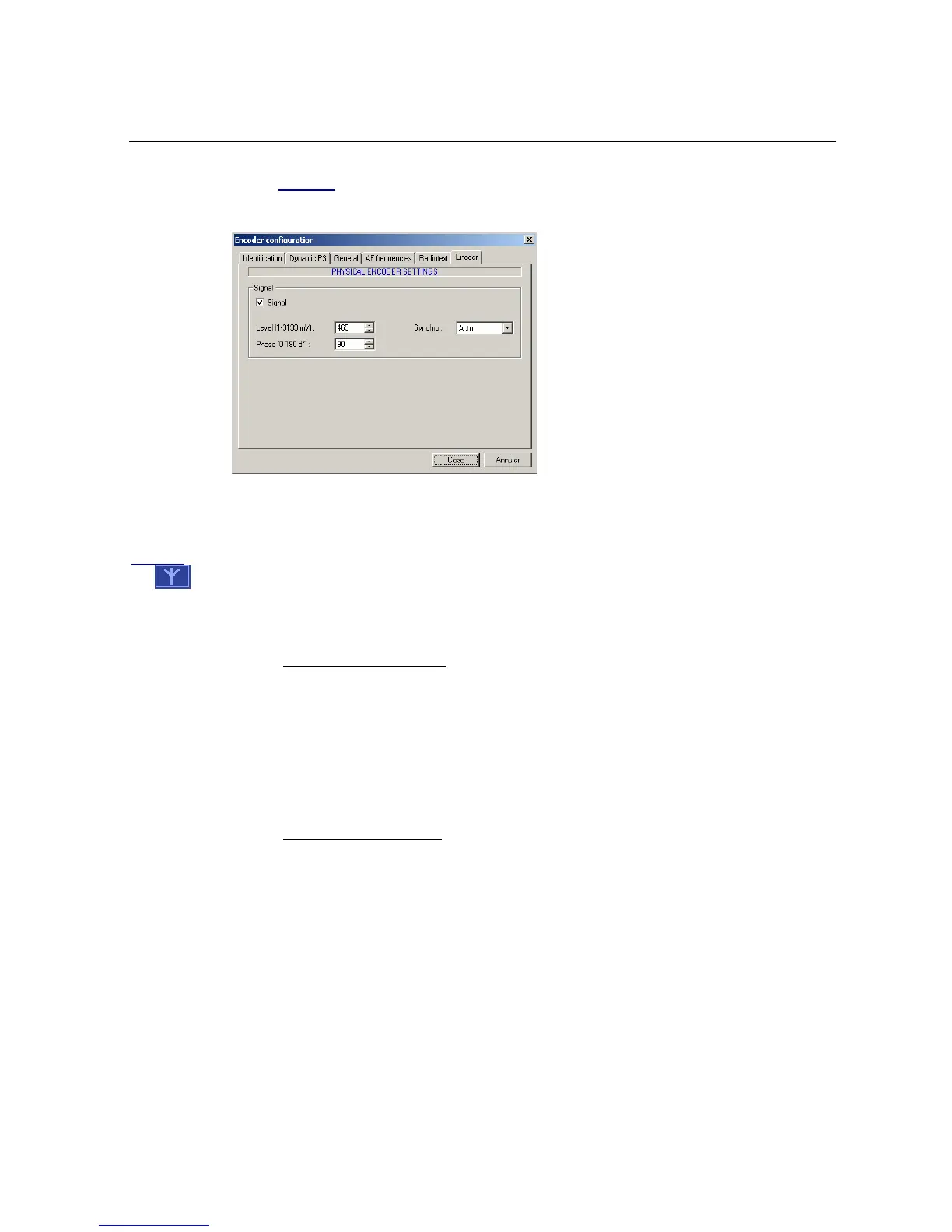
This page enables the encoder’s physical parameters to be configured:
• Signal: these parameters enable both the amplitude and the RDS sub-carrier phase to be
defined, as well as its synchronization mode with the 19 kHz pilot.
Caution
: if the Signal box has not been ticked, no signal will be generated in encoder output, as indicated by
the
symbol on the main displayer.
• UECP address: these two fields enable the encoder address to be defined when it is required
in UECP mode (non available with this software).
4.3.3 Configuration assistant
To help non-specialists to configure an encoder rapidly, the software has a configuration assistant,
which is accessible using the 'Tools / Configuration assistant' menu.
It proposes configuring the encoder’s main parameters step by step (PI, PS, dynamic PS, Info traffic
TP/TA, Alternative frequencies AF, Radio text). When the configuration is completed, it is
automatically sent to the encoder.
4.3.4 Software configuration
This page contains the software’s configuration parameters:


 To Next Page