2 Chapter 1 Aircraft
EVO Max 4T User Manual
3 LED Indicators
The LED indicator light located on the front arms, a steady blue
color is emitted, used to identify the front-facing direction of
4 Landing Gear
Used to support the aircraft to avoid damage to the bottom of
the fuselage.
5
System
Used to sense the obstacles ahead and avoid the aircraft from
colliding with them.
6 Gimbal Camera
The 4T gimbal integrates four sensor systems including
wide-angle camera, zoom camera, infrared thermal imaging
camera and laser rangefinder.
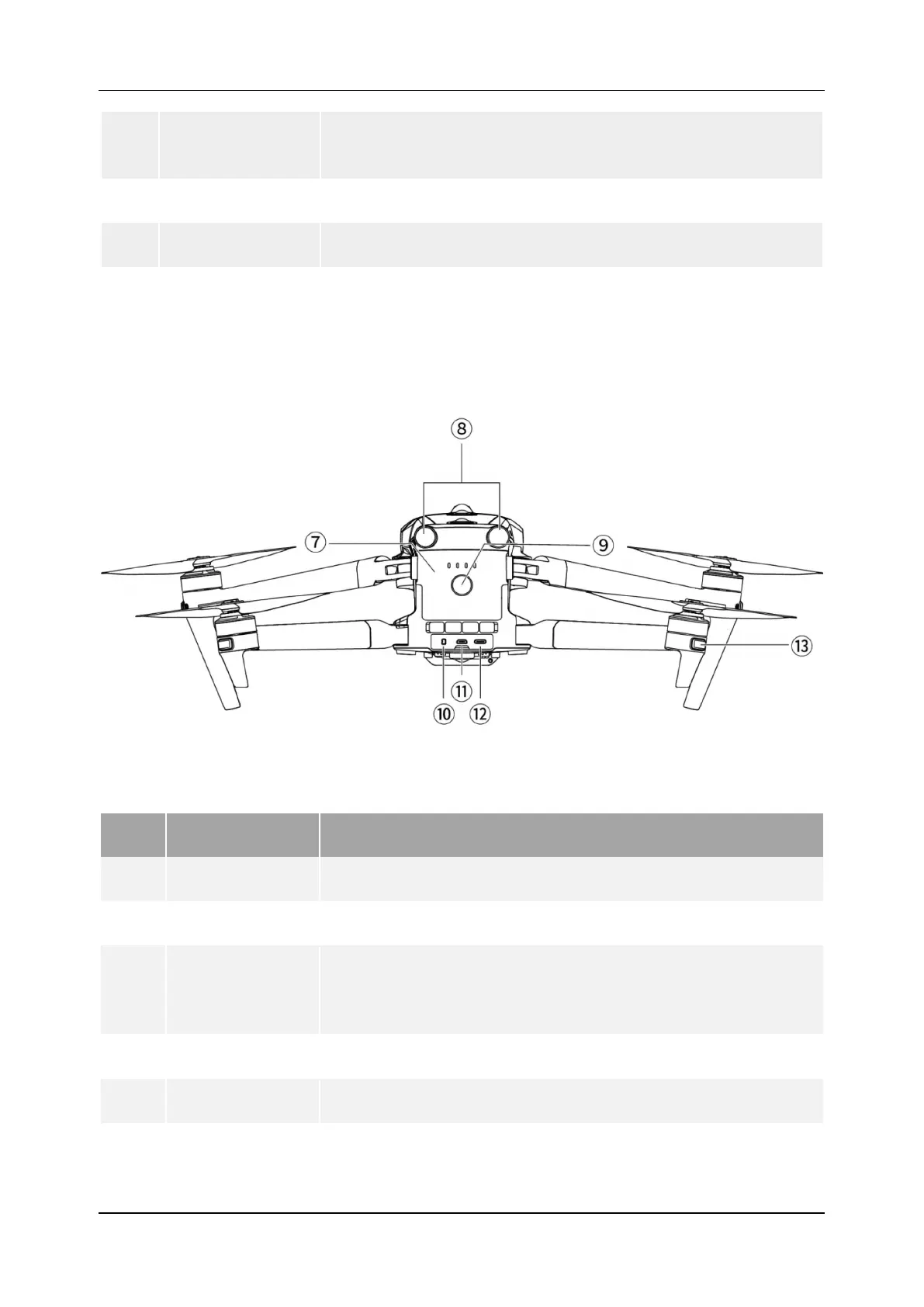
1.1.2 Aircraft Rear View
Figure 1-2 EVO Max 4T Rear View
Table 1-2 EVO Max 4T Rear View Details
No. Name Description
7 Aircraft Battery Used to provide energy for aircraft operation.
8
Camera
Used to sense the obstacles in the rear and avoid the aircraft
from colliding with them.
9
Power Button
Press and hold the power button for 3 seconds to start the
aircraft.
Pairing Button Quickly press the power button twice to enter pairing mode.
10
For inserting a microSD card.
11
For connecting an external SSD.
12
Used to connect to a computer for firmware updates or
debugging.












 To Next Page