26 Chapter 2 Remote Controller
EVO Max 4T User Manual
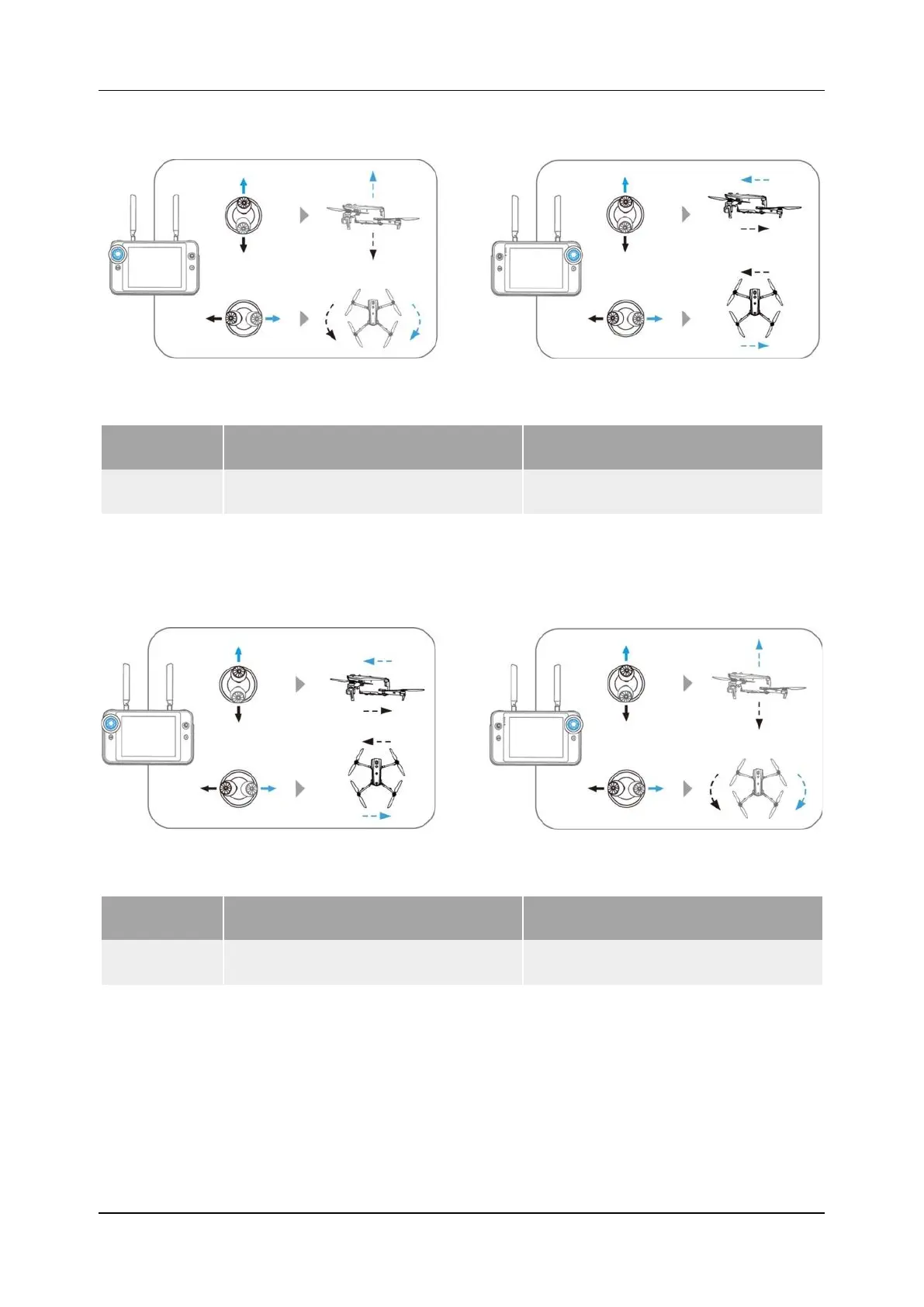
Mode 2
Figure 2-10 Mode 2
Table 2-9 Mode 2
Stick Move Up/Down Move Left/Right
Left Stick
Control the ascent and descent of
the aircraft
Control the heading of the aircraft
Right Stick
Control the forward and backward
Control the left or right movement of
Mode 3
Figure 2-11 Mode 3
Table 2-10 Mode 3
Stick Move Up/Down Move Left/Right
Left Stick
Control the forward and backward
movement of the aircraft
Control the left or right movement of
the aircraft
Right Stick
Control the ascent and descent of
the aircraft
Control the heading of the aircraft
2.4.2 Set Command Stick Modes
The layouts are divided into Mode 1, Mode 2, and Mode 3. You can set the input mode
according to your preference. Please refer to Chapter 4 Autel Enterprise App "4.3.3 Remote
Controller Settings". The factory default control mode of the remote controller is "Mode 2".












 To Next Page