CPU Specifications
and Operation
4--7
CPU Specifications and Operation
DL105 PLC User Manual, 3rd Edition
ou can use the Handheld Programmer or
DirectSOFT to set the proper bits in
V7633.
Since you cannot access the bits
individually, you have to enter a constant
that will result in the appropriate bit being
set. The first two digits of the constant are
used to select the CPU options. The
second two digits are used with the
High-Speed I/O function to select various
options. If you’re using High Speed I/O
functions, make sure you also enter the
appropriate code for the feature selected If
you want the HSIO inputs and outputs to
default to regular I/O point operation, just
enter 60 as the last two digits of the code.
This configures all I/O points to operate
only as standard discrete I/O.
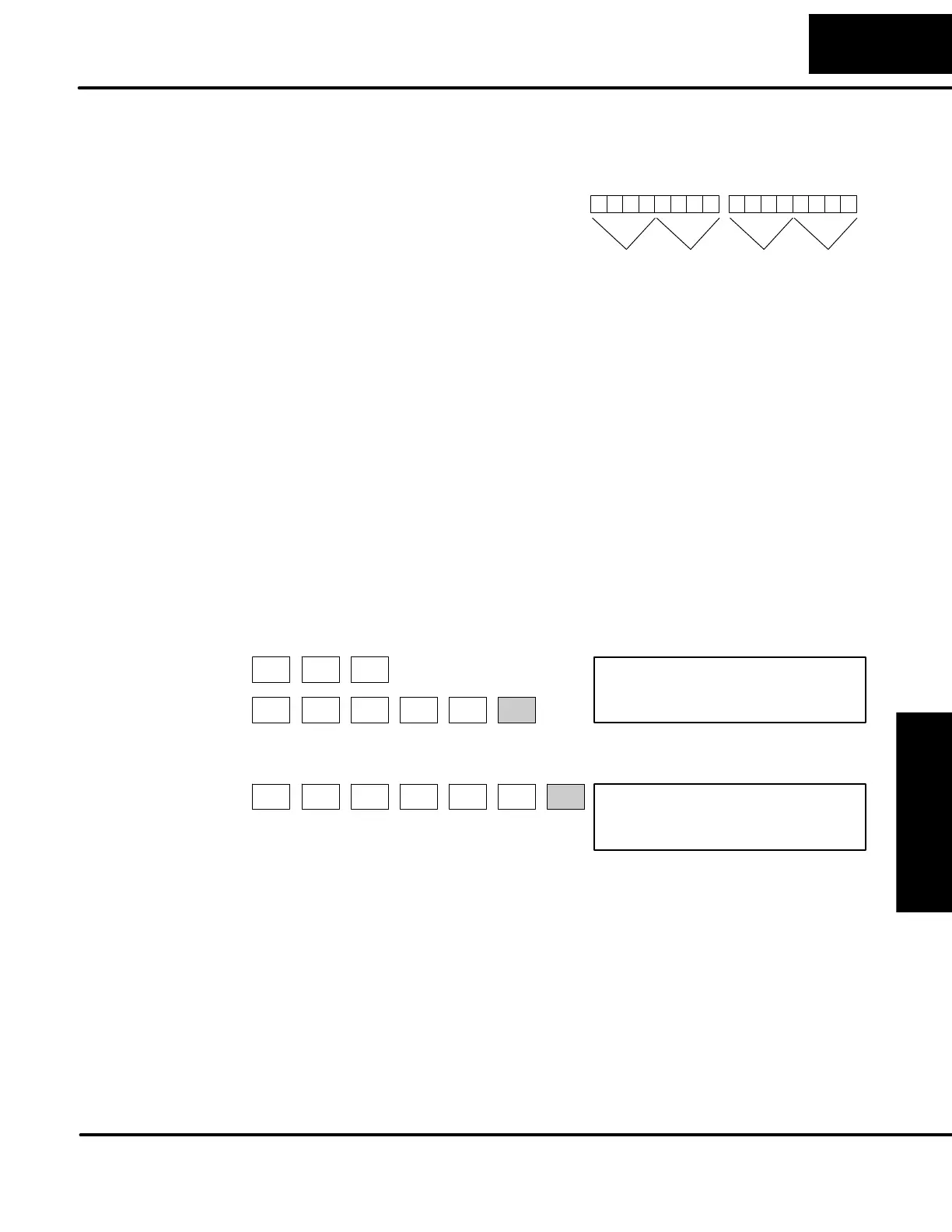
The diagram shows how the upper and
lower bytes of V7633 are used. For
example, if you entered 2060 into V7633,
the powerup-in-run option is selected, and
the discrete filtered inputs are selected.
0 00100000 0110000
V7633 -- 16 bits
2 0 6 0
01098 76543211112131415
CPU Setup HSIO Mode Select
Codes:
00: Default
20: Power-up in Run
Codes:
10: Up Counter
20: Quadrature
30: Pulse output
(High Speed)
40: Interrupt (High Speed)
50: Pulse catch (High Speed)
60: Discrete Filtered
Input (default)
Bit
The following keystrokes show how you can enter the codes into V7633 with the
D2--HPP Handheld Programmer.
0001 0000
V 7634 V7633
K2060
V 7634 V7633
CLR CLR SHFT
AND
V
7
H
STAT
6
G
3
D
3
D
2
C
ENT
0
A
SHFT
6
G
0
A
JMP
K
Select V7633 for Monitoring
Enter the Code
Since the changes take affect immediately, you may receive an error message. For
example, if you s elect Power-up in Run Mode and the CPU does not yet c ontain a
program, an error will occur.
Setting Bits in
V7633


 To Next Page