Installation, Wiring,
and Specifications
2--17
Installation, Wiring, and Specifications
DL105 PLC User Manual, 3rd Edition
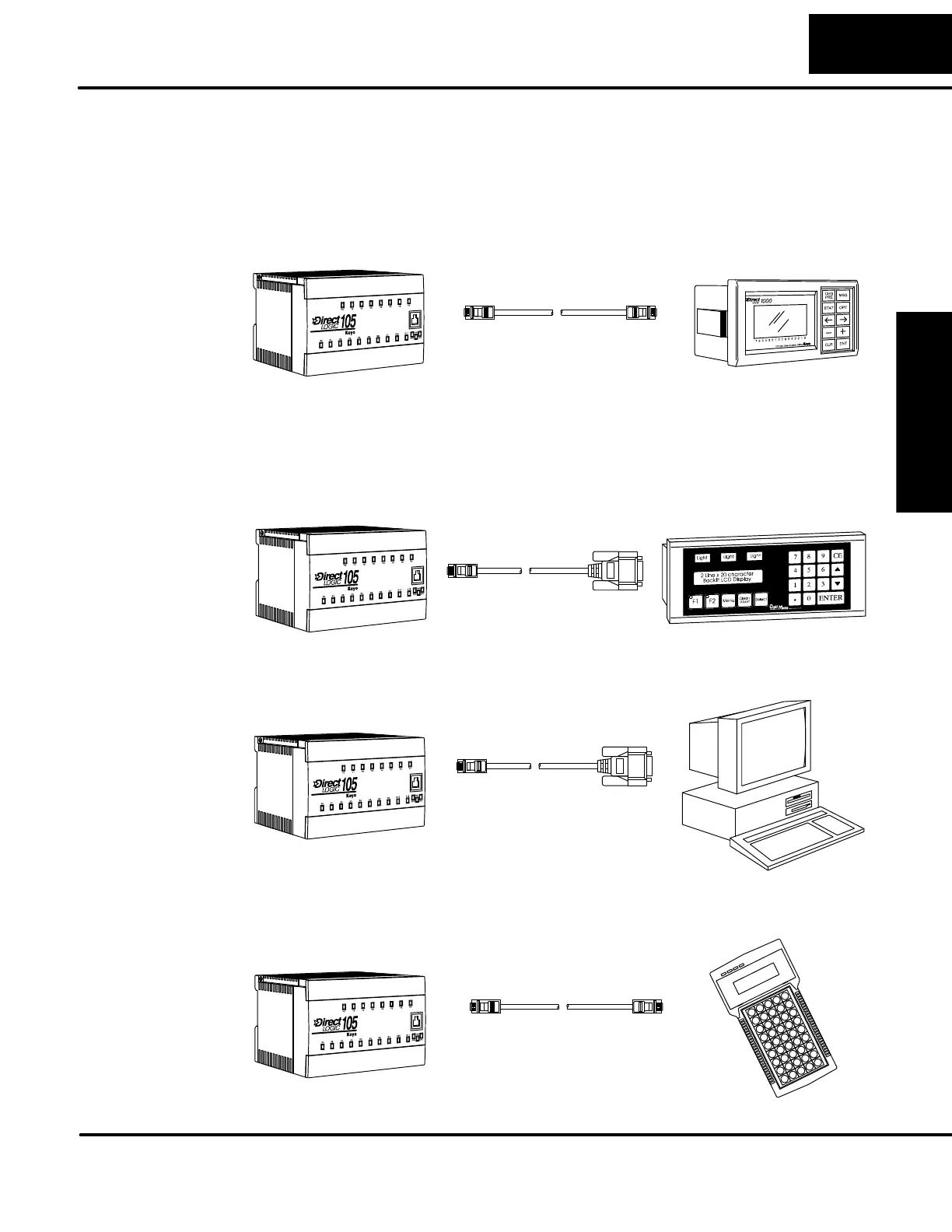
Operator interfaces require data and power connections. Operator interfaces with a
large CRT usually require separate AC power. However, small operator interface
devices like the DV-1000 Data Access Unit, some C--more Micro--Graphic panels
and some Optimation panels may be powered directly from the DL105 Micro PLC.
Connect the DV-1000 to the DL105 Micro PLC COM1 port using the cable s hown
below. A single cable contains transmit/receive data wires and +5V power.
DL105 Micro PLC
DV-1000
Use cable part no.
DV--1000CBL
RJ12
phone style
RJ12
phone style
Optimation operator interface panels require separate power and communications
connections. Connect the DL105 COM1 port to the 15-pin D-shell connector on the
rear of the Optimation panel using the cable shown below. Optimation panels require
8--30VDC power, so use separate wiring to connect the +24VDC supply output on
AC-powered DL105 PLCs. Use external +24VDC power for DC-powered DL105s.
DL105 Micro PLC
Optimation Panel
Use cable part no.
OP--2CBL
15-pin D-shell
male
RJ12
phone style
DL105 Micro PLCs can be programmed with either a handheld programmer or with
DirectSOFT32 on a PC. Connect the DL105 to a PC using the cable shown below.
Use cable part no.
D2--DSCBL
9-pin D-shell
female
RJ12
phone style
DL105 Micro PLC
The D2-HPP Handheld Programmer comes with a c ommunications cable. For a
replacement part, use the cable shown below.
For replacement
cable, use part no.
DV--1000CBL
RJ12
phone style
RJ12
phone style
(cable comes with HPP)
DL105 Micro PLC
D2--HPP
Connecting
Operator Interface
Devices
Connecting
Programming
Devices


 To Next Page