24
500 SeriesOperating instructions
Operating controls
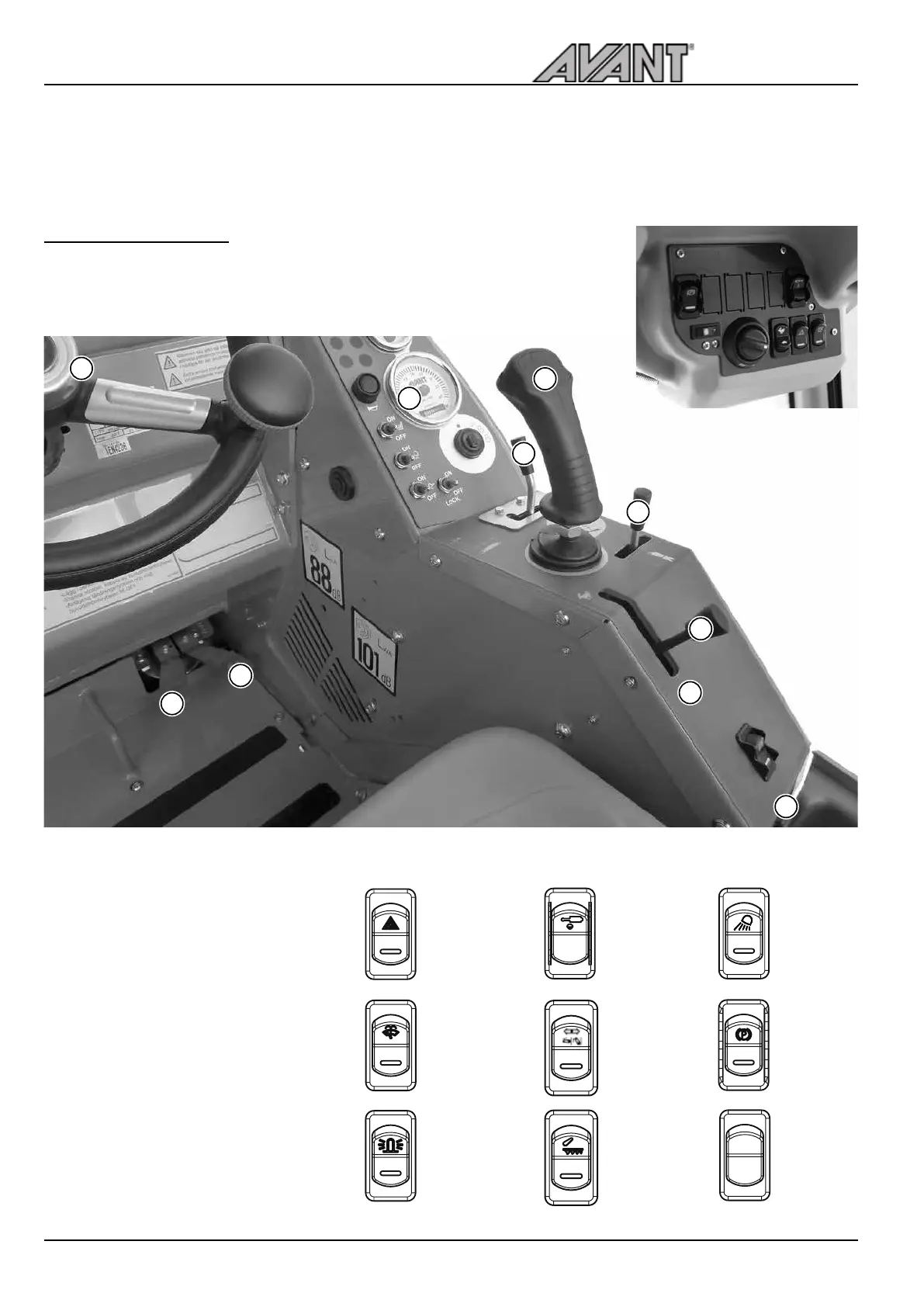
Following picture shows the location of operating controls. The location
and function of controls may be slightly different in different models, see
following pages.
Cab DLX: Some of the switches
are on the panel in the cab. See
page 44 for more information.
1. Steering wheel
2. Drive pedal, left: drive backward
3. Drive pedal, right: drive forward
4. Control lever of boom and bucket
5. Hand throttle lever
6. Auxiliary hydraulics control lever
7. Control lever of telescopic boom
8. 12 V outlet (max 15 A).
Cab LX/DLX see page 26
9. Dashboard, see page 26
10. Switches on the panel
Work light
(option)
Hydraulic quick
attachment
(option)
See page 38
Parking
brake switch
See page 29
Emergency
blinker
(option)
Windscreen
wiper and
washer
(Cab option)
Beacon
(option)
2
1
3
4
5
6
7
8
9
10
Hydraulic
rear lift
(Option)
Floating,
hydraulic rear
lift (Option)
2
1
Front/rear auxi-
liary hydraulics
selector switch
(option)
Operating instructions


 To Next Page