32
500 Series
Using the auxiliary hydraulics
Auxiliary hydraulics (hydraulically operated attachments)
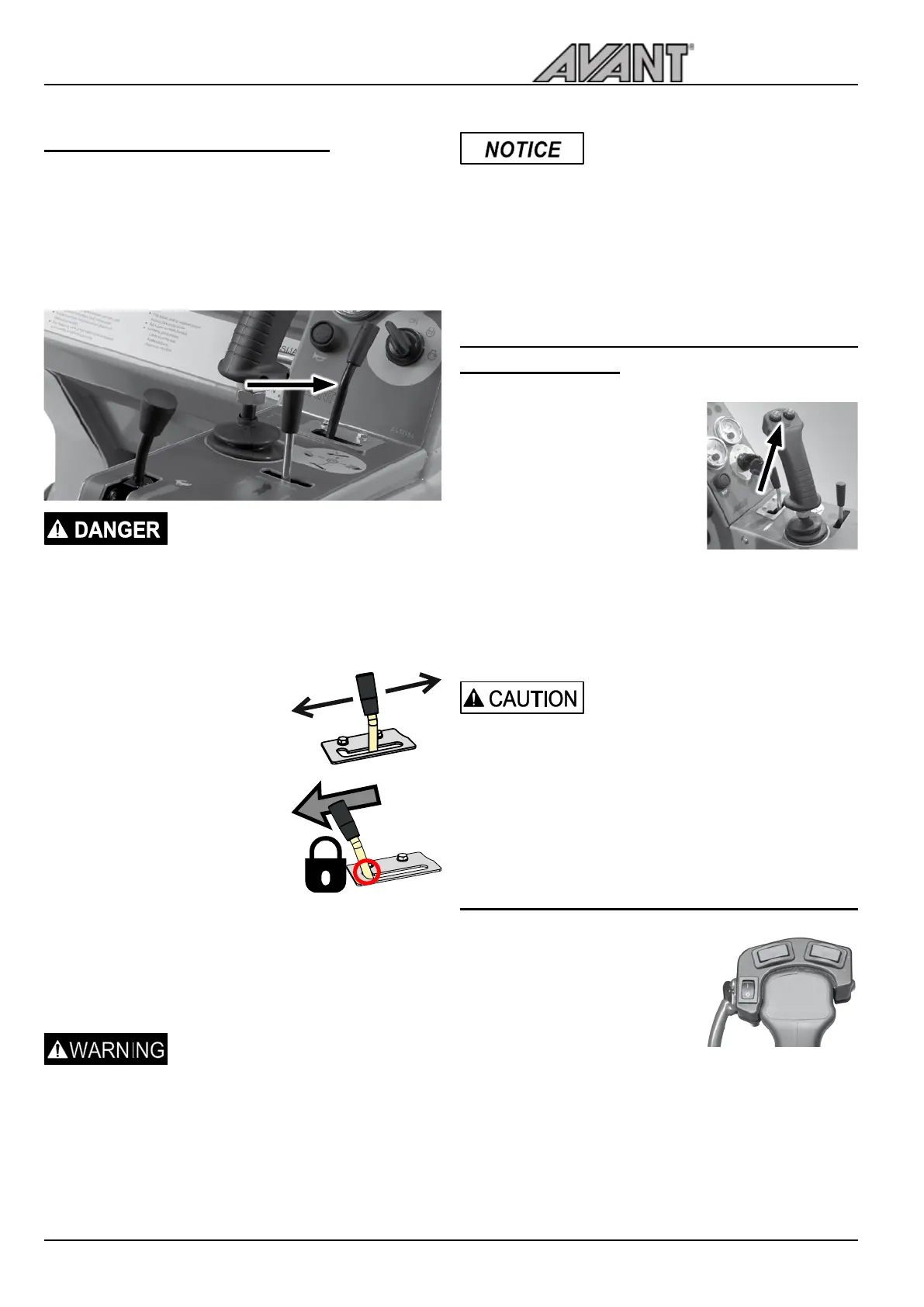
are controlled with the control lever on the control panel
front from the joystick, or with the optional auxiliary
hydraulic control buttons on the joystick. The lever locks in
the locking position (on the left) which facilitates operation
of the attachments that require constant oil ow to operate
(rotary broom, backhoe etc.).
Hazards related to attachments -
Going near an attachment that is in
operation can cause a serious risk.
Switch off auxiliary hydraulics before
leaving driver’s seat or stopping the
engine. Operate the controls only
when sitting in the driver’s seat.
• Operation directions depend
on the attachment used.
• When using an attachment
for the rst time, carefully
move the lever to test and
check the operating direction
of the attachment.
• For continuous operation of
rotating attachments, turn to
direction 1 and turn to locking
position.
You can use either this lever or the buttons of the electric
joystick (optional equipment) to operate the the attachment.
Release the lever to its neutral position when you stop
using the loader.
Avoid unintended movements
of the attachment - Release
the control lever to its neutral
position. If the lever is locked on,
the attachment may move during
start of the loader. Make sure to
release the lever, and to follow the
Safe stopping procedure.
Make sure that the auxiliary
hydraulics control lever will lock
in its fully engaged position when
locked on. Even a slightly incorrect
position is enough to decrease
the effectiveness of the hydraulic
system, and will cause overheating
of the hydraulic oil. Adjust the
locking plate if needed.
Joystick with auxiliary hydraulics control
buttons (option)
The loader can be equipped, as an
option with the 6 function joystick,
where the operation of auxiliary
hydraulics is controlled by push
buttons.
Auxiliary hydraulics
Push and hold either button to
operate hydraulic feature of the
attachment.
• The operation of the buttons depends on the
attachment, see Operator’s Manual of the attachment.
• Release buttons to stop.
• Make sure the manual control lever is not locked
when operating the electric joystick.
Avoid abrupt movements of an
attachment - Use electric buttons
with caution.
When you use certain attachments
with the electric joystick buttons,
the attachments can move abruptly.
This can cause falling of material
from the attachment, loss of
stability, or damage to attachment.
Attachment control switch pack (option)
• Optional extra with which
electric functions of the
attachment are controlled
• Consists of socket that mounts
on the boom. The electric
harness of the attachment
is connected to this socket,
and the electric features are controlled with switches
mounted on the boom control lever.
• Read the operator’s manual of the attachment to see
how the switches are used with each attachment.
Operating instructions
1
2


 To Next Page