PARTNER User Guide Page 40
- Issue 1b (22 February 2010)IP Office PARTNER Version
5.2 Listening to Your Messages
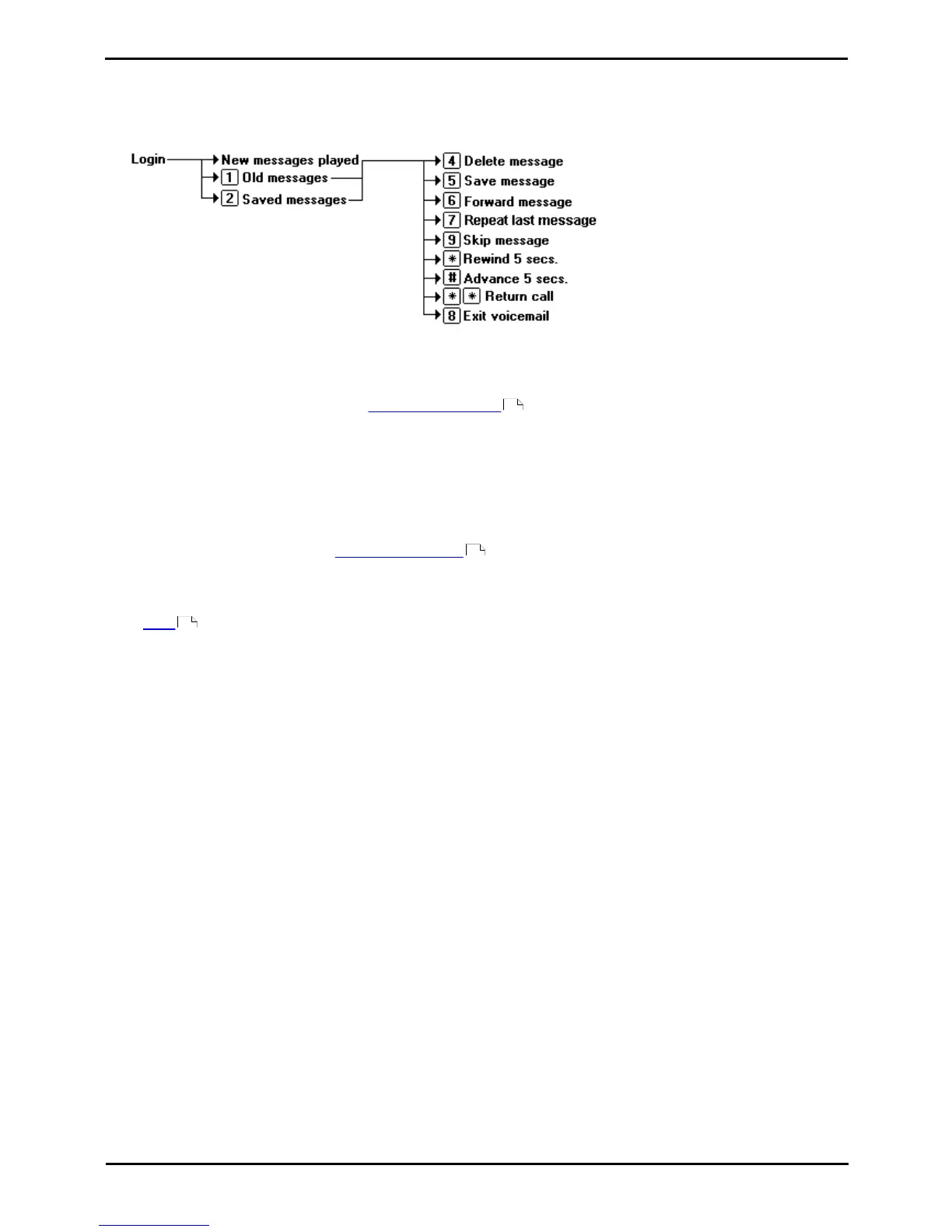
When you log in to your mailbox you are automatically played any new messages. After a message has been played it is
marked as being an old message. Old messages are automatically deleted after 24 hours unless you mark the message
as saved.
When you listen to any of your messages you have the following options:
· Press 4 to delete the message.
· Press 5 to save the message.
· Press 6 to forward the message. See Forwarding a Message .
· Press 7 to repeat the last message.
· Press 8 to exit voicemail.
· Press 9 to skip to the next message.
· Press * to rewind the message a few seconds.
· Press # to advance the message a few seconds.
· Press ** to return the call. See Replying to Messages .
To listen to an old message
1.Login to your mailbox.
2.Press 1 to listen to your old messages.
To save a message
1.Press 5 when listening to a new or old message.
45
45
39



 To Next Page