PARTNER User Guide Page 58
- Issue 1b (22 February 2010)IP Office PARTNER Version
8. Phone Settings (1408/1416)
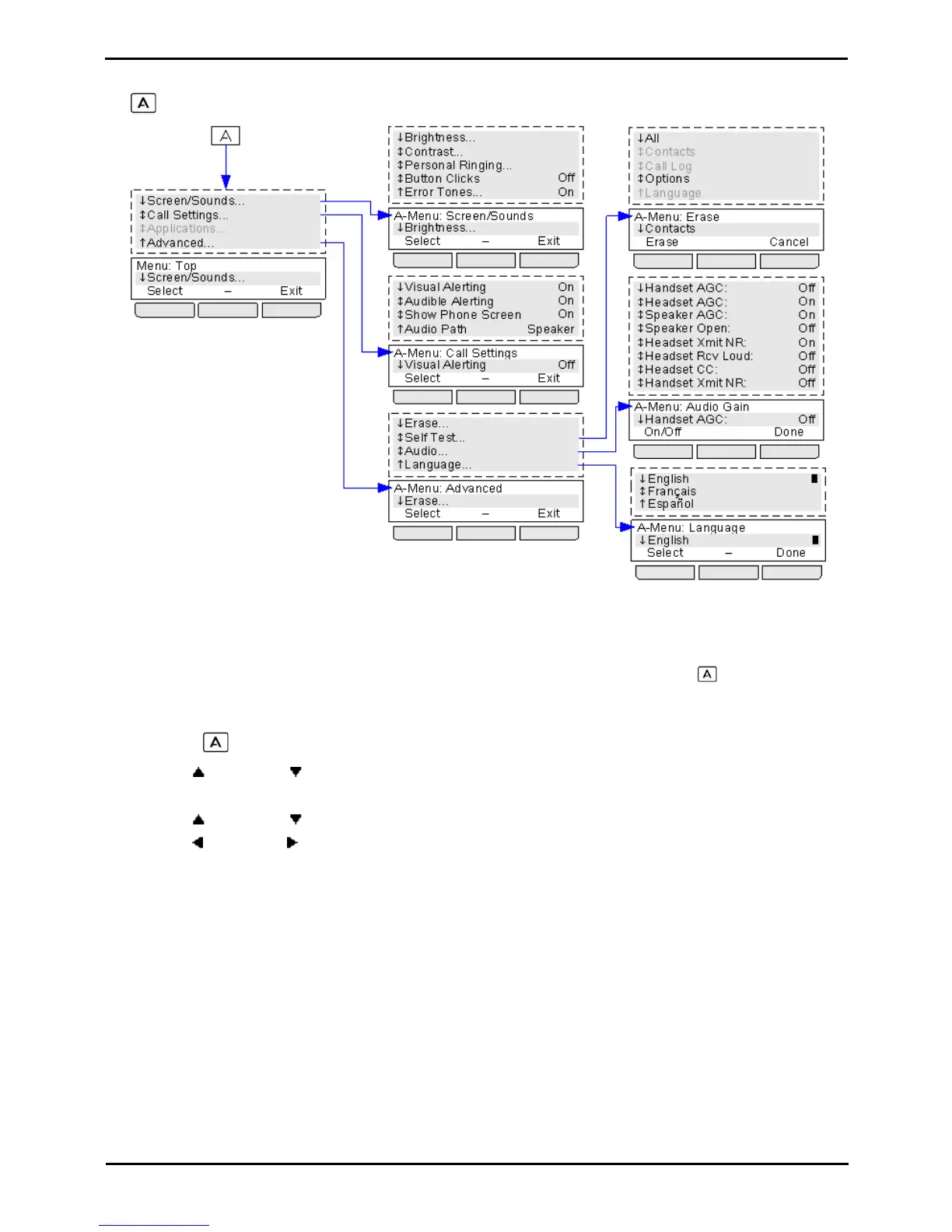
The MENU key is used to access a range of phone settings for your 1400 Series phone.
Options that are greyed out in the diagram above are not accessible or used.
8.1 A-Menu Auto Exit
The Show Phone Screen option only applies to the A-menu screens accessed when you press the key. If the option
is on, if you receive a call while in the A-menu, the phone will automatically exit the menus and display the call details.
1.Press the MENU button.
2.Use the up and down arrow keys to locate the option Call Settings....
3.Press the Select soft key.
4.Use the up and down arrow keys to locate the option Show Phone Screen.
5.Use the left and right arrow keys or press the On/Off soft key to change the setting.
6.When completed, press the Done soft key.
7.Press the Exit soft key to exit the menus.



 To Next Page