PARTNER User Guide Page 47
- Issue 1b (22 February 2010)IP Office PARTNER Version
Using Voicemail: Voicemail Email
5.10 Visual Voice
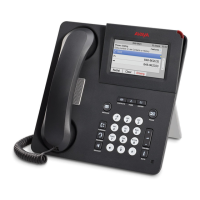
1408 and 1416 phones can access their mailbox messages and settings using a series of menus displayed on the phone.
This is called Visual Voice.
To access visual voice press the MESSAGE button on the phone. The controls available are:
· Listen
Access your own voicemail mailbox. When pressed the screen will show the number of New, Old and Saved
messages. Select one of those options to start playback of messages in that category. Use the up arrow and
arrow keys to move through the message. Use the options below
· Listen
Play the message.
· Pause
Pause the message playback.
· Delete
Delete the message.
· Save
Mark the message as a saved message.
· Call
Call the message sender if a caller ID is available.
· Copy
Copy the message to another mailbox. When pressed a number of
additional options are displayed.
· Message
Record and send a voicemail message to another mailbox or mailboxes.
· Greeting
Change the main greeting used for callers to your mailbox. If no greeting has been recorded then the default
system mailbox greeting is used.
· Email
This option is only shown if you have been configured with an email address for voicemail email usage by the
System Administrator. This control allows you to see and change the current voicemail email mode being used for
new messages received by your voicemail mailbox. Use Change to change the selected mode. Press Done when
the required mode is displayed. Possible modes are:
· Password
Change the voicemail mailbox password. To do this requires entry of the existing password.
· Voicemail
Switch voicemail coverage on/off.
Using the Visual Voice Button for Voicemail Transfer
If pressed when you have a call is connected, the MESSAGE button allows entry of an extension number for direct to
voicemail transfer of the connected call.



 To Next Page