13
2PRODUCT DESCRIPTION
2.1 OVERVIEW
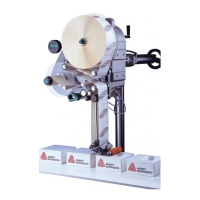
ALS
104
GB
A Control panel
– For sending commands to the device and for
displaying operating states and error messages.
– An optional external control panel can also be
connected to the device.
B Dispenser
– Dispenser mandrel grasps the label roll.
C Core diameter adapter
– For adjusting the diameter of the dispenser mandrel
to match the core diameter of the label roll.
D Adjusting knob
– Turning this in a clockwise direction secures the
label roll on the dispenser.
E Deflection rollers
F Dispensing edge bracket
G Label sensor
– Stops the label feed after a label has been
dispensed
H Pressure roller
– Prints the label once it is stuck to the product
I Dispensing edge
– Standard: (non-adjustable) L-shaped dispensing
edge
– The following options are available: V-shaped
dispensing edge, adjustable L-shaped dispensing
edge, spring-loaded L-shaped dispensing edge,
pneumatic L-shaped dispensing edge
J Drive roller
– Drives the label material forwards
K Pressure mechanism
– Presses the pressure roller against the drive roller
– Prevents the backing paper from slipping through
– Releases automatically once the backing paper has
been drawn around the drive roller
L Tensioning plate
– Keeps the backing paper taut
M Rewinder
– Rolls up the used backing paper
N Release button
– Pressing this button reduces the diameter of the
rewinder core.
– Allows the easy removal of the rewound backing
paper
O Dancer arm
– Keeps the backing paper stretched tight evenly
– Arrests the rotation of the material roll if tension
diminishes


 To Next Page