34
3BEFORE OPERATION
3.1 ELECTRICAL CONNECTIONS
ALS
104
GB
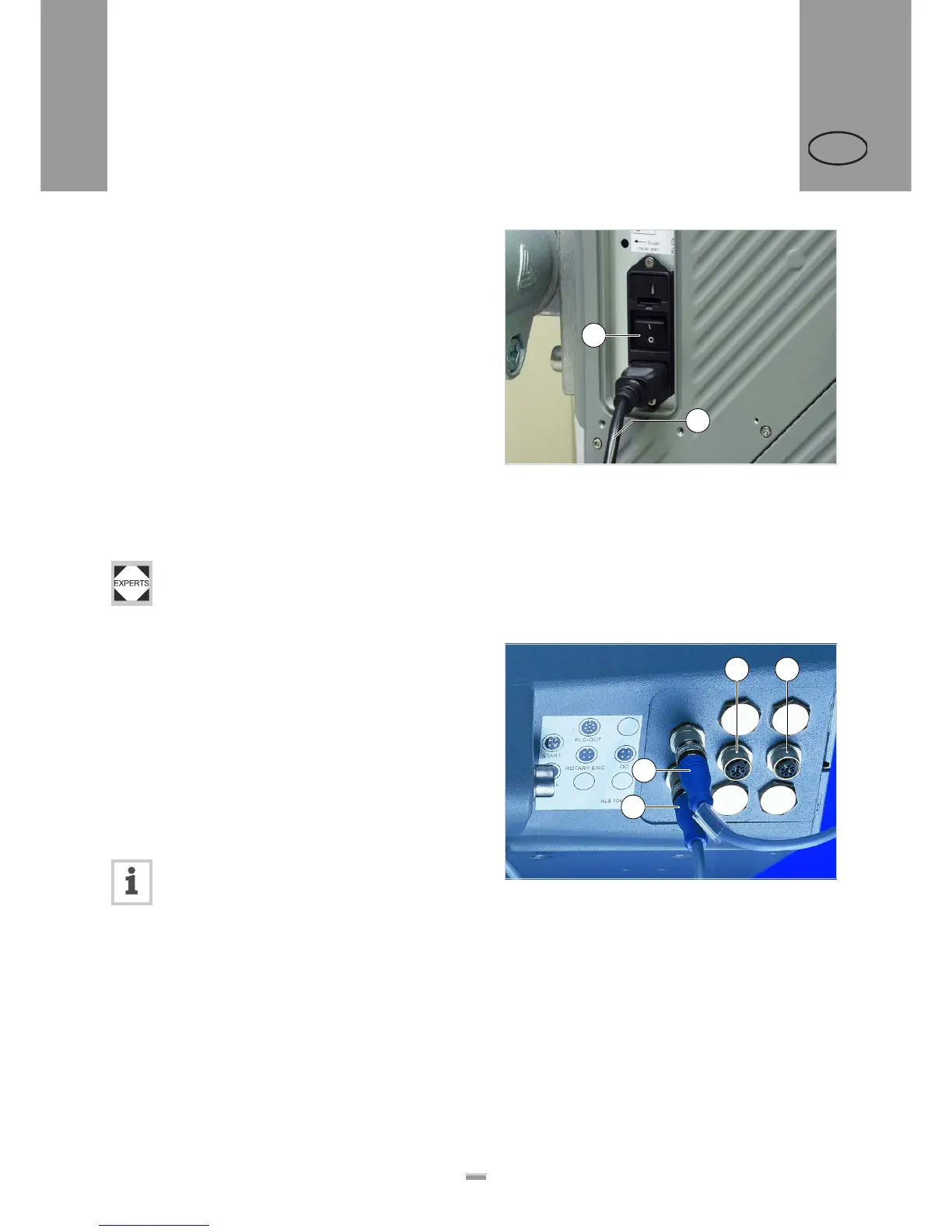
Connecting the power cable.
£ Ensure that power switch [39A] is set to “O” (off).
£ Using the supplied power cable, plug the ALS104
into a socket connected to the mains supply.
3.1.2 Power supply with dust/splash
guard option
ALS104 labeller with dust/splash guard option
(IP65) may only be connected by qualified ser-
vice technicians.
3.1.3 Connecting sensors
£ Check whether the required sensors are connected
[40] before turning on the ALS104.
The minimum required sensors:
– Label sensor (installation location: dispensing edge)
– Product sensor (installation location: conveyor belt)
You have the option of fitting additional sensors as well:
– Speed sensor (required for speed adaption)
– Outer diameter checking sensor (provides advance
warning of the end of a label roll)
You can find further information regarding suit-
able sensor types, pin assignments, and the
like in the service manual.
[39] Power cable (B) plugged in.
B
A
[40] Sensor connectors:
A Product sensor
B Label sensor
C Optional: Speed sensor
D Optional: Roll diameter (RD) sensor
B
A
C D


 To Next Page