Network Installation AXIS Panorama PTZ User’s Manual
10
Network Installation
The AXIS Panorama PTZ Network Camera includes 2 cameras. The installation procedure described
below should be followed for each camera. 2 IP addresses are required.
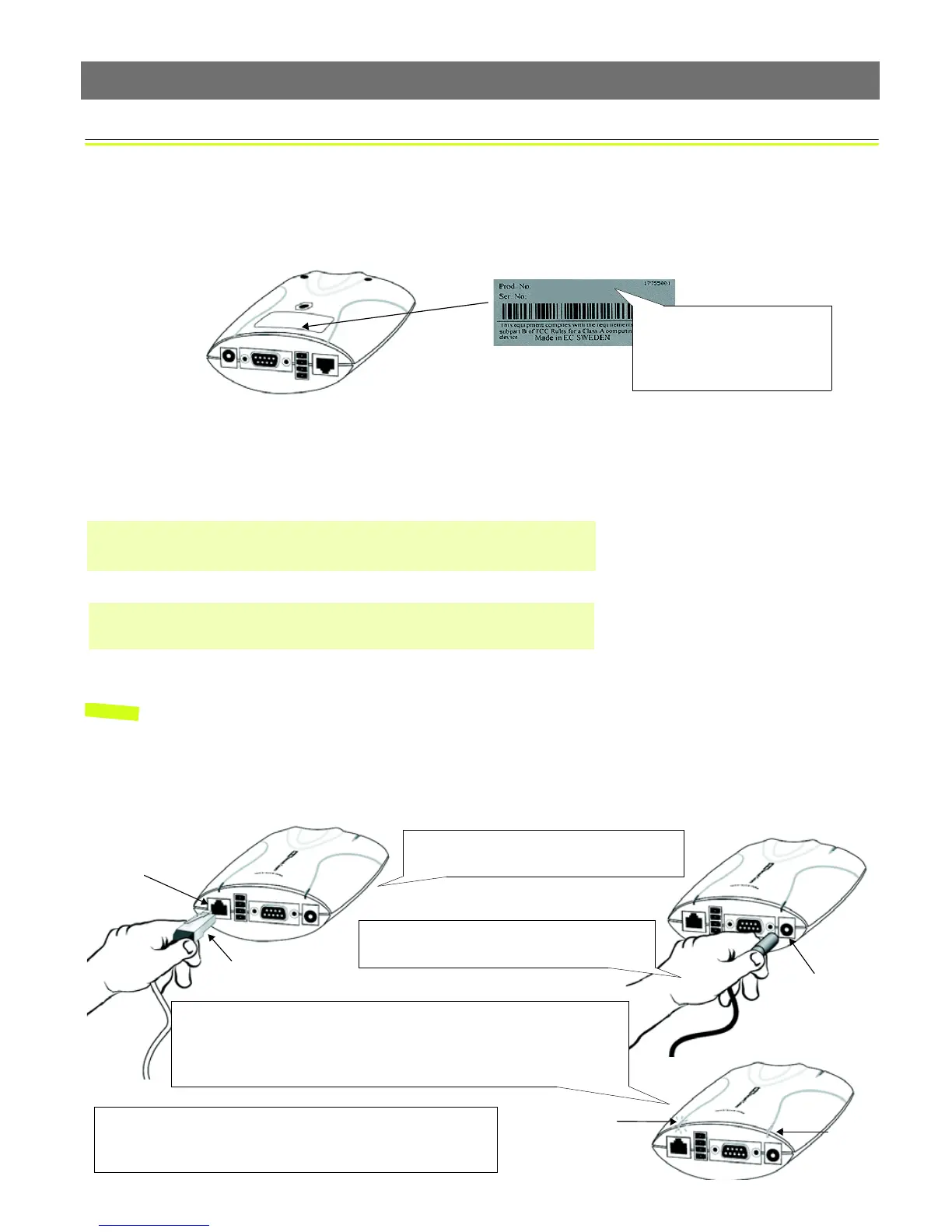
❶ Note the Serial number on the underside of the unit. You need to know this to set the IP address.
❷ Assign your product with a unique IP address (do not use the example address) from a computer
on your network, as follows:
Notes: •In Windows you can find out the IP address of your workstation by running winipcfg (Win
95/98/ME) or
ipconfig (Win NT/2000/XP) from a command prompt.
•Server Privileges: Although no special privileges are required for Windows 95/98/XP-Home, you
do need Administrator privileges for Windows NT/2000/XP-Professional.
You will now see ‘Request timed out ...’ messages repeatedly returned in the window.
Serial number same as
00408c100086 =
MAC/Ethernet number; e.g.
00-40-8c-10-00-86
Start a Command Prompt and type these commands:
Syntax:
arp -s <Camera IP address> <MAC address> <my PC IP address>
ping -t <Camera IP address>
Example:
arp -s 172.21.1.200 00-40-8c-10-00-86 172.21.1.193
ping -t 172.21.1.200
❸Connect an Ethernet cable to your AXIS
Panorama PTZ and attach it to the network.
❹Connect the power adapter to the unit and
connect it to your main power supply.
RJ-45 connector
Network socket
Network
Power Supply
socket
❻Exit Ping. The installation is now complete, and you are ready
to access the AXIS Panorama PTZ from your browser, as
described in the next section.
❺Approximately 10-15 seconds after connecting power, the message
‘Reply from 172.21.1.200...’ - or similar, is returned in the Command
Prompt window. Ensure that the Power Indicator is permanently lit and
that the Network Indicator flashes intermittently.
Indicator
Power
Indicator



 To Next Page