4-10
Chapter 4. BASIC OPERATION
Operating mode selection
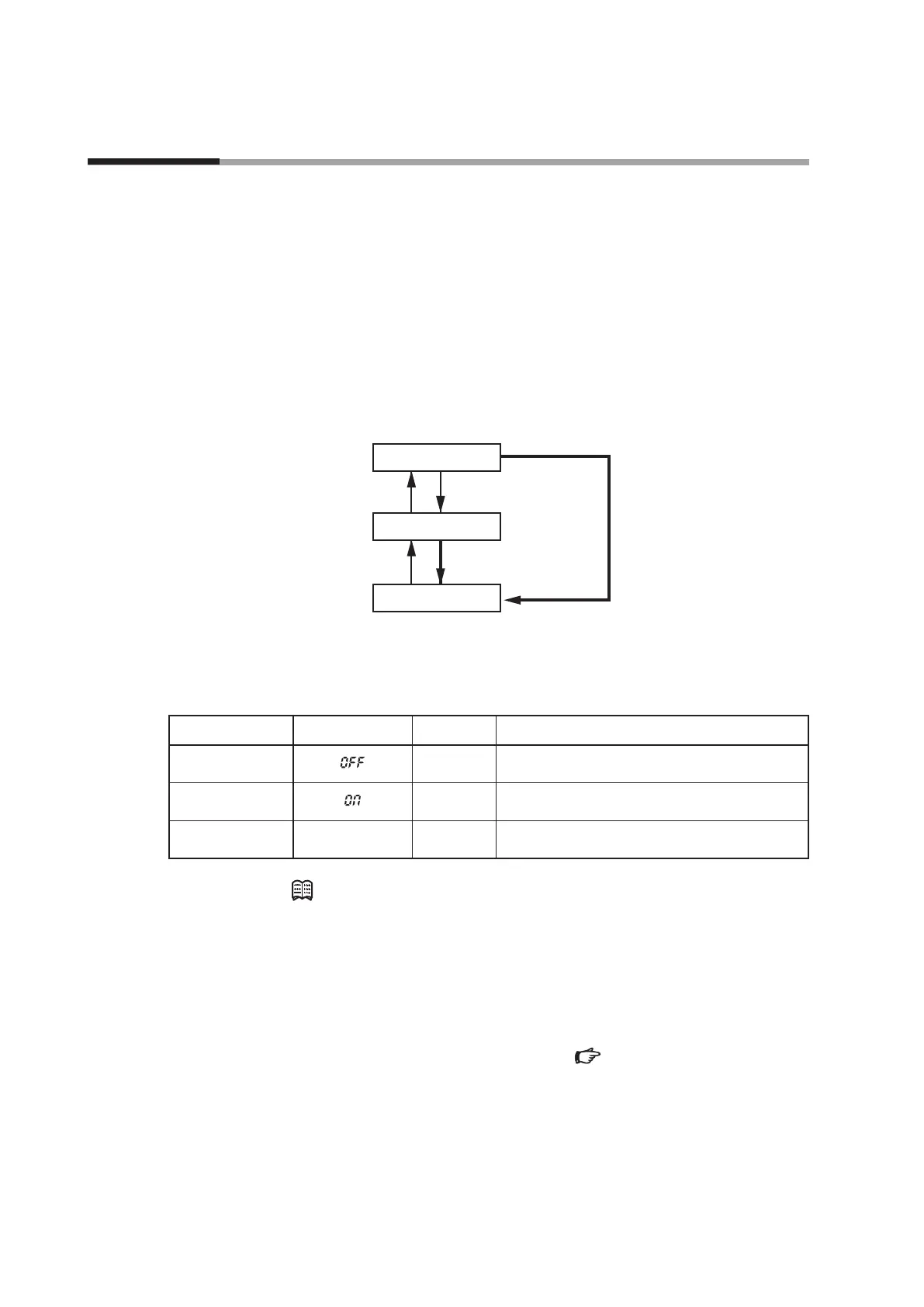
Three kinds of valve operating modes are provided, "control mode," "fully closed
mode," and "fully open mode."
The factory setting is the control mode. The operating mode can be forcibly
changed to "fully closed mode" (valve is fully closed) or "fully open mode" (valve is
fully open).
As shown in the diagram below, the mode is changed alternately between the
control mode and fully closed mode every time the RUN key is pressed.
Additionally, to change the mode from the control mode to the fully open mode,
keep the RUN key pressed for 2 seconds or longer.
Control mode
Fully closed mode
Fully open mode
RUN key
RUN key (less than 2 s)
RUN key (2 s or more)
RUN key
RUN key
Operating mode display
The operating mode is shown on the 7-segment display during instantaneous flow
rate display. Additionally, the OK lamp blinks in the fully open mode.
Operation mode 7-segment display OK lamp Remarks
Fully closed mode
Out
OFF
is always displayed after checking that the flow
rate is zero (0).
Control mode
Out or lit
On
is displayed for approximately 1 second when
the mode changes to the control mode.
Fully open mode
Full
Blinking
Full
is displayed for approximately 1 second when
the mode transits to the fully open mode.
Note (Advanced use, Selecting the operating mode through external input)
•
When "operating mode change (5, 6, or 8)" is selected for external contact
input function assignment
C-
10
to
C-
12
in the function setup, the
operating mode can be changed through external contact input.
•
When "operating mode change (1, or 5)" is selected for external 3-way
switching input function assignment
C-09
in the function setup, the
operating mode can be changed through the external 3-way switching input.
For details on how to set up functions, Chapter 5. ADVANCED
OPERATION.
4 - 3 Selecting the Operating Mode



 To Next Page