5-1
The advanced operation provides three kinds of modes, "Function setup mode," "Parameter setup mode," and
"Controller information display mode."
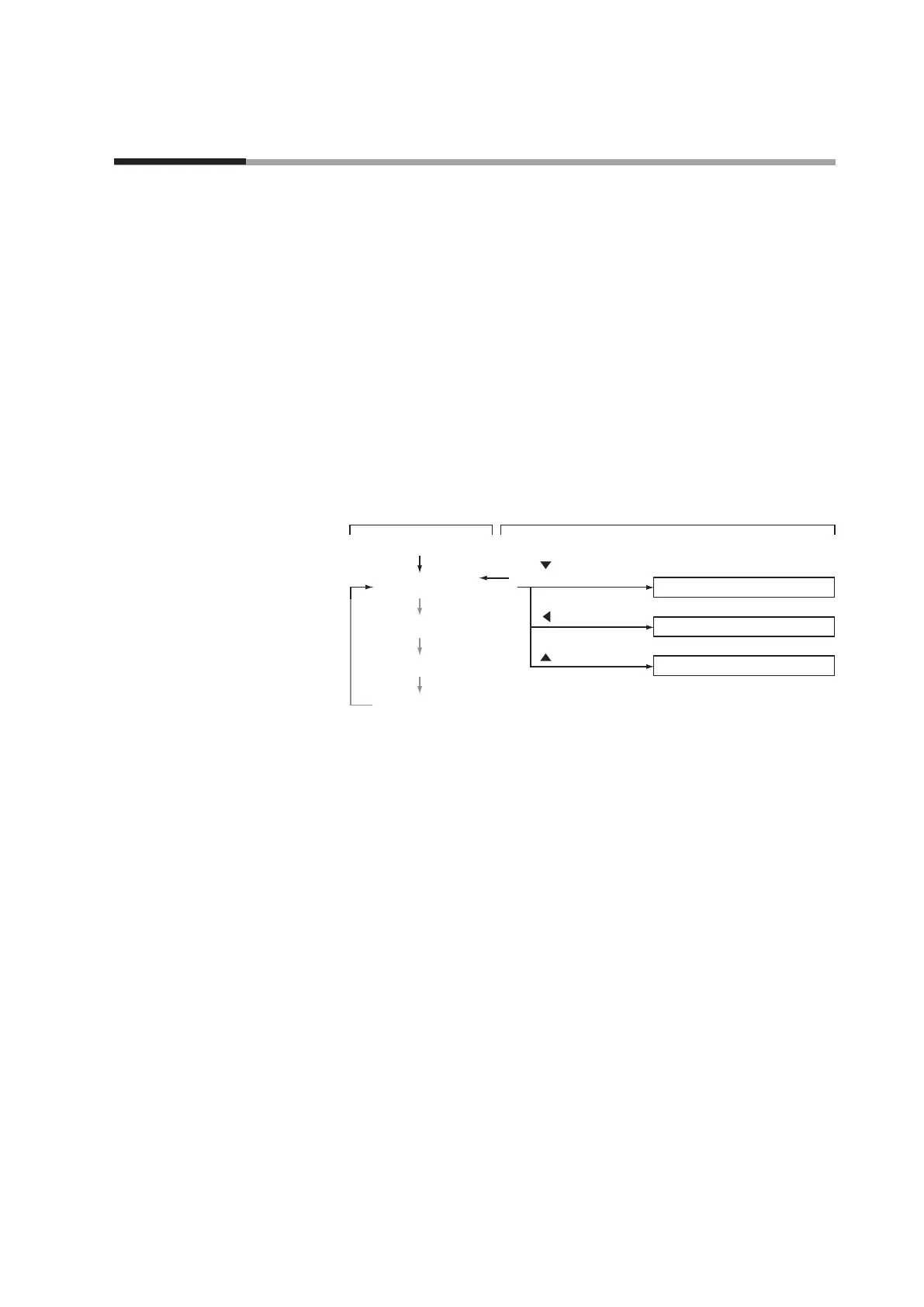
Setup mode transition operation
Normally, when the power is turned ON, the instantaneous flow rate is displayed in
the basic operation mode.
When keys are operated as described in the diagram below during instantaneous
flow rate display, the operation changes to the specified mode.
When the operating mode changes to "Function setup mode" or "Parameter setup
mode," the specified setup can be changed.
In the "Device information display mode," you can check the statuses of major setup
items (gas type, full scale flow rate, reference temperature, and communications
address).
Instantaneous ow rate display
DISP key
Flow set value display
DISP key
Totalized ow display
DISP key
Function setup mode
Parameter setup mode
Device information display mode
key + ENT key
(3 s or more)
DISP key
key (3 s or more)
key (3 s or more)
Basic operation Advanced operation
DISP key
Power ON
Chapter 5. ADVANCED OPERATION



 To Next Page