33
Bluetooth
H 12:00 amR O F
13
C
Spa Light Music Settings Invert Test
H 12:00 amR O F
13
C
Light
Spa
H 12:00 amR O F
13
C
My Favorite Song
0:45 3:15
Settings
0
0
Flat
O
Balance
Fade
EQ Preset
Filter
Bluetooth
My Favorite Song
0:45 3:15
Bluetooth
O
Bluetooth
BT Not Connected
Settings
0
Flat
O
15
Fade
EQ Preset
Filter
Bass Gain
Bluetooth
BT Connected
0:45 3:15
bba
TM
3 Screen
A
B
C
D
G
E
F
Bluetooth
H 12:00 amR O F
13
C
Spa Light Music Settings Invert Test
H 12:00 amR O F
13
C
Light
Spa
H 12:00 amR O F
13
C
My Favorite Song
0:45 3:15
Settings
0
0
Flat
O
Balance
Fade
EQ Preset
Filter
Bluetooth
My Favorite Song
0:45 3:15
Bluetooth
O
Bluetooth
BT Not Connected
Settings
0
Flat
O
15
Fade
EQ Preset
Filter
Bass Gain
Bluetooth
BT Connected
0:45 3:15
B
Bluetooth
H 12:00 amR O F
13
C
100
Spa
H 12:00 amR O F
13
C
Spa Light Music Settings Invert Test
H 12:00 amR O F
13
C
Light
Spa
H 12:00 amR O F
13
C
My Favorite Song
0:45 3:15
Settings
0
0
Flat
O
Balance
Fade
EQ Preset
Filter
Bluetooth
My Favorite Song
0:45 3:15
Bluetooth
O
Bluetooth
BT Not Connected
Settings
0
Flat
O
15
Fade
EQ Preset
Filter
Bass Gain
Bluetooth
BT Connected
0:45 3:15
C
Bluetooth
H 12:00 amR O F
13
C
100
Spa
H 12:00 amR O F
13
C
Spa Light Music Settings Invert Test
H 12:00 amR O F
13
C
Light
Spa
H 12:00 amR O F
13
C
H 12:00 amR O F
13
C
Music
My Favorite Song
0:45 3:15
Settings
0
0
Flat
O
Balance
Fade
EQ Preset
Filter
Bluetooth
My Favorite Song
0:45 3:15
Bluetooth
O
Bluetooth
BT Not Connected
Settings
0
Flat
O
15
Fade
EQ Preset
Filter
Bass Gain
Bluetooth
BT Connected
0:45 3:15
A
Bluetooth
H 12:00 amR O F
13
C
100
Spa
H 12:00 amR O F
13
C
Spa Light Music Settings Invert Test
H 12:00 amR O F
13
C
Light
Spa
H 12:00 amR O F
13
C
My Favorite Song
0:45 3:15
Settings
0
0
Flat
O
Balance
Fade
EQ Preset
Filter
Bluetooth
My Favorite Song
0:45 3:15
Bluetooth
O
Bluetooth
BT Not Connected
Settings
0
Flat
O
15
Fade
EQ Preset
Filter
Bass Gain
Bluetooth
BT Connected
0:45 3:15
H
I
J
Balboa Bluetooth Audio
BALBOA | Your Single Source Solution Document No. 42418 Rev. B1 - 04/16/24
Language: English
TP740 User Guide
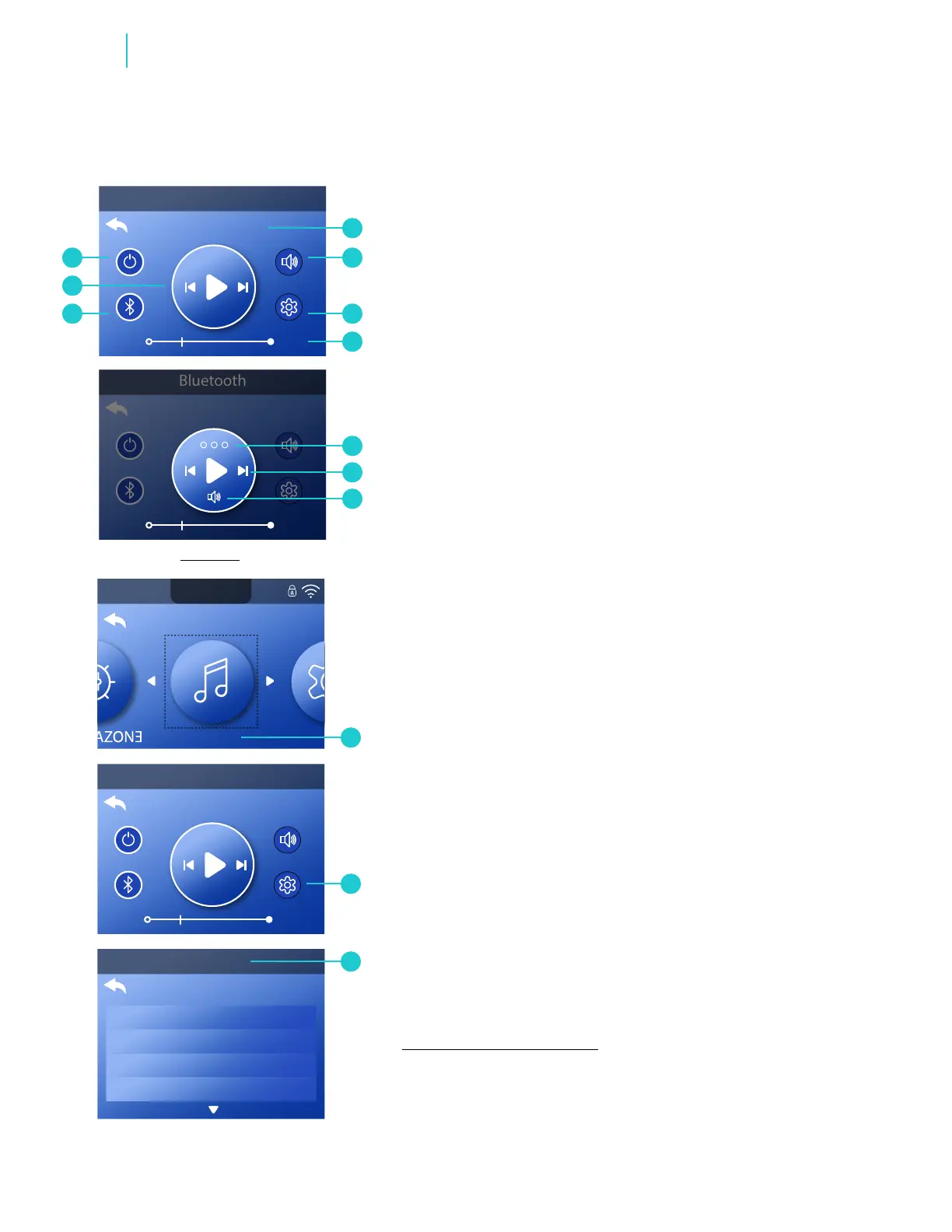
A - Song title & artist / Bluetooth status.
B - Volume control
C - Audio settings
D - Progress bar
E - Input modes: Bluetooth, Line In **
F - Select this to play, pause, etc.
G - Power On/Off
H - Press the UP button to exit.
I - Press the LEFT button to go to the previous track.
Press the SELECT button to play/pause.
Press the RIGHT button to go to the next track.
J - Press the DOWN button to control volume.
REVIEW SCREEN
Follow these steps to ne-tune the sound:
1 - Go to the Main menu, Music (A), Settings (B) to view the
Settings menu (C).*
2 - Fine tune your sound with the following controls:
FINE-TUNE YOUR SOUND
Balance
Fade
EQ Preset
Filter
Bass Gain
View “Navigate Main Menu” on page 7.
1 - Some spas may not provide a
“Line In” option.
2 - If your screen shows “USB”, you have
an older bba1 or bba2 unit.
*
* *



 To Next Page