34
Bluetooth
H 12:00 amR O F
13
C
100
Spa
H 12:00 amR O F
13
C
Spa Light Music Settings Invert Test
H 12:00 amR O F
13
C
Light
Spa
H 12:00 amR O F
13
C
My Favorite Song
0:45 3:15
Settings
0
0
Flat
O
Balance
Fade
EQ Preset
Filter
Bluetooth
My Favorite Song
0:45 3:15
Bluetooth
O
Bluetooth
BT Not Connected
Settings
0
Flat
O
15
Fade
EQ Preset
Filter
Bass Gain
Bluetooth
BT Connected
0:45 3:15
Bluetooth
H 12:00 amR O F
13
C
100
Spa
H 12:00 amR O F
13
C
Spa Light Music Settings Invert Test
H 12:00 amR O F
13
C
Light
Spa
H 12:00 amR O F
13
C
My Favorite Song
0:45 3:15
Settings
0
0
Flat
O
Balance
Fade
EQ Preset
Filter
Bluetooth
My Favorite Song
0:45 3:15
Bluetooth
O
Bluetooth
BT Not Connected
Settings
0
Flat
O
15
Fade
EQ Preset
Filter
Bass Gain
Bluetooth
BT Connected
0:45 3:15
C
Bluetooth
H 12:00 amR O F
13
C
100
Spa
H 12:00 amR O F
13
C
Spa Light Music Settings Invert Test
H 12:00 amR O F
13
C
Light
Spa
H 12:00 amR O F
13
C
H 12:00 amR O F
13
C
Music
My Favorite Song
0:45 3:15
Settings
0
0
Flat
O
Balance
Fade
EQ Preset
Filter
Bluetooth
My Favorite Song
0:45 3:15
Bluetooth
O
Bluetooth
BT Not Connected
Settings
0
Flat
O
15
Fade
EQ Preset
Filter
Bass Gain
Bluetooth
BT Connected
0:45 3:15
A
Bluetooth
H 12:00 amR O F
13
C
100
Spa
H 12:00 amR O F
13
C
Spa Light Music Settings Invert Test
H 12:00 amR O F
13
C
Light
Spa
H 12:00 amR O F
13
C
My Favorite Song
0:45 3:15
Settings
0
0
Flat
O
Balance
Fade
EQ Preset
Filter
Bluetooth
My Favorite Song
0:45 3:15
Bluetooth
O
Bluetooth
BT Not Connected
Settings
0
Flat
O
15
Fade
EQ Preset
Filter
Bass Gain
Bluetooth
BT Connected
0:45 3:15
D
B
GG
GF
GE
BALBOA | Your Single Source Solution Document No. 42418 Rev. B1 - 04/16/24
Language: English
TP740 User Guide
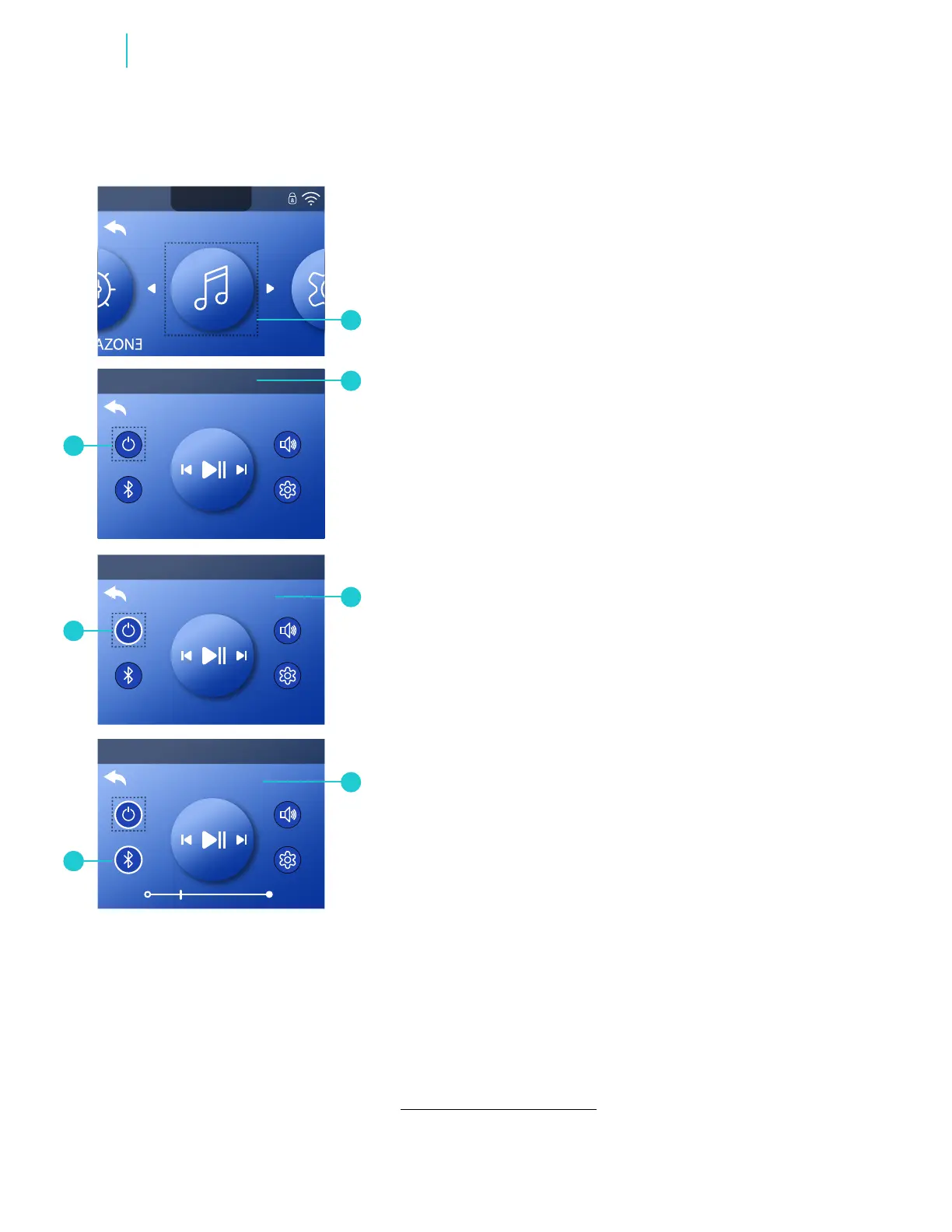
1 - Go to the Main menu and Music (A) to view the
Bluetooth screen (B).*
2 - Turn On the bba
TM
3 amplier (G). This message appears
(C) when your smart device is not connected/paired with
the bba
TM
3 amplier. “BT” stands for Bluetooth.
3 - On your smart device, turn On the Bluetooth function
and click search for Bluetooth device. Make sure the smart
device is close enough to the spa tub, so the smart device
can pair with the bba
TM
3 amplier.
4 - On your smart device, select “BBA Spa Music” from the
pairing list. If “BBA Spa Music” does not appear, repeat
steps 1 - 3.
5 - Some smart devices will connect automatically, but with
others you will need to select “Connect.” Once connected,
a white ring appears around the Bluetooth icon (E) and “BT
Connected” appears (D).
Note: All paired devices are erased from the bba
TM
3 amplier
when power to the spa is cycled. While the bba
TM
3 amplier
forgets your smart device when the spa power is cycled,
your smart device might not forget the bba
TM
3 amplier.
In this case, an error message may appear if you try to
reconnect. You may need to have your smart device “forget”
the bba
TM
3 amplier, and only after that connect to the
bba
TM
3 amplier again to avoid such error messages.
PAIR YOUR SMART DEVICE
Balboa Bluetooth Audio
* View “Navigate Settings Menu” on page 7.



 To Next Page