6-4 Using the Keypad MN762
6.3 Using the REV/0/FWD Selector Switch
(Switched version only)
By adjusting the parameter settings the VS1MX can be congured for multiple applications and not just for Forward or
Reverse. This could typically be for Hand/Off/Auto applications (also known as Local/Remote) for HVAC and pumping
industries.
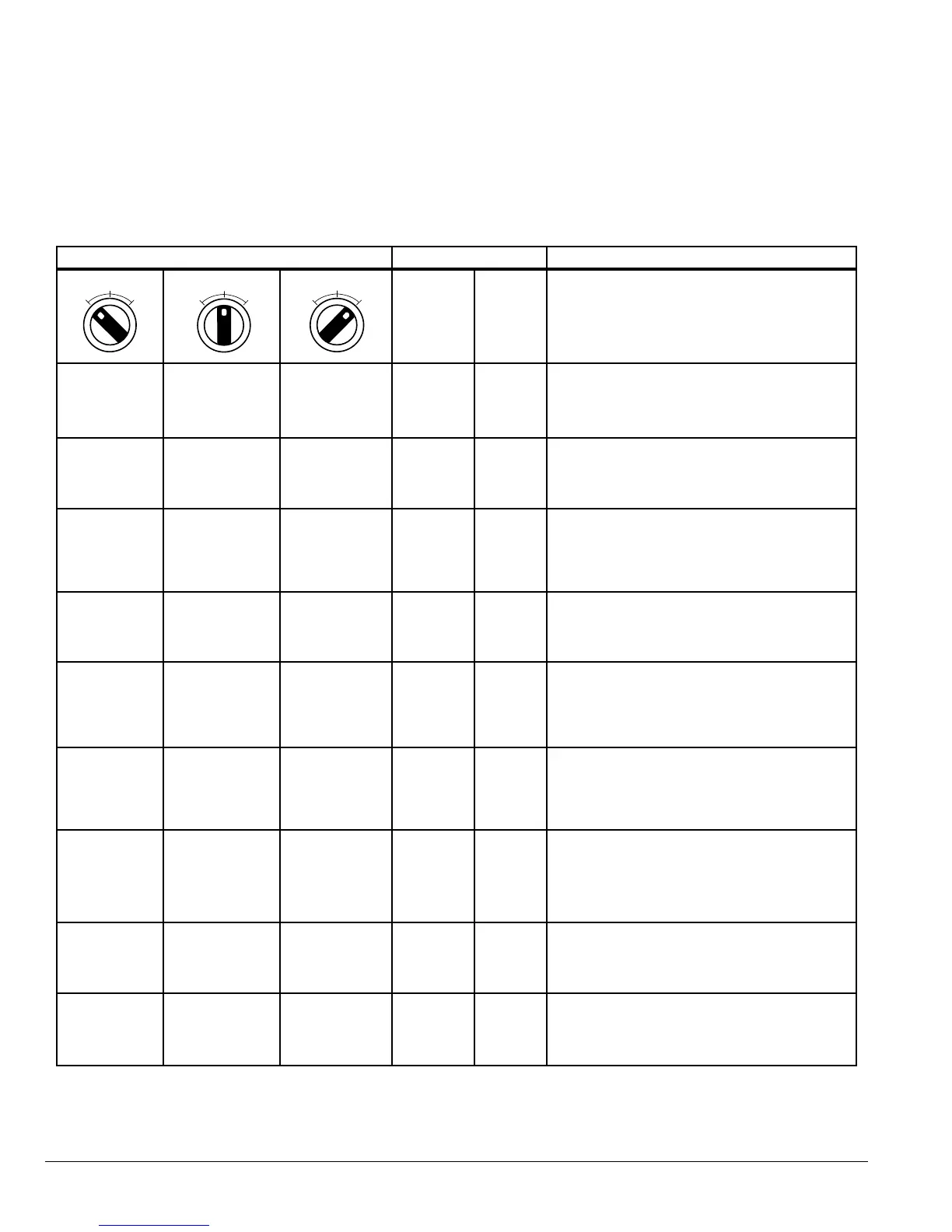
Table 6-2 REV/0/FWD Switch Controls
Switch Position Parameters Notes
P-07 P-08
Run Reverse STOP Run Forward 0 0
Factory Default Conguration
Run Forward or Reverse with speed controlled
from the Local Potentiometer (POT)
STOP STOP Run Forward 0 5, 7
Run forward with speed controlled from the
local POT
Run Reverse - disabled
Preset Speed
1
STOP Run Forward 0 1
Run Forward with speed controlled from the
Local POT
Preset Speed 1 provides a ‘Jog’ Speed set in
P-12
Run Reverse STOP Run Forward 0 6
Run Forward or Reverse with speed controlled
from the Local POT; E-Trip if Dig IN3 is open
Run in Auto STOP Run in Hand 0 4
Run in Hand – Speed controlled from the Local
POT
Run in Auto - Speed controlled using Analog
input 2 e.g. from PLC with 4-20mA signal.
Run in Speed
Control
STOP
Run in PI
Control
5 1
In Speed Control the speed is controlled from
the Local POT
In PI Control, Local POT controls PI set point
Run in Preset
Speed Control
STOP
Run in PI
Control
5
0, 2, 4, 5,
9-12
In Preset Speed Control, P-12 sets the Preset
Speed
In PI Control, POT can control the PI set point
(P-41=1)
Run in Hand STOP Run in Auto 3 6
Hand – speed controlled from the Local POT
Auto – Speed Reference from Modbus
E-Trip if Dig IN3 is open
Run in Hand STOP Run in Auto 3 3
Hand – Speed reference from Preset Speed 1
(P-12)
Auto – Speed Reference from Modbus
FW
EV
FW
EV
FW
EV











 To Next Page