ALPHA 2 Pro™ Wave Operator’s Instruction Manual
36 MKT-AH-1CC40ST [A]
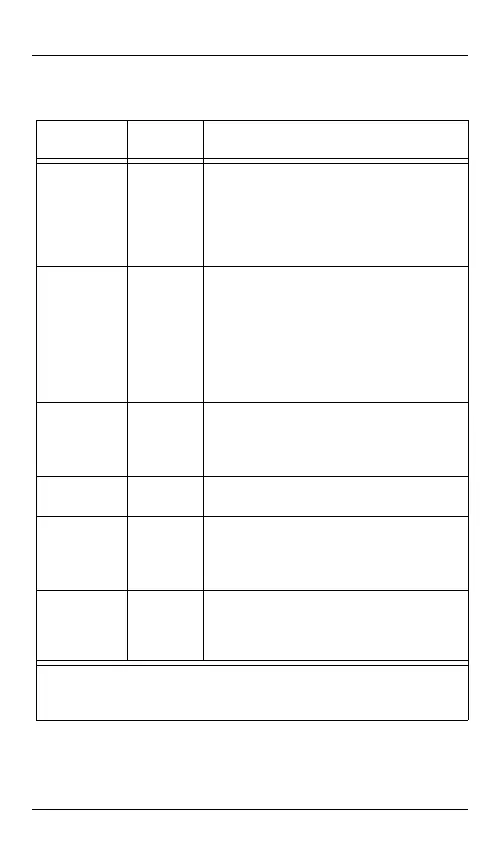
LCU Board LED Indicator Light (D2)
Indicator Button
Deck State
Description
Off Off-line One of the following error conditions may
exist: the power is off; the power cable is
unplugged; a firmware error exists; a
hardware error exists; or the LCU is held in
reset by software, not yet loaded or no
Operating System software is installed.
On
(Solid, without
Blinking)
Off-line The power is on and the firmware is loaded.
If the green LED indicator light is solid for 1.5
to 2 seconds and then briefly blinks off, then
a reset may be occurring and one of the
following error conditions may exist: a
hardware error condition exists; incorrect
firmware; a cable problem; or a defective
LCU.
Two Blinks Off-line/No
Tilts
The machine communicates with the deck
gadget. The operating system has acquired
the deck gadget, however, the deck gadget
is unavailable.
One Blink On-line/No
Tilts
The machine communicates with the LCU.
No errors exist.
Three Blinks On-line/
Tilted
One of the following error conditions may
exist: a hardware error condition exists or an
SPI Error (Serial Protocol Interface Error) may
exist.
Four Blinks Off-line/
Tilted
One of the following error conditions may
exist: a hardware error condition exists or an
SPI Error (Serial Protocol Interface Error) may
exist.
NOTE: A blink is a brief period where the indicator light is on. The
indicator light continues to blink at 2 to 3 second intervals until the
error is corrected.
MKT-AH-1CC40ST.book Page 36 Friday, November 15, 2013 3:47 PM


 To Next Page