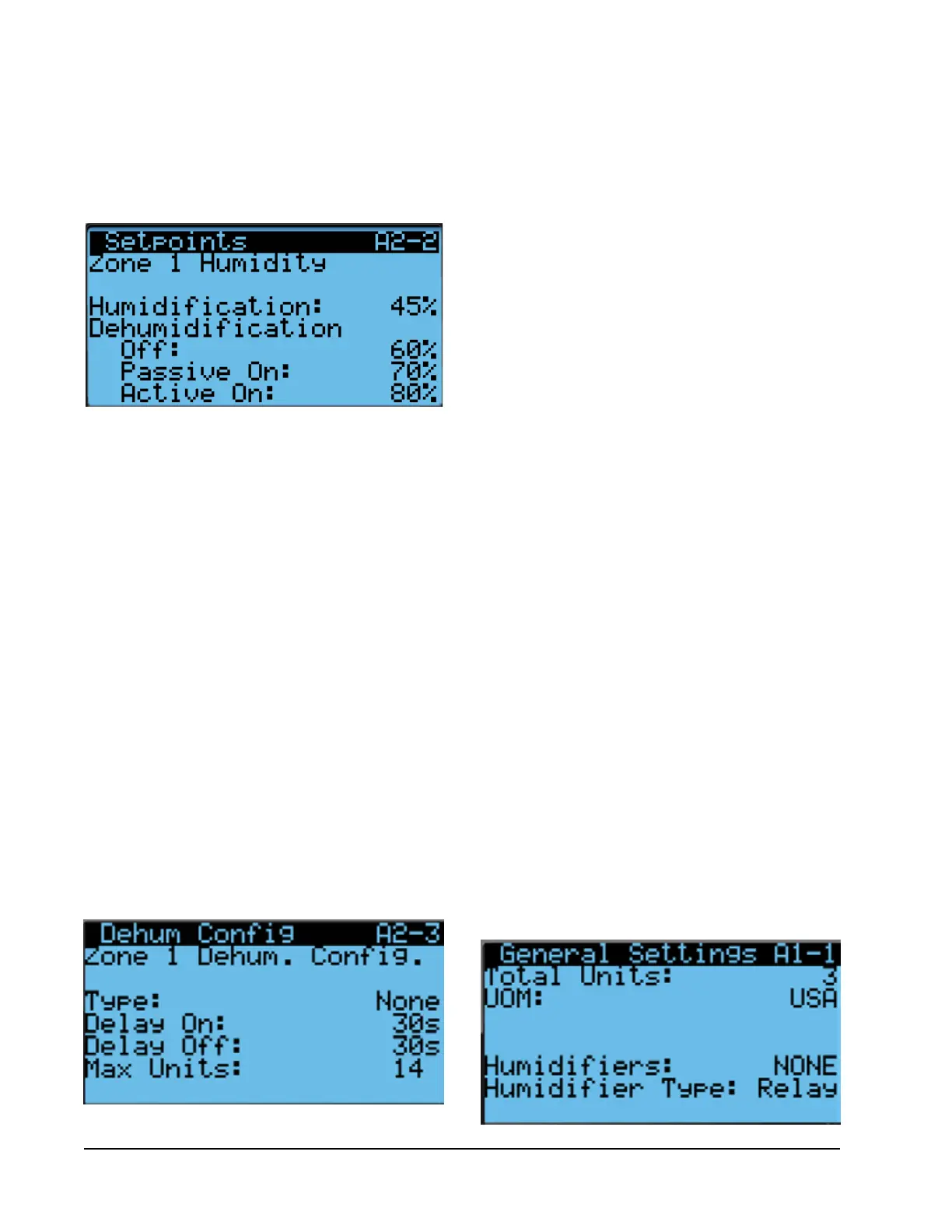
6. Press ENTER key to scroll to Dehumidification Off,
Passive On or Active On (see Figure 24).
7. Press UP and DOWN keys to change
dehumidification setpoints to desired values.
FIGURE 24
Humidity Control Setpoints
FIGURE 26
Enabling Humidifier
FIGURE 25
Dehumidification Types
Humidification
If the humidity level is below 45% RH (Humidification
Setpoint), the LC will enable humidification for
that zone. Once the humidity level rises to 55%
RH (humidification setpoint plus 10% RH), the
humidification for that zone will be disabled.
NOTE: Humidifiers are field supplied.
To change the humidification setpoint:
1. Press MENU key to go to the Main Menu screen.
2. Use UP or DOWN keys and ENTER key to enter
USER password 2000.
3. Press UP or DOWN keys to scroll to Sys Config;
press ENTER key.
4. Press UP or DOWN keys to scroll to Zone 1, Zone 2
or Zone 3; press ENTER key.
5. Press UP or DOWN keys to scroll to Setpoints A2-2
(Zone 1), Setpoints A3-2 (Zone 2) or Setpoints
A4-2 (Zone 3).
6. Press ENTER key to scroll to Humidification (see
Figure 24).
7. Press UP and DOWN keys to change humidification
setpoint to desired value.
Enabling Humidifier
1. Press MENU key to go to the Main Menu screen.
2. Use UP or DOWN keys and ENTER key to enter
USER password 2000.
3. Press UP or DOWN keys to scroll to Sys Config;
press ENTER key.
4. Press UP or DOWN keys to scroll to General; press
ENTER key.
5. Press ENTER key to scroll to Humidifiers (see
Figure 26).
6. Press UP or DOWN keys to change value to NONE,
Zone 1, Z1 & Z2 or Z1, Z2, & Z3.
7. Press ENTER to scroll to Humidifier Type.
8. Press UP or DOWN keys to change value to Relay
from Comm.
In addition to the setpoint configuration for
dehumidification, each zone must be configured for the
type of active dehumidification.
To change the dehumidification type:
1. Press MENU key to go to the Main Menu screen.
2. Use UP or DOWN keys and ENTER key to enter
USER password 2000.
3. Press UP or DOWN keys to scroll to Sys Config;
press ENTER key.
4. Press UP or DOWN keys to scroll to Zone 1, Zone 2
or Zone 3; press ENTER key.
5. Press UP or DOWN keys to scroll to Setpoints A2-3
(Zone 1), Setpoints A3-3 (Zone 2) or Setpoints
A4-3 (Zone 3).
6. Press ENTER key to scroll to Type (see Figure 25).
7. Press UP and DOWN keys to change to desired
value. Dehumidification type choices are None,
Electric Reheat, Mechanical Reheat or Cycling
Reheat. The units in the zone being configured will
need to have the capability of the setting being
selected (see unit model number).
Manual 2100-669F
Page 24 of 37



 To Next Page