One solution to use UDP command interface is the Barix ICgraph application.
This can communicate over UDP and as Java application it can run on
almost all platforms. ICgraph can send UDP commands to the Barionet and
also display the state response from the Barionet. Here is a little example
showing how to control a Barionet over ICgraph.
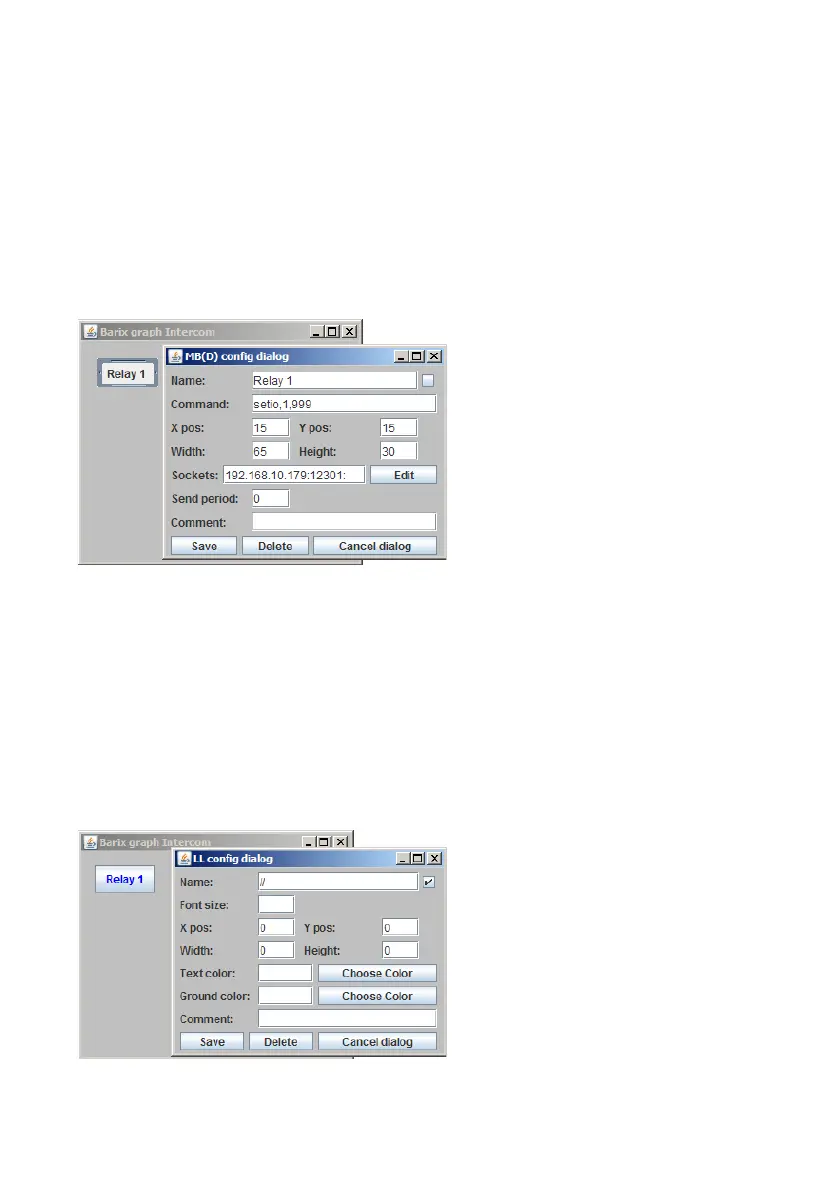
To send a UDP command create a Message Button (MB).
In the left picture a new direct
Message button will be created
which sends the command
“setio,1,999” when pressed.
This command will toggle the
Barionet relay 1 to reverse state
as soon the command is
received.
Note, after saving the ICgraph configuration, the application should be also
restarted to get the new configuration active!
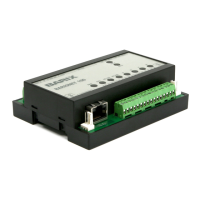
For monitoring the state of the relay in ICgraph a dynamic label can be used.
Two steps are necessary for that.
First a generic label is required
so that ICgraph is generally able
to forward any incoming
network messages to the
ICgraph screen, see picture
left.
BARIX AG | 17. Oct. 2013 | Barionet Hands-on Training Guide | Page 18/38


 To Next Page