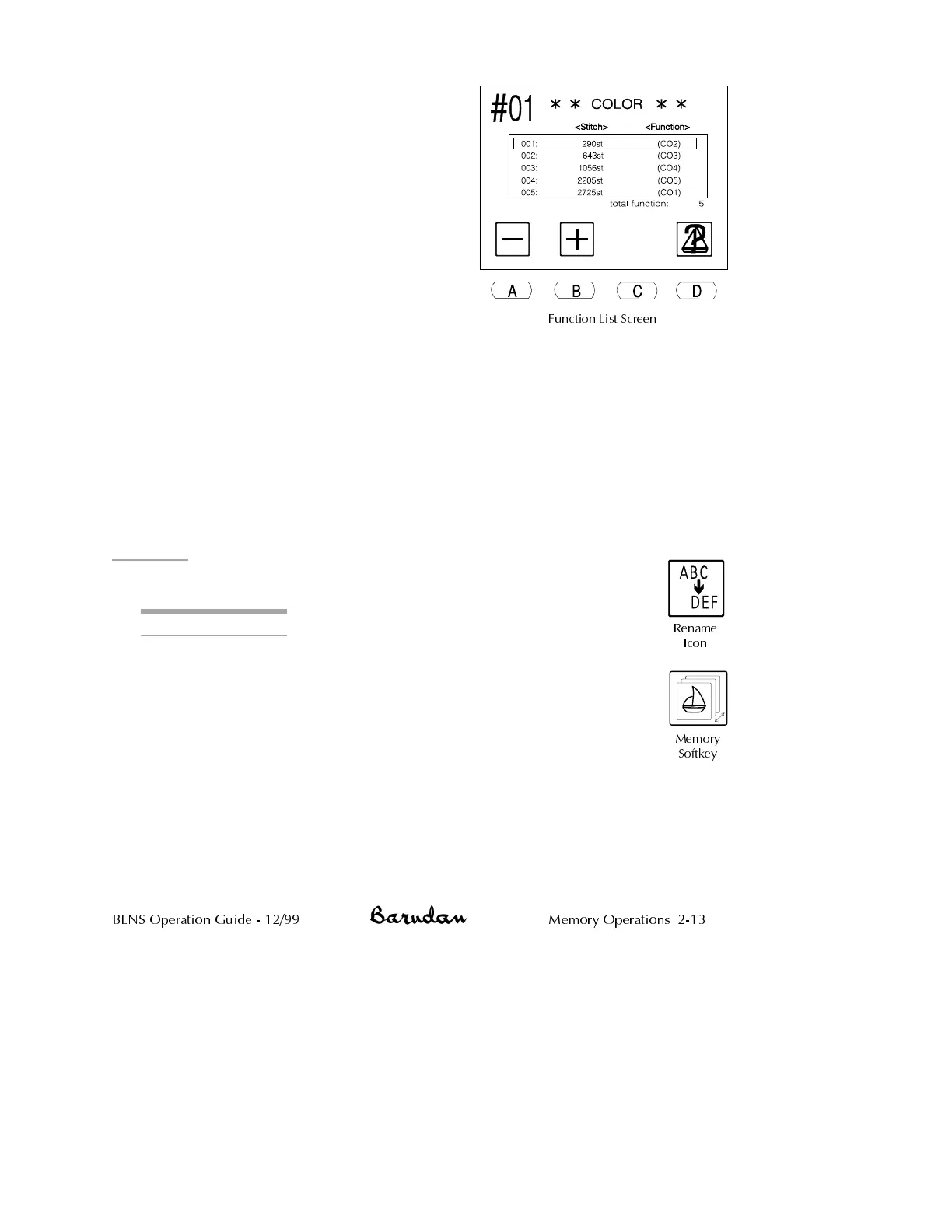
6. Use the menu keys to change the color
code.
•
Press A, below the Minus icon,to
move to the previous code.
•
Press B, below the Plus icon, to move
to the code after the current code.
Notice that when a code is changed, it
displays with a darker box behind it,
showing this is not the original code.
NOTE: The Function List screen does not
have a cancel option. All changes are
confirmed when you exit.
Before changing codes, make sure you
have a record of the original, in writing or
another copy of the pattern, in case you want to restore the original color
sequence.
7.
Press D, below the Pattern Characteristics icon, to return to the Pattern
Characteristics screen.
•
Press B, below the Pattern Characteristics icon, to return to the
Pattern List screen.
•
Press the Memory softkey to close the Pattern List screen.
Rename
Pattern in memory can be renamed from the Pattern Characteristics screen.
Renaming a Pattern
1.
Press the Memory softkey. The Pattern List displays, showing
patterns in memory.
2.
Use the jog keys to select a pattern. A box outline displays around
the selected pattern.
3.
Press B, below the Pattern Characteristics icon, to open the Pattern
Characteristics screen.
BENS Operation Guide - 12/99 Memory Operations 2-13
Rename
Icon
Memory
Softkey
Function List Screen



 To Next Page