FUNCTION CODES
NUMBER FUNCTION
DISPLAYED
AS
18 Needle 15 18 (C15)
19 Group 1 (G1)
20 Group 2 (G2)
23 Sub End 23 (SE)
NOTE: As you change the color sequence, you are changing the original function codes in the
pattern. If you do not want to change the original pattern, note the changes in case you want to
return to original colors. The best safeguard is to make a
backup copy
of the pattern. See page 2-27
for instructions on saving the pattern to floppy disk.
Display Method
Use the display method to change existing function codes on the display before
beginning to sew the pattern.
Changing Colors on the Display with Teach
1.
Select a pattern. Press the Memory softkey and use the jog keys to
move through the pattern list.
2.
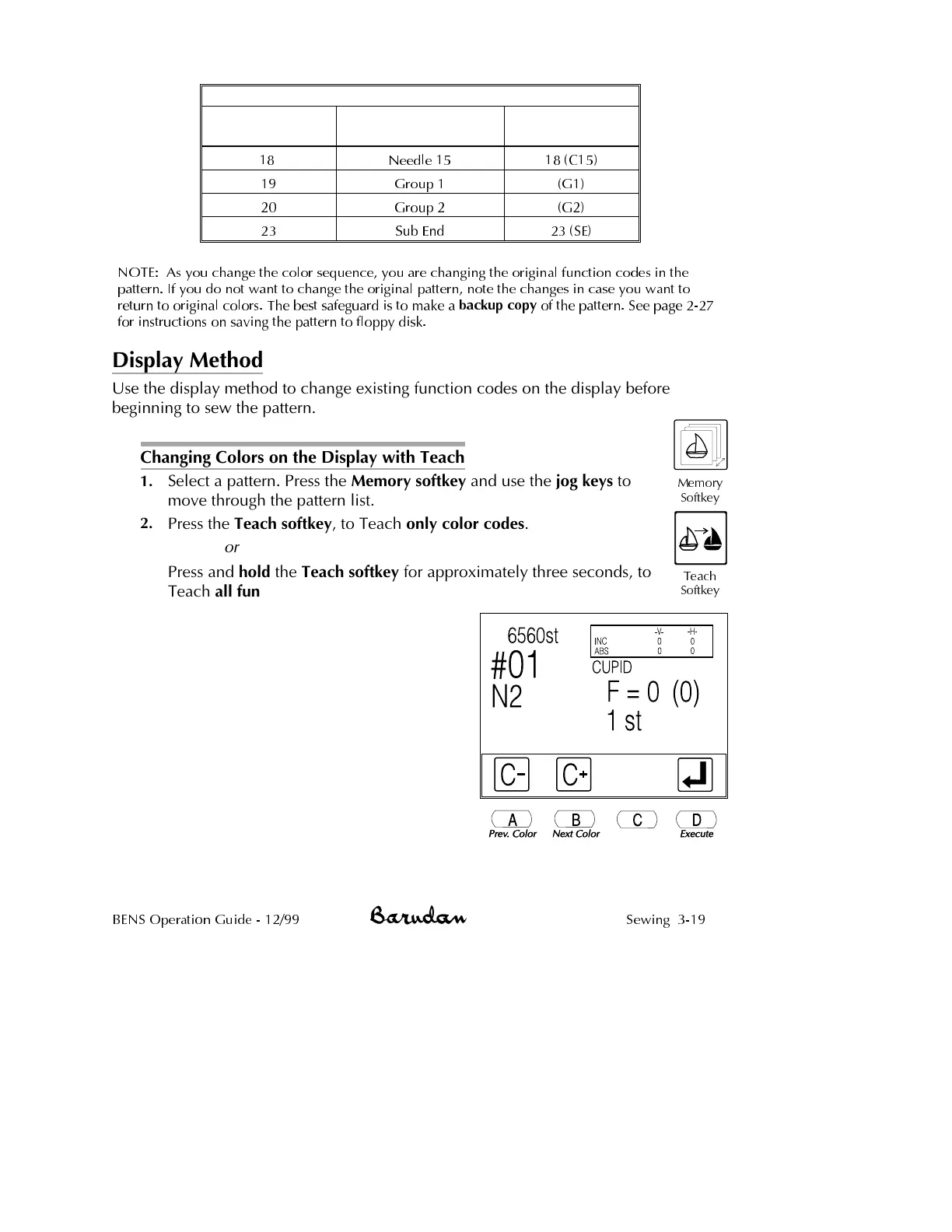
Press the Teach softkey, to Teach only color codes.
or
Press and hold the Teach softkey for approximately three seconds, to
Teach all function codes. The Teach screen displays.
NOTE: The screen appears slightly
different if you held down the Teach
softkey to select all function codes. The
icons F- and F+ display, instead of the C-
and C+ icons.
3.
Press D, below the Execute icon to
move to the first color or function code
in the pattern.
The Teach screen shows the stitch
number where the code is located and
current function code. The current code
is flashing. The number in parentheses
indicates the corresponding color
code/needle number.
BENS Operation Guide - 12/99 Sewing 3-19
Memory
Softkey
Teach
Softkey



 To Next Page