Error Codes and Display Prompts
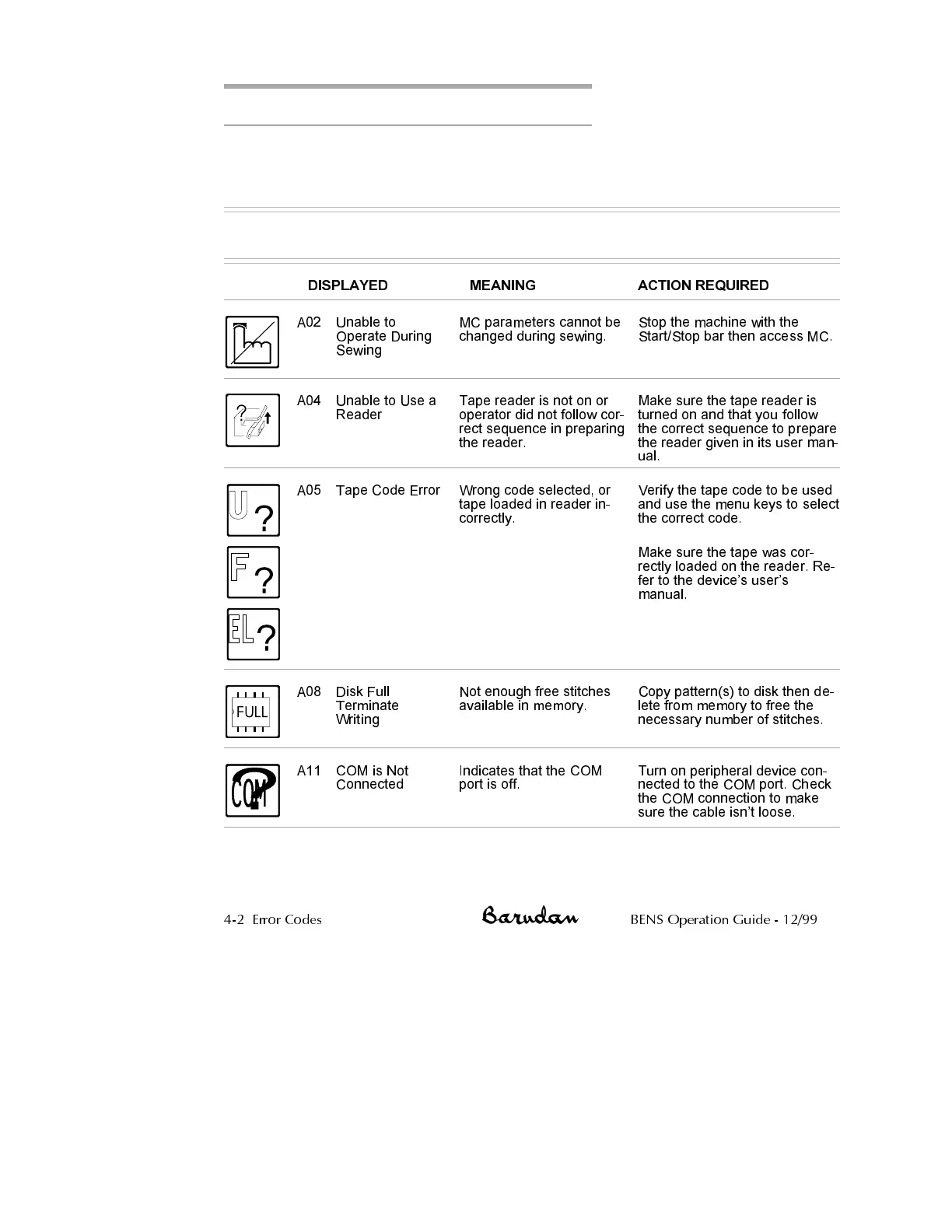
The chart on the following pages explains the various prompts displayed during
operation and guides you through performing the appropriate action. The chart
includes error codes and the steps necessary to correct machine malfunctions.
ERROR CODES
DISPLAYED MEANING ACTION REQUIRED
A02 Unable to
Operate During
Sewing
MC parameters cannot be
changed during sewing.
Stop the machine with the
Start/Stop bar then access MC.
A04 Unable to Use a
Reader
Tape reader is not on or
operator did not follow cor
-
rect sequence in preparing
the reader.
Make sure the tape reader is
turned on and that you follow
the correct sequence to prepare
the reader given in its user man
-
ual.
A05 Tape Code Error Wrong code selected, or
tape loaded in reader in
-
correctly.
Verify the tape code to be used
and use the menu keys to select
the correct code.
Make sure the tape was cor-
rectly loaded on the reader. Re-
fer to the devices users
manual.
A08 Disk Full
Terminate
Writing
Not enough free stitches
available in memory.
Copy pattern(s) to disk then de-
lete from memory to free the
necessary number of stitches.
A11 COM is Not
Connected
Indicates that the COM
port is off.
Turn on peripheral device con
-
nected to the COM port. Check
the COM connection to make
sure the cable isnt loose.
4-2 Error Codes BENS Operation Guide - 12/99



 To Next Page