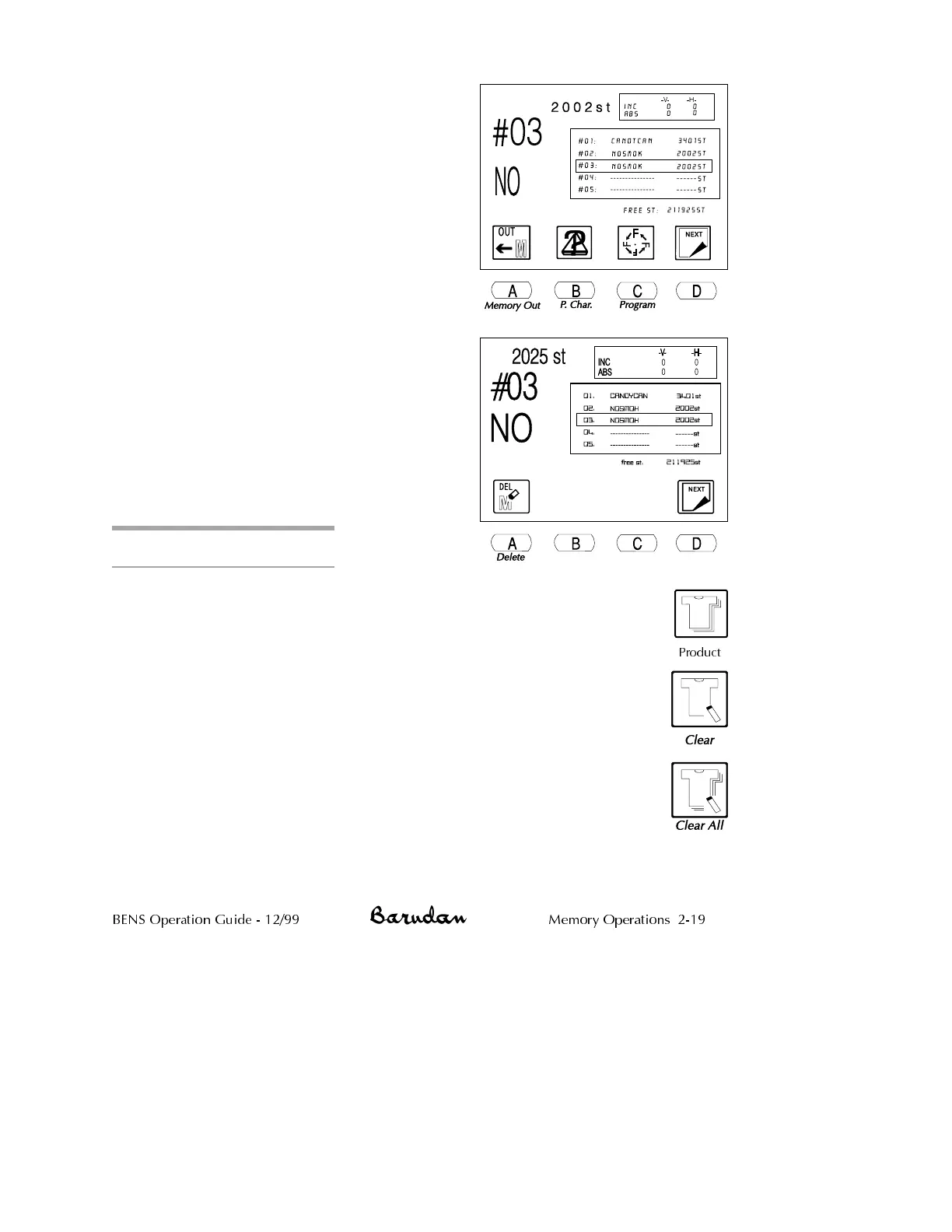
2.
Use the jog keys to select a pattern from
the list. A box outline displays around
the selected pattern.
3.
Press D, below the Next icon, to bring
up the next menu level. The Delete icon
is now displayed.
NOTE: Cancel at any time, by pressing
the Memory softkey, to clear the Pattern
List and menu icons.
4.
Press A, below the Delete icon.
5.
Press C, below the Yes icon, to delete
the pattern. To cancel, press D, below
the No icon.
When the pattern has been deleted, the
BENS beeps and the basic screen
displays. If desired, press the Memory
softkey again, to view the Pattern List
and confirm that the pattern was
deleted.
Production Statistics
The Production Statistics option shows information for each pattern in
memory. It tracks how many times each was sewn, total stitches sewn for
each pattern, and total number of times all patterns in memory (combined)
were sewn.
You can continue to accumulate statistics, or clear them to start fresh. Use
the Clear options to start new totals daily, weekly, or monthly, as suits your
needs.
Clear
Erases production statistics for the selected pattern.
Clear All
Erases production statistics for all patterns in Memory.
BENS Operation Guide - 12/99 Memory Operations 2-19
Product



 To Next Page