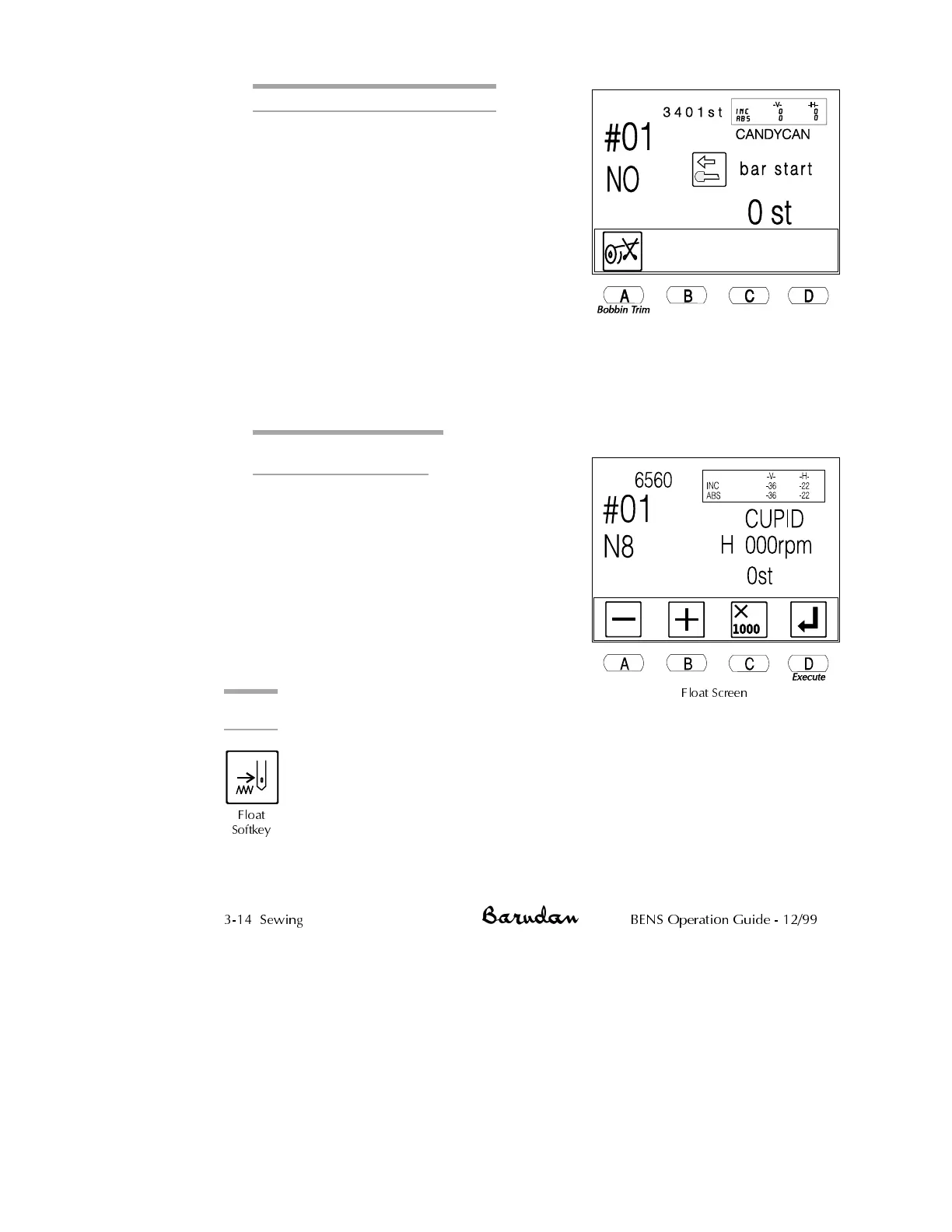
Executing a Manual Thread Trim
1.
If you were sewing, move the Start/Stop
bar to the right to stop.
2.
Press the Thread Trim softkey. The
following screen displays, telling you to
use the Start/Stop bar to execute.
3. At this time, you can execute only a
bobbin trim, or a top thread trim.
•
Press A, below the Bobbin Trim icon,
to execute a manual cut on only the
bobbin threads. The icon displays
with a darker box while it is executed.
After using Bobbin Trim, the manual
trim screen still displays, to let you also execute a normal trim.
•
Move the Start/Stop bar to the left or press the green Start button to
execute the trim.
Executing a Manual Trim
From Any Sewing Head
1. Flip any head control switch off and on.
2. The LED’s on all the heads will blink
green on and off for three seconds.
During this time, if the Start bar or is
engaged, a manual trim will be
performed on all heads. If the Start bar
or green Start Button is not engaged, the
machine returns to normal operation.
Float
Float advances the pantograph
through a pattern without sewing. This is useful when you need to begin
sewing within a pattern - not from the starting point.
Manual
Float
Used to move the pantograph through the pattern without
sewing, usually when you do not know the exact stitch
number.
3-14 Sewing BENS Operation Guide - 12/99
Float Screen
Float
Softkey



 To Next Page